Badges and Events
Badges are small coloured indicators overlaid on calendar dates to mark events or appointments. Each TTMSFNCCalendarEvent item in the Events collection attaches one badge to a specific date.
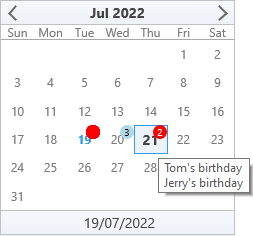
Adding badges
// Add event badges programmatically
procedure TForm1.FormCreate(Sender: TObject);
begin
  TMSFNCCalendar1.ShowHint := True;

  // Using Events.Add (date defaults to today)
  TMSFNCCalendar1.Events.Add;  // badge on today

  with TMSFNCCalendar1.Events.Add do
  begin
    Date           := Now + 1;
    BadgeColor     := gcLightblue;
    BadgeFontColor := gcBlack;
    BadgeValue     := 3;
  end;

  with TMSFNCCalendar1.Events.Add do
  begin
    Date       := Now + 2;
    BadgeValue := 2;
    Hint       := 'Tom''s birthday' + sLineBreak + 'Jerry''s birthday';
  end;

  // Using SelectEvent shortcut — sets today's date automatically
  TMSFNCCalendar1.SelectEvent(Now + 5);
  TMSFNCCalendar1.SelectEvent(Now + 10);
end;
// Add event badges programmatically
void __fastcall TForm1::FormCreate(TObject *Sender)
{
  TMSFNCCalendar1->ShowHint = true;

  // Using Events.Add (date defaults to today)
  TMSFNCCalendar1->Events->Add();  // badge on today

  TTMSFNCCalendarEventItem *e = static_cast<TTMSFNCCalendarEventItem *>(TMSFNCCalendar1->Events->Add());
  e->Date           = Now() + 1;
  e->BadgeColor     = gcLightblue;
  e->BadgeFontColor = gcBlack;
  e->BadgeValue     = 3;

  e = static_cast<TTMSFNCCalendarEventItem *>(TMSFNCCalendar1->Events->Add());
  e->Date       = Now() + 2;
  e->BadgeValue = 2;
  e->Hint       = System::UnicodeString("Tom's birthday") + sLineBreak + "Jerry's birthday";

  // Using SelectEvent shortcut - sets today's date automatically
  TMSFNCCalendar1->SelectEvent(Now() + 5);
  TMSFNCCalendar1->SelectEvent(Now() + 10);
}
SelectEvent shortcut
SelectEvent adds an event directly on the given date without configuring it first:
TMSFNCCalendar1.SelectEvent(Now + 5);
TMSFNCCalendar1.Events.Items[0].BadgeColor := gcOrange;
Badge properties
| Property | Description |
|---|---|
Date |
The calendar date the badge appears on. |
BadgeColor |
Badge circle fill colour. Default is red. |
BadgeFontColor |
Badge text colour. Default is white. |
BadgeValue |
Integer count shown inside the badge circle. 0 = no text. |
Hint |
Tooltip text shown on hover (requires ShowHint = True). |
Global badge size
TMSFNCCalendar1.BadgeSize := 16; // diameter in pixels (default: 14)
Design-time badges
Open the Events property in the Object Inspector, click Add New, and configure Date, BadgeColor, BadgeValue, and Hint directly.
Combining badge placement, badge properties, and design-time defaults
// Calendar with multi-select, range limits, event badges, and custom navigation
procedure TForm1.FormCreate(Sender: TObject);
begin
  // Multi-select with keyboard support
  TMSFNCCalendar1.Interaction.MultiSelect     := True;
  TMSFNCCalendar1.Interaction.KeyboardSupport := True;

  // Year/month selector popups
  TMSFNCCalendar1.Interaction.AllowYearSelection  := True;
  TMSFNCCalendar1.Interaction.AllowMonthSelection := True;

  // Date range
  TMSFNCCalendar1.MinDate := EncodeDate(2024, 1, 1);
  TMSFNCCalendar1.MaxDate := EncodeDate(2027, 12, 31);

  // Pre-select a range
  TMSFNCCalendar1.SelectMultiDates(Now, Now + 4);

  // Event badges
  TMSFNCCalendar1.ShowHint := True;
  TMSFNCCalendar1.SelectEvent(Now + 7);
  with TMSFNCCalendar1.Events.Items[0] do
  begin
    BadgeValue := 2;
    Hint       := 'Sprint review';
  end;

  // Badge appearance
  TMSFNCCalendar1.BadgeSize := 16;

  // Navigate to next month programmatically
  TMSFNCCalendar1.Date := IncMonth(TMSFNCCalendar1.Date);
end;

// Custom 10-year navigation
procedure TForm1.TMSFNCCalendar1CustomNavigation(Sender: TObject;
  ADate, AFocusedDate: TDate; ADirection: Boolean);
begin
  if ADirection then
    TMSFNCCalendar1.Year := TMSFNCCalendar1.Year + 10
  else
    TMSFNCCalendar1.Year := TMSFNCCalendar1.Year - 10;
end;
// Calendar with multi-select, range limits, event badges, and custom navigation
void __fastcall TForm1::FormCreate(TObject *Sender)
{
  // Multi-select with keyboard support
  TMSFNCCalendar1->Interaction->MultiSelect     = true;
  TMSFNCCalendar1->Interaction->KeyboardSupport = true;

  // Year/month selector popups
  TMSFNCCalendar1->Interaction->AllowYearSelection  = true;
  TMSFNCCalendar1->Interaction->AllowMonthSelection = true;

  // Date range
  TMSFNCCalendar1->MinDate = EncodeDate(2024, 1, 1);
  TMSFNCCalendar1->MaxDate = EncodeDate(2027, 12, 31);

  // Pre-select a range
  TMSFNCCalendar1->SelectMultiDates(Now(), Now() + 4);

  // Event badges
  TMSFNCCalendar1->ShowHint = true;
  TMSFNCCalendar1->SelectEvent(Now() + 7);
  TTMSFNCCalendarEventItem *e = TMSFNCCalendar1->Events->Items[0];
  e->BadgeValue = 2;
  e->Hint       = "Sprint review";

  // Badge appearance
  TMSFNCCalendar1->BadgeSize = 16;

  // Navigate to next month programmatically
  TMSFNCCalendar1->Date = IncMonth(TMSFNCCalendar1->Date);
}

// Custom 10-year navigation
void __fastcall TForm1::TMSFNCCalendar1CustomNavigation(TObject *Sender,
  TDate ADate, TDate AFocusedDate, bool ADirection)
{
  if (ADirection)
    TMSFNCCalendar1->Year = TMSFNCCalendar1->Year + 10;
  else
    TMSFNCCalendar1->Year = TMSFNCCalendar1->Year - 10;
}
Global font override
TTMSFNCCalendar has many independent appearance sub-objects, each with its own Font property: DayNameAppearance, WeekNumberAppearance, DateAppearance (including its SelectedFont, DisabledFont, DateBeforeFont, DateAfterFont, BadgeFont, and TodayFont), Header, and Footer. Reskinning the whole calendar by setting each of these individually is tedious and easy to leave inconsistent. GlobalFont solves this: set Color, Size, Name, Scale, or Style once and the calendar cascades that attribute to every one of those fonts, including the badge font used above.
See TTMSFNCAppearanceGlobalFont for the full property list.
procedure TForm1.FormCreate(Sender: TObject);
begin
  // Instead of setting DayNameAppearance.Font, DateAppearance.Font,
  // DateAppearance.BadgeFont, Header.Font, Footer.Font, and every other
  // font individually, GlobalFont cascades one setting to all of them.
  TMSFNCCalendar1.GlobalFont.Name  := 'Segoe UI';
  TMSFNCCalendar1.GlobalFont.Size  := 11;
  TMSFNCCalendar1.GlobalFont.Style := [TFontStyle.fsBold];
end;
void __fastcall TForm1::FormCreate(TObject *Sender)
{
  // Instead of setting DayNameAppearance.Font, DateAppearance.Font,
  // DateAppearance.BadgeFont, Header.Font, Footer.Font, and every other
  // font individually, GlobalFont cascades one setting to all of them.
  TMSFNCCalendar1->GlobalFont->Name  = "Segoe UI";
  TMSFNCCalendar1->GlobalFont->Size  = 11;
  TMSFNCCalendar1->GlobalFont->Style = TFontStyles() << TFontStyle::fsBold;
}
Day-name row height
DayNameAppearance.Height sizes the header row that shows the day-of-week names (Mon, Tue, ...), independently of every other row in the calendar. Increase it when pairing a larger GlobalFont size with the day-name row so the enlarged text does not feel cramped.
procedure TForm1.FormCreate(Sender: TObject);
begin
  // Height defaults to 15px; enlarge it so a bigger day-name font (see
  // GlobalFont above) still has comfortable padding instead of clipping.
  TMSFNCCalendar1.DayNameAppearance.Height := 24;
end;
void __fastcall TForm1::FormCreate(TObject *Sender)
{
  // Height defaults to 15px; enlarge it so a bigger day-name font (see
  // GlobalFont above) still has comfortable padding instead of clipping.
  TMSFNCCalendar1->DayNameAppearance->Height = 24;
}