Date Selection
TTMSFNCCalendar supports single and multi-date selection, keyboard navigation, and programmatic range selection. The same API applies to TTMSFNCDatePicker, which displays the calendar in a dropdown.
Selecting dates
// --- Single date selection ---
TMSFNCCalendar1.SelectADate(Now + 2);   // select one date, deselects all others

// --- Multi-date selection (requires MultiSelect) ---
TMSFNCCalendar1.Interaction.MultiSelect := True;
TMSFNCCalendar1.SelectDate(Now - 3);                 // add a date to the selection
TMSFNCCalendar1.SelectDate(EncodeDate(2025, 12, 25));

// Range selection: select all dates from AStartDate to AEndDate (clears prior selection)
TMSFNCCalendar1.SelectMultiDates(Now - 10, Now + 5);

// --- Reading selected dates ---
var
  d: TDate;
begin
  d := TMSFNCCalendar1.SelectedDate;  // last / only selected date
  if TMSFNCCalendar1.SelectedDates.Count > 0 then
    d := TMSFNCCalendar1.SelectedDates.Items[0];
end;

// --- Deselecting ---
TMSFNCCalendar1.SelectedDates.UnselectAll;
TMSFNCCalendar1.SelectedDates.UnselectDate(Now);

// --- Date limits ---
TMSFNCCalendar1.MinDate := EncodeDate(2024, 1, 1);
TMSFNCCalendar1.MaxDate := EncodeDate(2026, 12, 31);

// --- Navigate the calendar view ---
TMSFNCCalendar1.Date  := EncodeDate(2025, 6, 1);  // jump to June 2025
TMSFNCCalendar1.Month := 12;
TMSFNCCalendar1.Year  := 2025;

// React to selection
procedure TForm1.TMSFNCCalendar1SelectDate(Sender: TObject; ADate: TDate);
begin
  ShowMessage(DateToStr(ADate) + ' selected');
end;
// --- Single date selection ---
void __fastcall TForm1::CalendarDateExamples()
{
  TMSFNCCalendar1->SelectADate(Now() + 2);   // select one date, deselects all others

  // --- Multi-date selection (requires MultiSelect) ---
  TMSFNCCalendar1->Interaction->MultiSelect = true;
  TMSFNCCalendar1->SelectDate(Now() - 3);                 // add a date to the selection
  TMSFNCCalendar1->SelectDate(EncodeDate(2025, 12, 25));

  // Range selection: select all dates from AStartDate to AEndDate (clears prior selection)
  TMSFNCCalendar1->SelectMultiDates(Now() - 10, Now() + 5);

  // --- Reading selected dates ---
  TDate d = TMSFNCCalendar1->SelectedDate();  // last / only selected date
  if (TMSFNCCalendar1->SelectedDates->Count > 0)
    d = TMSFNCCalendar1->SelectedDates->Items[0]->Date;

  // --- Deselecting ---
  TMSFNCCalendar1->SelectedDates->UnselectAll();
  TMSFNCCalendar1->SelectedDates->UnselectDate(Now());

  // --- Date limits ---
  TMSFNCCalendar1->MinDate = EncodeDate(2024, 1, 1);
  TMSFNCCalendar1->MaxDate = EncodeDate(2026, 12, 31);

  // --- Navigate the calendar view ---
  TMSFNCCalendar1->Date  = EncodeDate(2025, 6, 1);  // jump to June 2025
  TMSFNCCalendar1->Month = 12;
  TMSFNCCalendar1->Year  = 2025;
}

// React to selection
void __fastcall TForm1::TMSFNCCalendar1SelectDate(TObject *Sender, TDate ADate)
{
  ShowMessage(DateToStr(ADate) + " selected");
}
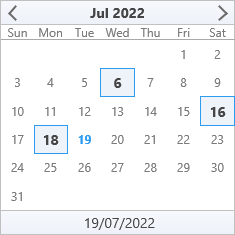
SelectADate — replace selection
TMSFNCCalendar1.SelectADate(Now + 2);
Selects one date and deselects everything else. Also moves the focused date to the selected date.
SelectDate — add to selection
TMSFNCCalendar1.Interaction.MultiSelect := True;
TMSFNCCalendar1.SelectDate(Now - 3);
TMSFNCCalendar1.SelectDate(EncodeDate(2025, 12, 25));
Keeps existing selected dates and adds the new one. Requires MultiSelect = True for more than one date.
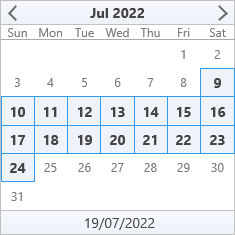
SelectMultiDates — range selection
TMSFNCCalendar1.SelectMultiDates(Now - 10, Now + 5);
Selects all dates from AStartDate to AEndDate and clears any previous selection.
Reading selected dates
var d: TDate;
begin
  d := TMSFNCCalendar1.SelectedDate;  // last/only selected date
  if TMSFNCCalendar1.SelectedDates.Count > 0 then
    d := TMSFNCCalendar1.SelectedDates.Items[0];
end;
Deselecting dates
TMSFNCCalendar1.SelectedDates.UnselectAll;         // clear all
TMSFNCCalendar1.SelectedDates.UnselectDate(Now);   // clear one date
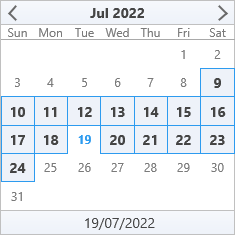
Date limits
TMSFNCCalendar1.MinDate := EncodeDate(2024, 1, 1);
TMSFNCCalendar1.MaxDate := EncodeDate(2026, 12, 31);
Dates outside the min/max range are disabled and cannot be selected.
Interaction options
Set on TTMSFNCCalendar.Interaction:
| Property | Description |
|---|---|
MultiSelect |
Enable selecting more than one date. |
KeyboardSupport |
Allow keyboard navigation of the focused date. |
ReadOnlyMode |
Disable all user date selection. |
Events
Reach for the selection events whenever something outside the calendar has to
follow the selection — a detail panel, an agenda list, a Save command, or a
persisted user preference. Read the selection from the after event
(OnSelectDate / OnSelectMultiDate), where SelectedDates already reflects
the change; OnBeforeSelectDate still sees the previous state.
| Event | Signature | Fires |
|---|---|---|
OnBeforeSelectDate |
(Sender: TObject; ADate: TDate) |
Once per date, before it is added to SelectedDates. |
OnSelectDate |
(Sender: TObject; ADate: TDate) |
Once per date, after it has been added. |
OnSelectMultiDate |
(Sender: TObject; AStartDate, AEndDate: TDate) |
Once for a whole range instead of once per day. |
procedure TForm1.FormCreate(Sender: TObject);
begin
  TMSFNCCalendar1.Interaction.MultiSelect := True;

  TMSFNCCalendar1.OnBeforeSelectDate := DoBeforeSelectDate;
  TMSFNCCalendar1.OnSelectDate       := DoSelectDate;
  TMSFNCCalendar1.OnSelectMultiDate  := DoSelectMultiDate;
end;

{ Fires once per date, just before it is added to SelectedDates. The handler has
  no cancel parameter, so use it to observe or prefetch only - block a date with
  MinDate / MaxDate or Interaction.ReadOnlyMode instead. }
procedure TForm1.DoBeforeSelectDate(Sender: TObject; ADate: TDate);
begin
  StatusLabel.Text := 'Loading agenda for ' + DateToStr(ADate);
end;

{ Fires after the date has been added. SelectedDates is already up to date here,
  so this is the right place to read the full selection. }
procedure TForm1.DoSelectDate(Sender: TObject; ADate: TDate);
begin
  StatusLabel.Text := Format('%s selected (%d day(s) in total)',
    [DateToStr(ADate), TMSFNCCalendar1.SelectedDates.Count]);
end;

{ Fires once for a range selection - either SelectMultiDates or a shift-click
  drag - instead of once per day. AStartDate and AEndDate are the range bounds. }
procedure TForm1.DoSelectMultiDate(Sender: TObject; AStartDate, AEndDate: TDate);
begin
  StatusLabel.Text := Format('Range %s - %s',
    [DateToStr(AStartDate), DateToStr(AEndDate)]);
  SaveDateRange(AStartDate, AEndDate);
end;
void __fastcall TForm1::FormCreate(TObject *Sender)
{
  TMSFNCCalendar1->Interaction->MultiSelect = true;

  TMSFNCCalendar1->OnBeforeSelectDate = DoBeforeSelectDate;
  TMSFNCCalendar1->OnSelectDate       = DoSelectDate;
  TMSFNCCalendar1->OnSelectMultiDate  = DoSelectMultiDate;
}

// Fires once per date, just before it is added to SelectedDates. The handler has
// no cancel parameter, so use it to observe or prefetch only - block a date with
// MinDate / MaxDate or Interaction.ReadOnlyMode instead.
void __fastcall TForm1::DoBeforeSelectDate(TObject *Sender, TDate ADate)
{
  StatusLabel->Text = "Loading agenda for " + DateToStr(ADate);
}

// Fires after the date has been added. SelectedDates is already up to date here,
// so this is the right place to read the full selection.
void __fastcall TForm1::DoSelectDate(TObject *Sender, TDate ADate)
{
  StatusLabel->Text = Format("%s selected (%d day(s) in total)",
    ARRAYOFCONST((DateToStr(ADate), TMSFNCCalendar1->SelectedDates->Count)));
}

// Fires once for a range selection - either SelectMultiDates or a shift-click
// drag - instead of once per day. AStartDate and AEndDate are the range bounds.
void __fastcall TForm1::DoSelectMultiDate(TObject *Sender, TDate AStartDate, TDate AEndDate)
{
  StatusLabel->Text = Format("Range %s - %s",
    ARRAYOFCONST((DateToStr(AStartDate), DateToStr(AEndDate))));
  SaveDateRange(AStartDate, AEndDate);
}
Note
OnBeforeSelectDate carries no cancel parameter, so it cannot veto a
selection. Prevent a date from being selected with MinDate / MaxDate, or
block selection entirely with Interaction.ReadOnlyMode.