PDF export
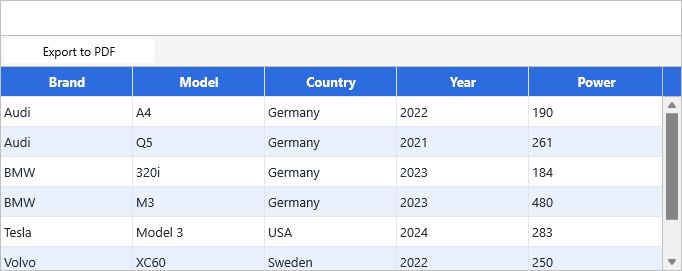
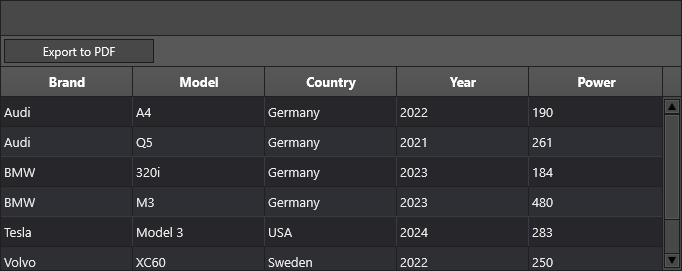
Save the grid as a PDF document with one call — fixed rows repeated as headers on every page, custom header/footer text per page, optional scale, and auto-open in the default PDF reader.
Overview
TTMSFNCDataGridPDFIO is a non-visual companion component that wraps the TMS
FNC PDF library. Drop it on the form, point its DataGrid property at the
grid, configure Options, and call Save. Multi-page output is automatic —
fixed rows and columns are repeated on each page when the corresponding
options are on.
Quick example
procedure TForm1.FormCreate(Sender: TObject);
begin
  PDF.DataGrid := Grid;
  PDF.Options.Header := 'TMS FNC Data Grid PDF Export';
  PDF.Options.OpenInPDFReader := True;       // open the result automatically
end;

procedure TForm1.ExportButtonClick(Sender: TObject);
begin
  PDF.Save('gridexport.pdf');
end;

procedure TForm1.PDFGetFooter(Sender, AExportObject: TObject;
  APageIndex: Integer; var AFooter: string);
begin
  AFooter := Format('Page %d', [APageIndex + 1]);
end;
using namespace Fmx::Tmsfncdatagridpdfio;
void __fastcall TForm1::FormCreate(TObject *Sender)
{
  PDF->DataGrid = Grid;
  PDF->Options->Header = "TMS FNC Data Grid PDF Export";
  PDF->Options->OpenInPDFReader = true;       // open the result automatically
}

void __fastcall TForm1::ExportButtonClick(TObject *Sender)
{
  PDF->Save("gridexport.pdf");
}

void __fastcall TForm1::PDFGetFooter(TObject *Sender, TTMSFNCPDFIOExportObject *AExportObject,
  int APageIndex, System::UnicodeString &AFooter)
{
  AFooter = Format("Page %d", ARRAYOFCONST((APageIndex + 1)));
}
Step by step
1. Drop the component
PDF.DataGrid := Grid;
PDF->DataGrid = Grid;
If a TTMSFNCDataGrid already lives on the same form, the component
auto-binds to it on construction.
2. Configure page settings
PDF.Options.Header          := 'Quarterly Report — 2026 Q1';
PDF.Options.Footer          := 'Confidential';
PDF.Options.OpenInPDFReader := True;      // open the file once written
PDF.Options.RepeatFixedRows    := True;   // repeat headers on every page
PDF.Options.RepeatFixedColumns := True;   // repeat fixed columns on every page
PDF.Options.FitToPage := True;            // shrink to one page wide
PDF.Options.Scale     := 0.85;            // or set an explicit scale factor
PDF->Options->Header          = L"Quarterly Report — 2026 Q1";
PDF->Options->Footer          = L"Confidential";
PDF->Options->OpenInPDFReader = true;      // open the file once written
PDF->Options->RepeatFixedRows    = true;   // repeat headers on every page
PDF->Options->RepeatFixedColumns = true;   // repeat fixed columns on every page
PDF->Options->FitToPage = true;            // shrink to one page wide
PDF->Options->Scale     = 0.85;            // or set an explicit scale factor
The ExportScale option on Options.IO provides an alternative global scale
that applies to the rendering canvas when exporting.
3. Save
PDF.Save('report.pdf');
PDF->Save(L"report->pdf");
4. Dynamic header / footer per page
For "Page 3 of 12" or per-page metadata, hook the events:
procedure TForm1.PDFGetFooter(Sender, AExportObject: TObject;
  APageIndex: Integer; var AFooter: string);
begin
  AFooter := Format('Page %d', [APageIndex + 1]);
end;

procedure TForm1.PDFGetHeader(Sender, AExportObject: TObject;
  APageIndex: Integer; var AHeader: string);
begin
  AHeader := Format('Quarterly Report — Page %d', [APageIndex + 1]);
end;
void __fastcall TForm1::PDFGetFooter(TObject *Sender, TObject *AExportObject,
  int APageIndex, System::UnicodeString &AFooter)
{
  AFooter = System::Sysutils::Format(L"Page %d", ARRAYOFCONST((APageIndex + 1)));
}

void __fastcall TForm1::PDFGetHeader(TObject *Sender, TObject *AExportObject,
  int APageIndex, System::UnicodeString &AHeader)
{
  AHeader = System::Sysutils::Format(L"Quarterly Report — Page %d", ARRAYOFCONST((APageIndex + 1)));
}
5. Force a manual page break
procedure TForm1.PDFRowIsPageBreak(Sender: TObject;
  AExportObject: TTMSFNCPDFIOExportObject; ARow: Integer;
  var IsPageBreak: Boolean);
begin
  IsPageBreak := IsGroupHeader(ARow);     // your own predicate
end;
void __fastcall TForm1::PDFRowIsPageBreak(TObject *Sender,
  TTMSFNCPDFIOExportObject *AExportObject, int ARow,
  bool &IsPageBreak)
{
  IsPageBreak = IsGroupHeader(ARow);     // your own predicate
}
6. Skip controls or decorations during export
Use ACell.IsExporting inside OnBeforeDrawCell to detect PDF rendering
and suppress on-screen-only elements:
procedure TForm1.GridBeforeDrawCell(Sender: TObject; AGraphics: TTMSFNCGraphics;
  ACell: TTMSFNCDataGridCell; var ACanDraw: Boolean);
begin
  if ACell.IsExporting and
     (Grid.Controls[ACell.Column, ACell.Row] <> nil) then
    ACell.DrawElements := [gcdText, gcdStroke];  // skip the embedded control
end;
void __fastcall TForm1::GridBeforeDrawCell(TObject *Sender, TTMSFNCGraphics *AGraphics,
  TTMSFNCDataGridCell *ACell, bool &ACanDraw)
{
  if (ACell->IsExporting &&
      (Grid->Controls[ACell->Column][ACell->Row] != nullptr))
    ACell->DrawElements = TTMSFNCDataGridCellDrawElements() << gcdText << gcdStroke;  // skip the embedded control
}
Custom PDF reports with a standalone renderer
For full control over the PDF layout — combining grid output with custom text,
charts, or summary banners on the same page — bypass TTMSFNCDataGridPDFIO
and use TTMSFNCDataGridRenderer directly with the low-level
TTMSFNCPDFLib.
This pattern creates a headless renderer (no visual component), connects a
database adapter to it, and calls Renderer.Export to place the grid table
inside a specific rectangle on the page.
procedure TForm1.BtnReportClick(Sender: TObject);
const
  PL = 40;   // page left margin
  PR = 570;  // page right margin
var
  Renderer  : TTMSFNCDataGridRenderer;
  PDFAdapter: TTMSFNCDataGridDatabaseAdapter;
  PDFLib    : TTMSFNCPDFLib;
  Stream    : TMemoryStream;
begin
  Renderer   := TTMSFNCDataGridRenderer.Create;
  PDFAdapter := TTMSFNCDataGridDatabaseAdapter.Create;
  try
    // Snippet 1 — Wire data to the headless renderer
    PDFAdapter.DataSource        := DataSource1;
    PDFAdapter.AutoCreateColumns := True;
    PDFAdapter.LoadMode          := almAllRecords;
    PDFAdapter.Renderer          := Renderer;
    PDFAdapter.Active            := True;

    // Snippet 2 — Apply appearance and filter/sort for the report view
    Renderer.CellAppearance.FixedLayout.Fill.Color := $FF1F3864;
    Renderer.CellAppearance.FixedLayout.Font.Color := gcWhite;
    Renderer.CellAppearance.BandLayout.Fill.Color  := $FFF0F4FF;
    Renderer.GlobalFont.Scale                      := 1.3;

    Renderer.Filter.Add(COL_STOCK, '<50');
    Renderer.ApplyFilter;
    Renderer.Sort(COL_STOCK, gsdAscending);

    // Snippet 3 — Conditional row formatting for the PDF only
    Renderer.OnGetCellLayout := RendererGetCellLayout;

    PDFLib := TTMSFNCPDFLib.Create;
    try
      // Snippet 4 — Page header, footer, page numbers
      PDFLib.Header              := 'LOW STOCK REPORT';
      PDFLib.HeaderFont.Size     := 18;
      PDFLib.HeaderFont.Style    := [TFontStyle.fsBold];
      PDFLib.Footer              := FormatDateTime('"Generated: "dd mmm yyyy', Now);
      PDFLib.PageNumber          := pnFooter;
      PDFLib.PageNumberFormat    := 'Page %d';
      PDFLib.PageNumberAlignment := gtaTrailing;

      PDFLib.BeginDocument;
      PDFLib.NewPage;

      // Snippet 5 — Draw a custom summary banner before the table
      PDFLib.Graphics.Fill.Kind  := gfkSolid;
      PDFLib.Graphics.Fill.Color := $FFF0F4FF;
      PDFLib.Graphics.DrawRectangle(RectF(0, 40, 612, 66));
      PDFLib.Graphics.DrawText('Low-stock items only — sorted by stock level',
        RectF(PL, 46, PR, 62));

      // Snippet 6 — Render the grid table into a page rectangle
      // MakeCellRange(col1, row1, col2, row2) defines which cells to include
      Renderer.Export(
        PDFLib,
        RectF(PL, 68, PR, 756),                              // table area on page
        MakeCellRange(COL_NAME, 0, COL_STOCK, Renderer.RowCount - 1),
        False,  // scale to fit width
        True,   // repeat fixed rows as table header
        True,   // repeat fixed columns
        False,  // clip to rect
        1.0,    // scale factor
        procedure begin PDFLib.NewPage; end   // callback for additional pages
      );

      Stream := PDFLib.EndDocument(False);
      if Assigned(Stream) then
      try
        Stream.SaveToFile('low_stock_report.pdf');
        TTMSFNCUtils.OpenFile('low_stock_report.pdf');
      finally
        Stream.Free;
      end;
    finally
      PDFLib.Free;
    end;
  finally
    PDFAdapter.Free;
    Renderer.Free;
  end;
end;

// The renderer gets its own OnGetCellLayout — independent of the screen grid
procedure TForm1.RendererGetCellLayout(Sender: TObject;
  ACell: TTMSFNCDataGridCell);
var
  R    : TTMSFNCDataGridRenderer;
  Stock: Integer;
begin
  if ACell.Row = 0 then Exit;
  R     := Sender as TTMSFNCDataGridRenderer;
  Stock := Round(R.Floats[COL_STOCK, ACell.Row]);
  if Stock < 10 then
    ACell.Layout.Fill.Color := $FFFFE0E0    // critical
  else if Stock < 25 then
    ACell.Layout.Fill.Color := $FFFFF0D0;  // urgent
end;
// Anonymous-method callback of Export: starts the next PDF page.
class TNewPageAction : public TCppInterfacedObject<TTMSFNCDataGridRendererExportNewPageCallback>
{
  TTMSFNCPDFLib *FPDFLib;
public:
  __fastcall TNewPageAction(TTMSFNCPDFLib *APDFLib) : FPDFLib(APDFLib) {}
  void __fastcall Invoke() { FPDFLib->NewPage(); }
};

void __fastcall TForm1::BtnReportClick(TObject *Sender)
{
  const int PL = 40;   // page left margin
  const int PR = 570;  // page right margin

  TTMSFNCDataGridRenderer *Renderer = new TTMSFNCDataGridRenderer(nullptr);
  TTMSFNCDataGridDatabaseAdapter *PDFAdapter = new TTMSFNCDataGridDatabaseAdapter();
  try
  {
    // Snippet 1 - Wire data to the headless renderer
    PDFAdapter->DataSource        = DataSource1;
    PDFAdapter->AutoCreateColumns = true;
    PDFAdapter->LoadMode          = almAllRecords;
    PDFAdapter->Renderer          = Renderer;
    PDFAdapter->Active            = true;

    // Snippet 2 - Apply appearance and filter/sort for the report view
    Renderer->CellAppearance->FixedLayout->Fill->Color = (TTMSFNCGraphicsColor)0xFF1F3864;
    Renderer->CellAppearance->FixedLayout->Font->Color = gcWhite;
    Renderer->CellAppearance->BandLayout->Fill->Color  = (TTMSFNCGraphicsColor)0xFFF0F4FF;
    Renderer->GlobalFont->Scale                        = 1.3;

    Renderer->Filter->Add(COL_STOCK, "<50");
    Renderer->ApplyFilter();
    Renderer->Sort(COL_STOCK, gsdAscending);

    // Snippet 3 - Conditional row formatting for the PDF only
    Renderer->OnGetCellLayout = RendererGetCellLayout;

    TTMSFNCPDFLib *PDFLib = new TTMSFNCPDFLib();
    try
    {
      // Snippet 4 - Page header, footer, page numbers
      PDFLib->Header              = "LOW STOCK REPORT";
      PDFLib->HeaderFont->Size    = 18;
      PDFLib->HeaderFont->Style   = TFontStyles() << TFontStyle::fsBold;
      PDFLib->Footer              = FormatDateTime("\"Generated: \"dd mmm yyyy", Now());
      PDFLib->PageNumber          = Fmx::Tmsfncpdflib::pnFooter;
      PDFLib->PageNumberFormat    = "Page %d";
      PDFLib->PageNumberAlignment = gtaTrailing;

      PDFLib->BeginDocument();
      PDFLib->NewPage();

      // Snippet 5 - Draw a custom summary banner before the table
      _di_ITMSFNCCustomPDFGraphicsLib PDFGraphics = PDFLib->Graphics();
      PDFGraphics->Fill->Kind  = gfkSolid;
      PDFGraphics->Fill->Color = (TTMSFNCGraphicsColor)0xFFF0F4FF;
      PDFGraphics->DrawRectangle(RectF(0, 40, 612, 66));
      PDFGraphics->DrawText("Low-stock items only " + System::UnicodeString(wchar_t(0x2014)) + " sorted by stock level",
        RectF(PL, 46, PR, 62), false);

      // Snippet 6 - Render the grid table into a page rectangle
      // MakeCellRange(col1, row1, col2, row2) defines which cells to include
      Renderer->Export(
        PDFLib,
        RectF(PL, 68, PR, 756),                              // table area on page
        Fmx::Tmsfncdatagridcore::MakeCellRange(COL_NAME, 0, COL_STOCK, Renderer->RowCount - 1),
        true,   // repeat fixed columns
        true,   // repeat fixed rows as table header
        false,  // scale to fit width
        false,  // clip to rect
        1.0f,   // scale factor
        _di_TTMSFNCDataGridRendererExportNewPageCallback(new TNewPageAction(PDFLib))   // callback for additional pages
      );

      TMemoryStream *Stream = PDFLib->EndDocument(false);
      if (Stream != nullptr)
      {
        try
        {
          Stream->SaveToFile("low_stock_report.pdf");
          TTMSFNCUtils::OpenFile("low_stock_report.pdf");
        }
        __finally
        {
          delete Stream;
        }
      }
    }
    __finally
    {
      delete PDFLib;
    }
  }
  __finally
  {
    delete PDFAdapter;
    delete Renderer;
  }
}

// The renderer gets its own OnGetCellLayout - independent of the screen grid
void __fastcall TForm1::RendererGetCellLayout(TObject *Sender,
  TTMSFNCDataGridCell *ACell)
{
  if (ACell->Row == 0)
    return;
  TTMSFNCDataGridRenderer *R = dynamic_cast<TTMSFNCDataGridRenderer*>(Sender);
  int Stock = (int)(R->Floats[COL_STOCK][ACell->Row] + 0.5);
  if (Stock < 10)
    ACell->Layout->Fill->Color = (TTMSFNCGraphicsColor)0xFFFFE0E0;    // critical
  else if (Stock < 25)
    ACell->Layout->Fill->Color = (TTMSFNCGraphicsColor)0xFFFFF0D0;    // urgent
}
The key differences from TTMSFNCDataGridPDFIO:
| Aspect | TTMSFNCDataGridPDFIO |
Standalone renderer |
|---|---|---|
| Setup | Drop component, set DataGrid |
Create renderer + adapter in code |
| Appearance | Follows the screen grid | Independent — style it separately |
| Filter / sort | Uses the screen grid's current state | Apply to the renderer itself |
| Condition-based cell styling | Uses the screen grid's event | Wire Renderer.OnGetCellLayout |
| Custom page content | Not supported | Full TTMSFNCPDFLib access |
| Multi-section reports | Not supported | Interleave Export calls with custom drawing |
MakeCellRange(col1, row1, col2, row2) is a helper that constructs a
TTMSFNCDataGridCellRange record. Pass it to Renderer.Export to
restrict which columns and rows are included in the table.
Combining page setup, dynamic footers, and manual page breaks
For repeatable reports, configure the document-level options, dynamic footer callback, and page-break callback together. The export component can then repeat headers, fit the table to the page width, and insert page breaks at meaningful rows with one Save call.
procedure TForm1.FormCreate(Sender: TObject);
begin
  PDF.DataGrid := Grid;
  PDF.Options.Header := 'Quarterly Report';
  PDF.Options.OpenInPDFReader := True;
  PDF.Options.RepeatFixedRows := True;
  PDF.Options.FitToPage := True;
  PDF.OnGetFooter := PDFGetFooter;
  PDF.OnRowIsPageBreak := PDFRowIsPageBreak;
end;

procedure TForm1.PDFGetFooter(Sender, AExportObject: TObject;
  APageIndex: Integer; var AFooter: UnicodeString);
begin
  AFooter := Format('Page %d', [APageIndex + 1]);
end;

procedure TForm1.PDFRowIsPageBreak(Sender: TObject;
  AExportObject: TTMSFNCPDFIOExportObject; ARow: Integer;
  var IsPageBreak: Boolean);
begin
  IsPageBreak := IsGroupHeader(ARow);
end;
using namespace Fmx::Tmsfncdatagridpdfio;
void __fastcall TForm1::FormCreate(TObject *Sender)
{
  PDF->DataGrid = Grid;
  PDF->Options->Header = "Quarterly Report";
  PDF->Options->OpenInPDFReader = true;
  PDF->Options->RepeatFixedRows = true;
  PDF->Options->FitToPage = true;
  PDF->OnGetFooter = PDFGetFooter;
  PDF->OnRowIsPageBreak = PDFRowIsPageBreak;
}

void __fastcall TForm1::PDFGetFooter(TObject *Sender, TTMSFNCPDFIOExportObject *AExportObject,
  int APageIndex, System::UnicodeString &AFooter)
{
  AFooter = Format("Page %d", ARRAYOFCONST((APageIndex + 1)));
}

void __fastcall TForm1::PDFRowIsPageBreak(TObject *Sender,
  TTMSFNCPDFIOExportObject *AExportObject, int ARow,
  bool &IsPageBreak)
{
  IsPageBreak = IsGroupHeader(ARow);
}
Related API
TTMSFNCDataGridPDFIOPDF.Options.Header/Footer/OpenInPDFReaderPDF.Options.Scale/FitToPagePDF.Options.RepeatFixedRows/RepeatFixedColumnsPDF.Save(FileName)OnGetHeader,OnGetFooterOnRowIsPageBreakOnBeforeDrawHeader/OnAfterDrawHeaderOnBeforeDrawFooter/OnAfterDrawFooterOnBeforeDrawContent/OnAfterDrawContentTTMSFNCDataGridRenderer— headless renderer for custom reportsRenderer.Export(PDFLib, PageRect, CellRange, ...)— low-level page renderMakeCellRange(col1, row1, col2, row2)— construct a cell range recordTTMSFNCPDFLib— direct PDF document API (header, footer, page numbers, graphics)
See also
- Printing — same options, sent to the system printer instead.
- Import & export (XLS) — for editable Excel output.
- Headless data layer — using
TTMSFNCDataGridDatawithout a visual component. - Demo:
Demo/FMX/DataGrid/Basic/PDF Export