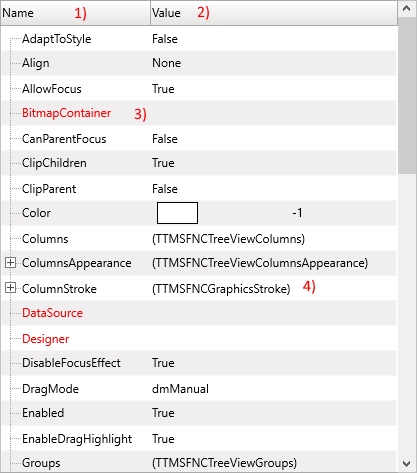
Getting Started with TMS FNC Object Inspector
Use TTMSFNCObjectInspector to inspect and edit published properties of an object at runtime. It can show ordinary values, assignable object properties, expandable object hierarchies, collections, lists, and dataset fields.
Inspect an Object
- Drop a
TTMSFNCObjectInspectoron the form. - Assign an object instance to the
Objectproperty. - Call
RebuildListafter changing the inspected object or when the public property surface changes.
type
  TEditorSettings = class(TPersistent)
  private
    FCaption: string;
    FRefreshInterval: Integer;
  published
    property Caption: string read FCaption write FCaption;
    property RefreshInterval: Integer read FRefreshInterval write FRefreshInterval;
  end;

  TForm1 = class(TForm)
  private
    FEditorSettings: TEditorSettings;
  end;

procedure TForm1.FormCreate(Sender: TObject);
begin
  FEditorSettings := TEditorSettings.Create;
  FEditorSettings.Caption := 'Dashboard';
  FEditorSettings.RefreshInterval := 30;
  TMSFNCObjectInspector1.&Object := FEditorSettings;
  TMSFNCObjectInspector1.RebuildList;
end;

procedure TForm1.FormDestroy(Sender: TObject);
begin
  FEditorSettings.Free;
end;
class TEditorSettings : public System::Classes::TPersistent
{
private:
  System::UnicodeString FCaption;
  int FRefreshInterval;
__published:
  __property System::UnicodeString Caption = {read=FCaption, write=FCaption};
  __property int RefreshInterval = {read=FRefreshInterval, write=FRefreshInterval};
};

void __fastcall TForm1::FormCreate(TObject *Sender)
{
  FEditorSettings = new TEditorSettings();
  FEditorSettings->Caption = "Dashboard";
  FEditorSettings->RefreshInterval = 30;
  TMSFNCObjectInspector1->Object = FEditorSettings;
  TMSFNCObjectInspector1->RebuildList();
}

void __fastcall TForm1::FormDestroy(TObject *Sender)
{
  delete FEditorSettings;
}