Objects and Property Events
The object inspector reads the published properties of the assigned object. Use the read and write events to decide which properties are visible, how values are displayed, and whether a value should be written back.
Assign an Object
Assign any object with published properties to Object. For application-specific editors, create a small settings or view-model class and expose only the properties that should be edited.
type
  TEditorSettings = class(TPersistent)
  private
    FCaption: string;
    FRefreshInterval: Integer;
  published
    property Caption: string read FCaption write FCaption;
    property RefreshInterval: Integer read FRefreshInterval write FRefreshInterval;
  end;

  TForm1 = class(TForm)
  private
    FEditorSettings: TEditorSettings;
  end;

procedure TForm1.FormCreate(Sender: TObject);
begin
  FEditorSettings := TEditorSettings.Create;
  FEditorSettings.Caption := 'Dashboard';
  FEditorSettings.RefreshInterval := 30;
  TMSFNCObjectInspector1.&Object := FEditorSettings;
  TMSFNCObjectInspector1.RebuildList;
end;

procedure TForm1.FormDestroy(Sender: TObject);
begin
  FEditorSettings.Free;
end;
class TEditorSettings : public System::Classes::TPersistent
{
private:
  System::UnicodeString FCaption;
  int FRefreshInterval;
__published:
  __property System::UnicodeString Caption = {read=FCaption, write=FCaption};
  __property int RefreshInterval = {read=FRefreshInterval, write=FRefreshInterval};
};

void __fastcall TForm1::FormCreate(TObject *Sender)
{
  FEditorSettings = new TEditorSettings();
  FEditorSettings->Caption = "Dashboard";
  FEditorSettings->RefreshInterval = 30;
  TMSFNCObjectInspector1->Object = FEditorSettings;
  TMSFNCObjectInspector1->RebuildList();
}

void __fastcall TForm1::FormDestroy(TObject *Sender)
{
  delete FEditorSettings;
}
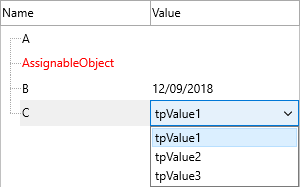
Filter and Rewrite Values
OnReadProperty can hide a property before it is shown. OnReadPropertyValue can replace the displayed value, and OnWritePropertyValue can adjust or reject a value before it is written.
procedure TForm1.TMSFNCObjectInspector1ReadProperty(Sender: TObject;
  AObject: TObject; APropertyInfo: TTMSFNCPropertyInfo; APropertyName: string;
  APropertyType: TTypeKind; var ACanRead: Boolean);
begin
  ACanRead := APropertyName <> 'InternalToken';
end;

procedure TForm1.TMSFNCObjectInspector1WritePropertyValue(Sender: TObject;
  AObject: TObject; APropertyInfo: TTMSFNCPropertyInfo; APropertyName: string;
  APropertyType: TTypeKind; var APropertyValue: string; var ACanWrite: Boolean);
begin
  if APropertyName = 'Caption' then
    APropertyValue := Trim(APropertyValue);
end;
void __fastcall TForm1::TMSFNCObjectInspector1ReadProperty(TObject *Sender,
  TObject *AObject, TTMSFNCPropertyInfo APropertyInfo, System::UnicodeString APropertyName,
  System::Typinfo::TTypeKind APropertyType, bool &ACanRead)
{
  ACanRead = APropertyName != "InternalToken";
}

void __fastcall TForm1::TMSFNCObjectInspector1WritePropertyValue(TObject *Sender,
  TObject *AObject, TTMSFNCPropertyInfo APropertyInfo, System::UnicodeString APropertyName,
  System::Typinfo::TTypeKind APropertyType, System::UnicodeString &APropertyValue, bool &ACanWrite)
{
  if (APropertyName == "Caption")
    APropertyValue = Trim(APropertyValue);
}
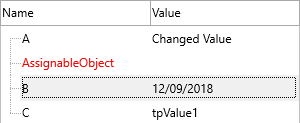
Assignable and Nested Properties
Assignable object properties can be connected to compatible components already present on the form. Expandable object properties reveal their nested published properties. Keep circular object graphs out of the editable surface by filtering properties in OnReadProperty.
Combining object assignment, property filtering, and value rewriting
Assign an object, hide internal properties, and adjust write-back values in a single coordinated setup:
type
  TEditorSettings = class(TPersistent)
  private
    FCaption: string;
    FMaxRetries: Integer;
    FInternalToken: string;
  published
    property Caption: string read FCaption write FCaption;
    property MaxRetries: Integer read FMaxRetries write FMaxRetries;
    property InternalToken: string read FInternalToken write FInternalToken;
  end;

  TForm1 = class(TForm)
  private
    FSettings: TEditorSettings;
  end;

procedure TForm1.FormCreate(Sender: TObject);
begin
  FSettings := TEditorSettings.Create;
  FSettings.Caption := 'Dashboard';
  FSettings.MaxRetries := 5;

  TMSFNCObjectInspector1.&Object := FSettings;
  TMSFNCObjectInspector1.OnReadProperty := TMSFNCObjectInspector1ReadProperty;
  TMSFNCObjectInspector1.OnWritePropertyValue := TMSFNCObjectInspector1WritePropertyValue;
  TMSFNCObjectInspector1.RebuildList;
end;

procedure TForm1.TMSFNCObjectInspector1ReadProperty(Sender: TObject;
  AObject: TObject; APropertyInfo: TTMSFNCPropertyInfo; APropertyName: string;
  APropertyType: TTypeKind; var ACanRead: Boolean);
begin
  // Hide the internal property so it never appears in the inspector.
  ACanRead := APropertyName <> 'InternalToken';
end;

procedure TForm1.TMSFNCObjectInspector1WritePropertyValue(Sender: TObject;
  AObject: TObject; APropertyInfo: TTMSFNCPropertyInfo; APropertyName: string;
  APropertyType: TTypeKind; var APropertyValue: string; var ACanWrite: Boolean);
begin
  // Clamp the retry count to a maximum of 10 before it is written back.
  if (APropertyName = 'MaxRetries') and (StrToIntDef(APropertyValue, -1) > 10) then
    APropertyValue := '10';
end;

procedure TForm1.FormDestroy(Sender: TObject);
begin
  FSettings.Free;
end;
class TEditorSettings : public System::Classes::TPersistent
{
private:
  System::UnicodeString FCaption;
  int FMaxRetries;
  System::UnicodeString FInternalToken;
__published:
  __property System::UnicodeString Caption = {read=FCaption, write=FCaption};
  __property int MaxRetries = {read=FMaxRetries, write=FMaxRetries};
  __property System::UnicodeString InternalToken = {read=FInternalToken, write=FInternalToken};
};

void __fastcall TForm1::FormCreate(TObject *Sender)
{
  FSettings = new TEditorSettings();
  FSettings->Caption = "Dashboard";
  FSettings->MaxRetries = 5;

  TMSFNCObjectInspector1->Object = FSettings;
  TMSFNCObjectInspector1->OnReadProperty = TMSFNCObjectInspector1ReadProperty;
  TMSFNCObjectInspector1->OnWritePropertyValue = TMSFNCObjectInspector1WritePropertyValue;
  TMSFNCObjectInspector1->RebuildList();
}

void __fastcall TForm1::TMSFNCObjectInspector1ReadProperty(TObject *Sender,
  TObject *AObject, TTMSFNCPropertyInfo APropertyInfo, System::UnicodeString APropertyName,
  System::Typinfo::TTypeKind APropertyType, bool &ACanRead)
{
  // Hide the internal property so it never appears in the inspector.
  ACanRead = APropertyName != "InternalToken";
}

void __fastcall TForm1::TMSFNCObjectInspector1WritePropertyValue(TObject *Sender,
  TObject *AObject, TTMSFNCPropertyInfo APropertyInfo, System::UnicodeString APropertyName,
  System::Typinfo::TTypeKind APropertyType, System::UnicodeString &APropertyValue, bool &ACanWrite)
{
  // Clamp the retry count to a maximum of 10 before it is written back.
  if ((APropertyName == "MaxRetries") && (StrToIntDef(APropertyValue, -1) > 10))
    APropertyValue = "10";
}

void __fastcall TForm1::FormDestroy(TObject *Sender)
{
  delete FSettings;
}