Collections and Dataset Fields
Beyond simple scalar properties, the object inspector can edit list and
collection properties and can bind directly to a TDataSource to inspect the
fields of the active record. The two modes serve different needs: collection
editing surfaces the structured properties of an object graph, while dataset
binding turns the inspector into a record editor driven by live data. Dataset
binding is the richer of the two because three events — read-field, read-value,
and write-value — let you hide fields, reshape how values are displayed, and
validate or reject writes before they reach the dataset. This guide covers
collection and list editing, dataset field binding, and combining binding with
all three field events in one coordinated setup.
Collections and Lists
When the inspected object exposes a list or collection property, the value cell can open an editor. A string list opens a text editor, while a collection can open another object inspector scoped to the selected collection item, letting you drill into nested structures from a single inspector.
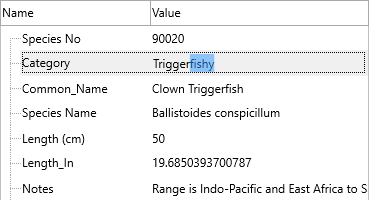
Dataset Fields
Assign DataSource when the inspector should show the fields of the active
dataset record. Use OnReadDBField to hide fields that should not be editable
(keys, audit columns), OnReadDBFieldValue to rewrite how a value is displayed,
and OnWriteDBFieldValue to validate or reject a value before it is written
back to the dataset.
procedure TForm1.FormCreate(Sender: TObject);
begin
  TMSFNCObjectInspector1.DataSource := DataSource1;
end;

procedure TForm1.TMSFNCObjectInspector1ReadDBField(Sender: TObject;
  AField: TField; var ACanRead: Boolean);
begin
  ACanRead := AField.FieldName <> 'ID';
end;
void __fastcall TForm1::FormCreate(TObject *Sender)
{
  TMSFNCObjectInspector1->DataSource = DataSource1;
}

void __fastcall TForm1::TMSFNCObjectInspector1ReadDBField(TObject *Sender,
  TField *AField, bool &ACanRead)
{
  ACanRead = AField->FieldName != "ID";
}
Combining dataset binding with field rules
Field binding is most useful when the three field events work together: bind the source, hide the key, format a currency column for display, and reject empty writes to a required field — all in one setup:
procedure TForm1.FormCreate(Sender: TObject);
begin
  TMSFNCObjectInspector1.DataSource := DataSource1;
  TMSFNCObjectInspector1.OnReadDBField := DoReadDBField;
  TMSFNCObjectInspector1.OnReadDBFieldValue := DoReadDBFieldValue;
  TMSFNCObjectInspector1.OnWriteDBFieldValue := DoWriteDBFieldValue;
end;

procedure TForm1.DoReadDBField(Sender: TObject; AField: TField;
  var ACanRead: Boolean);
begin
  // Hide the primary key from the editable surface.
  ACanRead := AField.FieldName <> 'ID';
end;

procedure TForm1.DoReadDBFieldValue(Sender: TObject; AField: TField;
  var AFieldValue: string; var ACanRead: Boolean);
begin
  // Present currency fields with a symbol.
  if AField.FieldName = 'Price' then
    AFieldValue := '$' + AFieldValue;
end;

procedure TForm1.DoWriteDBFieldValue(Sender: TObject; AField: TField;
  var AFieldValue: string; var ACanWrite: Boolean);
begin
  // Reject empty writes to a required field.
  if AField.FieldName = 'Name' then
    ACanWrite := Trim(AFieldValue) <> '';
end;
void __fastcall TForm1::FormCreate(TObject *Sender)
{
  TMSFNCObjectInspector1->DataSource = DataSource1;
  TMSFNCObjectInspector1->OnReadDBField = DoReadDBField;
  TMSFNCObjectInspector1->OnReadDBFieldValue = DoReadDBFieldValue;
  TMSFNCObjectInspector1->OnWriteDBFieldValue = DoWriteDBFieldValue;
}

void __fastcall TForm1::DoReadDBField(TObject *Sender, TField *AField,
  bool &ACanRead)
{
  // Hide the primary key from the editable surface.
  ACanRead = AField->FieldName != "ID";
}

void __fastcall TForm1::DoReadDBFieldValue(TObject *Sender, TField *AField,
  System::UnicodeString &AFieldValue, bool &ACanRead)
{
  // Present currency fields with a symbol.
  if (AField->FieldName == "Price")
    AFieldValue = "$" + AFieldValue;
}

void __fastcall TForm1::DoWriteDBFieldValue(TObject *Sender, TField *AField,
  System::UnicodeString &AFieldValue, bool &ACanWrite)
{
  // Reject empty writes to a required field.
  if (AField->FieldName == "Name")
    ACanWrite = Trim(AFieldValue) != "";
}
Common pitfalls
- No active record. The inspector shows fields from the current record; if the dataset is closed or empty, there is nothing to display. Open and position the dataset before expecting field rows.
- Filtering in the wrong event. Hide whole fields in
OnReadDBField(ACanRead), not by blanking values inOnReadDBFieldValue— the latter only changes the displayed text, leaving the field present and editable. - Expecting writes after rejecting them. Setting
ACanWrite := FalseinOnWriteDBFieldValuediscards the edit; surface a message so the user knows why the value did not stick.