Categories, Lookup, and Layout
TTMSFNCTableView can divide items into named sections and display a side lookup bar for fast navigation. The LayoutMode property switches between a standard vertical list and a grouped card layout.
CategoryType
The CategoryType property controls how sections are generated. Its default value is tvctNone.
| Value | Behaviour |
|---|---|
tvctNone |
No sections; items displayed in insertion order. |
tvctAlphaBetic |
Sections A–Z based on the first letter of Text. |
tvctAlphaNumericFirst |
Alphanumeric sections; numbers before letters. |
tvctAlphaNumericLast |
Alphanumeric sections; numbers after letters. |
tvctCustom |
Sections defined in the Categories collection. Each item's CategoryID assigns it to a section. |
Alphabetic categories
Set CategoryType to tvctAlphaBetic, then call Sort to ensure each letter's items appear together:
TMSFNCTableView1.CategoryType := tvctAlphaBetic;
TMSFNCTableView1.Sort; // ascending, case-sensitive by default
TMSFNCTableView1->CategoryType = tvctAlphaBetic;
TMSFNCTableView1->Sort(); // ascending, case-sensitive by default
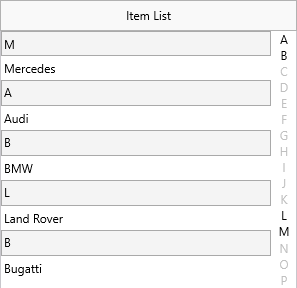
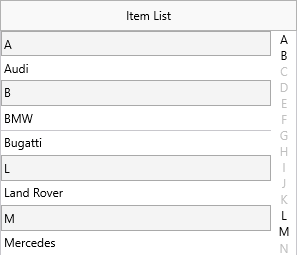
Sort accepts optional ACaseSensitive and ASortingMode parameters:
TMSFNCTableView1.Sort(False, tvismDescending);
TMSFNCTableView1->Sort(false, tvismDescending);
Custom categories
// Alphabetic categories — automatic, then sort
TMSFNCTableView1.CategoryType := tvctAlphaBetic;
TMSFNCTableView1.Sort; // sorts ascending, case-sensitive by default

// Custom categories
var
  it: TTMSFNCTableViewItem;
  cat: TTMSFNCTableViewCategory;
begin
  TMSFNCTableView1.BeginUpdate;
  TMSFNCTableView1.Items.Clear;
  TMSFNCTableView1.LookupBar.Width := 40;
  TMSFNCTableView1.CategoryType := tvctCustom;

  cat := TMSFNCTableView1.Categories.Add;
  cat.Id := 0;
  cat.Text := 'Category 1';
  cat.LookupText := 'Cat 1';

  cat := TMSFNCTableView1.Categories.Add;
  cat.Id := 1;
  cat.Text := 'Category 2';
  cat.LookupText := 'Cat 2';

  it := TMSFNCTableView1.Items.Add;
  it.Text := 'Pear<br/>This is a Pear';
  it.CategoryID := 0;

  it := TMSFNCTableView1.Items.Add;
  it.Text := 'Banana<br/>This is a Banana';
  it.CategoryID := 0;

  it := TMSFNCTableView1.Items.Add;
  it.Text := 'Apple<br/>This is an Apple';
  it.CategoryID := 1;

  it := TMSFNCTableView1.Items.Add;
  it.Text := 'Lemon<br/>This is a Lemon';
  it.CategoryID := 1;

  TMSFNCTableView1.Items.Sort;

  TMSFNCTableView1.EndUpdate;
end;

// Manual lookup (when AutoLookup = False)
procedure TForm1.TMSFNCTableView1ManualLookupCategory(Sender: TObject;
  ACategory: String; ACategoryID: Integer);
begin
  if TMSFNCTableView1.CategoryType = tvctCustom then
    TMSFNCTableView1.LookupCustomCategory(ACategoryID)
  else
    TMSFNCTableView1.LookupCategory(ACategory);
end;
// Alphabetic categories - automatic, then sort
void __fastcall TForm1::AlphabeticCategories()
{
  TMSFNCTableView1->CategoryType = tvctAlphaBetic;
  TMSFNCTableView1->Sort(); // sorts ascending, case-sensitive by default
}

// Custom categories
void __fastcall TForm1::CustomCategories()
{
  TMSFNCTableView1->BeginUpdate();
  TMSFNCTableView1->Items->Clear();
  TMSFNCTableView1->LookupBar->Width = 40;
  TMSFNCTableView1->CategoryType = tvctCustom;

  TTMSFNCTableViewCategory *cat = TMSFNCTableView1->Categories->Add();
  cat->Id = 0;
  cat->Text = "Category 1";
  cat->LookupText = "Cat 1";

  cat = TMSFNCTableView1->Categories->Add();
  cat->Id = 1;
  cat->Text = "Category 2";
  cat->LookupText = "Cat 2";

  TTMSFNCTableViewItem *it = TMSFNCTableView1->Items->Add();
  it->Text = "Pear<br/>This is a Pear";
  it->CategoryID = 0;

  it = TMSFNCTableView1->Items->Add();
  it->Text = "Banana<br/>This is a Banana";
  it->CategoryID = 0;

  it = TMSFNCTableView1->Items->Add();
  it->Text = "Apple<br/>This is an Apple";
  it->CategoryID = 1;

  it = TMSFNCTableView1->Items->Add();
  it->Text = "Lemon<br/>This is a Lemon";
  it->CategoryID = 1;

  TMSFNCTableView1->Items->Sort();

  TMSFNCTableView1->EndUpdate();
}

// Manual lookup (when AutoLookup = false)
void __fastcall TForm1::TMSFNCTableView1ManualLookupCategory(TObject *Sender,
  UnicodeString ACategory, int ACategoryID)
{
  if (TMSFNCTableView1->CategoryType == tvctCustom)
    TMSFNCTableView1->LookupCustomCategory(ACategoryID);
  else
    TMSFNCTableView1->LookupCategory(ACategory);
}
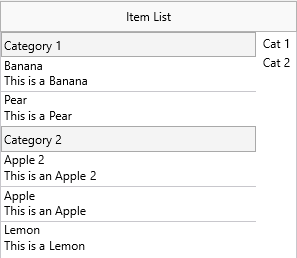
Each TTMSFNCTableViewCategory has:
| Property | Description |
|---|---|
Id |
Integer key; items with CategoryID = Id belong to this section. |
Text |
Label shown in the section header row. |
LookupText |
Abbreviated label shown in the lookup bar (defaults to Text). |
Lookup bar
When categories are active the lookup bar appears automatically on the right edge. Tapping or dragging through it scrolls to the matching section.
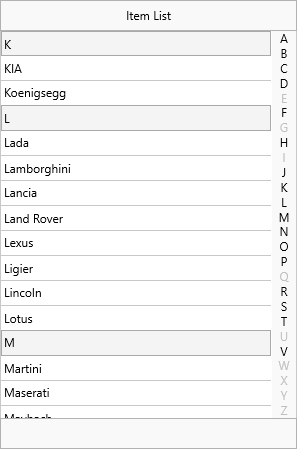
Key settings:
| Property | Description |
|---|---|
LookupBar.Visible |
Show or hide the bar. |
LookupBar.Width |
Width in pixels (default 20). |
LookupBar.AutoLookup |
When True (default), tapping a letter scrolls automatically. |
Manual lookup — set AutoLookup to False and handle OnManualLookupCategory:
procedure TForm1.TMSFNCTableView1ManualLookupCategory(
  Sender: TObject; ACategory: String; ACategoryID: Integer);
begin
  if TMSFNCTableView1.CategoryType = tvctCustom then
    TMSFNCTableView1.LookupCustomCategory(ACategoryID)
  else
    TMSFNCTableView1.LookupCategory(ACategory);
end;
void __fastcall TForm1::TMSFNCTableView1ManualLookupCategory(
  TObject *Sender, UnicodeString ACategory, int ACategoryID)
{
  if (TMSFNCTableView1->CategoryType == tvctCustom)
    TMSFNCTableView1->LookupCustomCategory(ACategoryID);
  else
    TMSFNCTableView1->LookupCategory(ACategory);
}
Keyboard lookup is also supported: focus the tableview and type characters to jump to the matching item; press Escape or Enter to reset.
Layout modes
LayoutMode controls how items are arranged on screen.
| Value | Description |
|---|---|
tvlmDefault |
Standard single-column vertical list. |
tvlmGroup |
Items in the same category displayed side-by-side in group rows. |
Group layout
In tvlmGroup mode, items in the same category are arranged into rows using the GroupIndex property. Items with the same GroupIndex share a row; different GroupIndex values start new rows within the category.
// Group layout — items from the same category displayed side-by-side
// within group rows controlled by GroupIndex
var
  itm: TTMSFNCTableViewItem;
begin
  TMSFNCTableView1.BeginUpdate;
  TMSFNCTableView1.LayoutMode := tvlmGroup;
  TMSFNCTableView1.LookupBar.Visible := False;

  // Style categories as plain headers
  TMSFNCTableView1.CategoryType := tvctCustom;
  TMSFNCTableView1.CategoryAppearance.Font.Style := [TFontStyle.fsBold];
  TMSFNCTableView1.CategoryAppearance.Fill.Kind := gfkNone;
  TMSFNCTableView1.CategoryAppearance.Stroke.Kind := gskNone;
  TMSFNCTableView1.CategoryAppearance.Height := 35;
  TMSFNCTableView1.GroupAppearance.Margins.Top := 0;
  TMSFNCTableView1.ItemAppearance.Stroke.Color := $FF2D9BEF;
  TMSFNCTableView1.ItemAppearance.Fill.Color := $FFF6F8FC;

  TMSFNCTableView1.Items.Clear;
  TMSFNCTableView1.Categories.Clear;

  TMSFNCTableView1.Categories.Add.Text := 'Internet settings'; // id = 0
  TMSFNCTableView1.Categories.Add.Text := 'Email settings';    // id = 1

  // Category 0 — two items in the same row (GroupIndex 0), one in next row (GroupIndex 1)
  itm := TMSFNCTableView1.Items.Add;
  itm.CategoryID := 0;
  itm.GroupIndex := 0;
  itm.Text := '<b>Proxy</b><br>Proxy server name';

  itm := TMSFNCTableView1.Items.Add;
  itm.CategoryID := 0;
  itm.GroupIndex := 1;
  itm.Text := '<b>IP address</b><br>192.168.0.1';

  // Category 1 — no GroupIndex set, items stack vertically
  itm := TMSFNCTableView1.Items.Add;
  itm.CategoryID := 1;
  itm.Text := '<b>POP server</b><br>pop.myserver.com';

  itm := TMSFNCTableView1.Items.Add;
  itm.CategoryID := 1;
  itm.Text := '<b>SMTP server</b><br>smtp.myserver.com';

  TMSFNCTableView1.EndUpdate;
end;
// Group layout - items from the same category displayed side-by-side
// within group rows controlled by GroupIndex
void __fastcall TForm1::BuildGroupLayout()
{
  TMSFNCTableView1->BeginUpdate();
  TMSFNCTableView1->LayoutMode = tvlmGroup;
  TMSFNCTableView1->LookupBar->Visible = false;

  // Style categories as plain headers
  TMSFNCTableView1->CategoryType = tvctCustom;
  TMSFNCTableView1->CategoryAppearance->Font->Style = TFontStyles() << TFontStyle::fsBold;
  TMSFNCTableView1->CategoryAppearance->Fill->Kind = gfkNone;
  TMSFNCTableView1->CategoryAppearance->Stroke->Kind = gskNone;
  TMSFNCTableView1->CategoryAppearance->Height = 35;
  TMSFNCTableView1->GroupAppearance->Margins->Top = 0;
  TMSFNCTableView1->ItemAppearance->Stroke->Color = (TColor)0xFF2D9BEF;
  TMSFNCTableView1->ItemAppearance->Fill->Color = (TColor)0xFFF6F8FC;

  TMSFNCTableView1->Items->Clear();
  TMSFNCTableView1->Categories->Clear();

  TMSFNCTableView1->Categories->Add()->Text = "Internet settings"; // id = 0
  TMSFNCTableView1->Categories->Add()->Text = "Email settings";    // id = 1

  // Category 0 - two items in the same row (GroupIndex 0), one in next row (GroupIndex 1)
  TTMSFNCTableViewItem *itm = TMSFNCTableView1->Items->Add();
  itm->CategoryID = 0;
  itm->GroupIndex = 0;
  itm->Text = "<b>Proxy</b><br>Proxy server name";

  itm = TMSFNCTableView1->Items->Add();
  itm->CategoryID = 0;
  itm->GroupIndex = 1;
  itm->Text = "<b>IP address</b><br>192.168.0.1";

  // Category 1 - no GroupIndex set, items stack vertically
  itm = TMSFNCTableView1->Items->Add();
  itm->CategoryID = 1;
  itm->Text = "<b>POP server</b><br>pop.myserver.com";

  itm = TMSFNCTableView1->Items->Add();
  itm->CategoryID = 1;
  itm->Text = "<b>SMTP server</b><br>smtp.myserver.com";

  TMSFNCTableView1->EndUpdate();
}
Note
Group layout requires CategoryType to be set to tvctCustom so items can be assigned to categories via CategoryID.
Combining categories, lookup bar, and group layout mode
Use custom categories, enable the lookup bar with manual handling, and switch to group layout so category items appear side-by-side:
procedure TForm1.FormCreate(Sender: TObject);
var
  cat: TTMSFNCTableViewCategory;
  item: TTMSFNCTableViewItem;
begin
  TMSFNCTableView1.BeginUpdate;
  try
    // Define two custom categories
    cat := TMSFNCTableView1.Categories.Add;
    cat.Id := 0; cat.Text := 'Fruits'; cat.LookupText := 'Fr';
    cat := TMSFNCTableView1.Categories.Add;
    cat.Id := 1; cat.Text := 'Vegetables'; cat.LookupText := 'Ve';

    TMSFNCTableView1.CategoryType := tvctCustom;

    // Add items assigned to categories and group rows
    item := TMSFNCTableView1.Items.Add; item.Text := 'Apple';  item.CategoryID := 0; item.GroupIndex := 0;
    item := TMSFNCTableView1.Items.Add; item.Text := 'Banana'; item.CategoryID := 0; item.GroupIndex := 0;
    item := TMSFNCTableView1.Items.Add; item.Text := 'Cherry'; item.CategoryID := 0; item.GroupIndex := 1;
    item := TMSFNCTableView1.Items.Add; item.Text := 'Carrot'; item.CategoryID := 1; item.GroupIndex := 0;
    item := TMSFNCTableView1.Items.Add; item.Text := 'Pea';    item.CategoryID := 1; item.GroupIndex := 0;

    // Side-by-side group layout
    TMSFNCTableView1.LayoutMode := tvlmGroup;

    // Manual lookup so the app scrolls programmatically
    TMSFNCTableView1.LookupBar.AutoLookup := False;
    TMSFNCTableView1.OnManualLookupCategory := DoManualLookup;
  finally
    TMSFNCTableView1.EndUpdate;
  end;
end;

procedure TForm1.DoManualLookupCategory(Sender: TObject;
  ACategory: String; ACategoryID: Integer);
begin
  TMSFNCTableView1.LookupCustomCategory(ACategoryID);
end;
void __fastcall TForm1::FormCreate(TObject *Sender)
{
  TMSFNCTableView1->BeginUpdate();
  try
  {
    // Define two custom categories
    TTMSFNCTableViewCategory *cat = TMSFNCTableView1->Categories->Add();
    cat->Id = 0; cat->Text = "Fruits"; cat->LookupText = "Fr";
    cat = TMSFNCTableView1->Categories->Add();
    cat->Id = 1; cat->Text = "Vegetables"; cat->LookupText = "Ve";

    TMSFNCTableView1->CategoryType = tvctCustom;

    // Add items assigned to categories and group rows
    TTMSFNCTableViewItem *item;
    item = TMSFNCTableView1->Items->Add(); item->Text = "Apple";  item->CategoryID = 0; item->GroupIndex = 0;
    item = TMSFNCTableView1->Items->Add(); item->Text = "Banana"; item->CategoryID = 0; item->GroupIndex = 0;
    item = TMSFNCTableView1->Items->Add(); item->Text = "Cherry"; item->CategoryID = 0; item->GroupIndex = 1;
    item = TMSFNCTableView1->Items->Add(); item->Text = "Carrot"; item->CategoryID = 1; item->GroupIndex = 0;
    item = TMSFNCTableView1->Items->Add(); item->Text = "Pea";    item->CategoryID = 1; item->GroupIndex = 0;

    // Side-by-side group layout
    TMSFNCTableView1->LayoutMode = tvlmGroup;

    // Manual lookup so the app scrolls programmatically
    TMSFNCTableView1->LookupBar->AutoLookup = false;
    TMSFNCTableView1->OnManualLookupCategory = DoManualLookup;
  }
  __finally
  {
    TMSFNCTableView1->EndUpdate();
  }
}

void __fastcall TForm1::DoManualLookupCategory(TObject *Sender,
  UnicodeString ACategory, int ACategoryID)
{
  TMSFNCTableView1->LookupCustomCategory(ACategoryID);
}