Editing, Filtering, and Reload
TTMSFNCTableView supports a built-in edit mode for multi-selection, a filter mechanism (both programmatic and interactive), and a pull-to-refresh reload pattern.
Edit mode
Edit mode allows users to select multiple items simultaneously. Enable the edit button in the header by setting Interaction.ShowEditButton to True. Tapping the button toggles edit mode; selected items are highlighted, and tapping again deselects them.
Show checkboxes on items during edit mode by setting DefaultItem.CheckType:
// --- Editing ---

// Show edit button in header; tap enables multi-select mode
TMSFNCTableView1.Interaction.ShowEditButton := True;

// Show checkboxes on items during edit mode
TMSFNCTableView1.DefaultItem.CheckType := tvictCheckBox;

// Retrieve checked items after user selection
var
  checkedItems: TArray<TTMSFNCTableViewItem>;
begin
  checkedItems := TMSFNCTableView1.GetCheckedItems;
  // process checkedItems...
end;

// Programmatically toggle edit mode
TMSFNCTableView1.StartEditMode;
TMSFNCTableView1.StopEditMode;

// --- Filtering ---

// Programmatic filter — wildcard condition
var
  f: TTMSFNCTableViewFilterData;
begin
  f := TMSFNCTableView1.Filter.Add;
  f.Condition := 'B*'; // items starting with B
  TMSFNCTableView1.ApplyFilter;
end;

// Remove filter without clearing filter conditions
TMSFNCTableView1.RemoveFilter;

// Remove filter and clear all conditions
TMSFNCTableView1.RemoveFilters;

// Show filter edit box in the header
TMSFNCTableView1.Interaction.ShowFilterButton := True;

// --- Reload ---

// Enable pull-to-refresh
TMSFNCTableView1.Reload.Enabled := True;

procedure TForm1.TMSFNCTableView1StartReload(Sender: TObject);
begin
  // Start async data fetch here; call StopReload when done
  TTask.Run(procedure
  begin
    Sleep(2000); // simulate network fetch
    TThread.Synchronize(nil, procedure
    begin
      TMSFNCTableView1.LoadFromFile('updated.txt');
      TMSFNCTableView1.StopReload;
    end);
  end);
end;
// --- Editing ---
void __fastcall TForm1::EditingDemo()
{
  // Show edit button in header; tap enables multi-select mode
  TMSFNCTableView1->Interaction->ShowEditButton = true;

  // Show checkboxes on items during edit mode
  TMSFNCTableView1->DefaultItem->CheckType = tvictCheckBox;

  // Retrieve checked items after user selection
  System::DynamicArray<TTMSFNCTableViewItem*> checkedItems = TMSFNCTableView1->GetCheckedItems();
  // process checkedItems...

  // Programmatically toggle edit mode
  TMSFNCTableView1->StartEditMode();
  TMSFNCTableView1->StopEditMode();
}

// --- Filtering ---
void __fastcall TForm1::FilteringDemo()
{
  // Programmatic filter - wildcard condition
  TTMSFNCTableViewFilterData *f = TMSFNCTableView1->Filter->Add();
  f->Condition = "B*"; // items starting with B
  TMSFNCTableView1->ApplyFilter();

  // Remove filter without clearing filter conditions
  TMSFNCTableView1->RemoveFilter();

  // Remove filter and clear all conditions
  TMSFNCTableView1->RemoveFilters();

  // Show filter edit box in the header
  TMSFNCTableView1->Interaction->ShowFilterButton = true;
}

// --- Reload ---
void __fastcall TForm1::ReloadDemo()
{
  // Enable pull-to-refresh
  TMSFNCTableView1->Reload->Enabled = true;
}

void __fastcall TForm1::TMSFNCTableView1StartReload(TObject *Sender)
{
  // Start async data fetch here; call StopReload when done
  TTask::Run([this]()
  {
    Sleep(2000); // simulate network fetch
    TThread::Synchronize(nullptr, [this]()
    {
      TMSFNCTableView1->LoadFromFile("updated.txt");
      TMSFNCTableView1->StopReload();
    });
  });
}
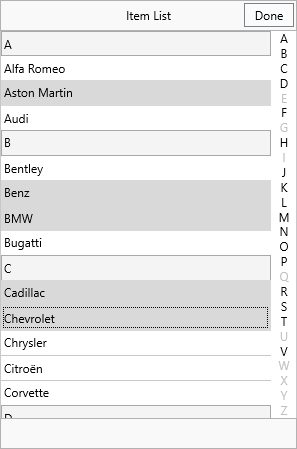
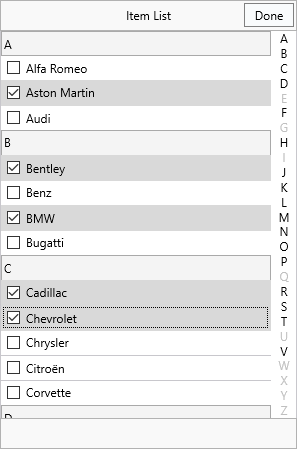
Retrieving selections:
| Method / Property | Description |
|---|---|
GetCheckedItems |
Returns an array of all checked items. |
GetSelectedItems |
Returns an array of all selected items. |
SelectedItemCount |
Number of currently selected items. |
CheckAllItems |
Checks every item. |
UnCheckAllItems |
Unchecks every item. |
Programmatic control:
TMSFNCTableView1.StartEditMode;
TMSFNCTableView1.StopEditMode;
TMSFNCTableView1.ToggleEditMode;
TMSFNCTableView1->StartEditMode();
TMSFNCTableView1->StopEditMode();
TMSFNCTableView1->ToggleEditMode();
Filtering
TTMSFNCTableView supports both code-driven and interactive filtering. The Filter collection holds one or more TTMSFNCTableViewFilterData conditions; call ApplyFilter to apply them, and RemoveFilters to clear them all.
TMSFNCTableView1.Filter.Clear;
TMSFNCTableView1.ApplyFilter;  // show all rows (no conditions)
TMSFNCTableView1->Filter->Clear();
TMSFNCTableView1->ApplyFilter();  // show all rows (no conditions)
Programmatic filter
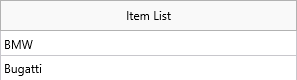
Add one or more conditions to the Filter collection, then call ApplyFilter:
var
  f: TTMSFNCTableViewFilterData;
begin
  f := TMSFNCTableView1.Filter.Add;
  f.Condition := 'B*'; // wildcard — items whose text starts with B
  TMSFNCTableView1.ApplyFilter;
end;
TTMSFNCTableViewFilterData *f = TMSFNCTableView1->Filter->Add();
f->Condition = "B*"; // wildcard - items whose text starts with B
TMSFNCTableView1->ApplyFilter();
| Method | Description |
|---|---|
ApplyFilter |
Applies all conditions in the Filter collection. |
RemoveFilter |
Hides filtered items without clearing the Filter collection. |
RemoveFilters |
Removes filter and clears all conditions from the collection. |
Interactive filter
Enable the filter button in the header to let users type a search string:
TMSFNCTableView1.Interaction.ShowFilterButton := True;
TMSFNCTableView1->Interaction->ShowFilterButton = true;
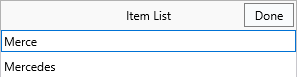
The user taps the filter button to reveal an edit box; typing updates the visible items in real time. Tapping the done button stops filtering.
Use OnBeforeApplyFilter and OnAfterApplyFilter events to customise or react to filter operations.
Reload (pull-to-refresh)
The reload mechanism lets users pull the list downward to trigger a data refresh, with a progress indicator while the operation runs.
Setup:
- Set
Reload.Enabled := True. - Handle
OnStartReloadto begin the async fetch. - Call
StopReloadfrom the main thread when the fetch completes.
TMSFNCTableView1.Reload.Enabled := True;

procedure TForm1.TMSFNCTableView1StartReload(Sender: TObject);
begin
  TTask.Run(procedure
  begin
    Sleep(2000); // simulate network delay
    TThread.Synchronize(nil, procedure
    begin
      TMSFNCTableView1.LoadFromFile('updated.txt');
      TMSFNCTableView1.StopReload;
    end);
  end);
end;
void __fastcall TForm1::EnableReload()
{
  TMSFNCTableView1->Reload->Enabled = true;
}

void __fastcall TForm1::TMSFNCTableView1StartReload(TObject *Sender)
{
  TTask::Run([this]()
  {
    Sleep(2000); // simulate network delay
    TThread::Synchronize(nullptr, [this]()
    {
      TMSFNCTableView1->LoadFromFile("updated.txt");
      TMSFNCTableView1->StopReload();
    });
  });
}
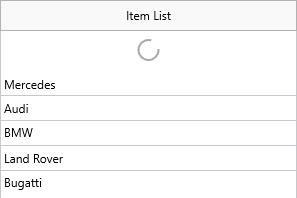
For manual progress control, set Reload.ProgressMode to tvrpmManual and call UpdateReloadProgress:
TMSFNCTableView1.UpdateReloadProgress(75); // report 75% progress
TMSFNCTableView1.UpdateReloadProgress(100, True); // done — auto-stop
TMSFNCTableView1->UpdateReloadProgress(75); // report 75% progress
TMSFNCTableView1->UpdateReloadProgress(100, true); // done - auto-stop
| Event | Description |
|---|---|
OnStartReload |
Raised when the user pulls down or StartReload is called. |
OnStopReload |
Raised after StopReload completes. |
Combining edit mode, filtering, and reload
// Combined example: categories + filtering + edit mode + swipe actions
// Shows multiple TableView features working together.
procedure TFormMain.BuildContactList;
var
  it: TTMSFNCTableViewItem;
  mo: TTMSFNCTableViewMoreOption;
begin
  TMSFNCTableView1.BeginUpdate;

  // Alphabetic categories with lookup bar
  TMSFNCTableView1.CategoryType := tvctAlphaBetic;

  // Fixed height for consistent swipe zone
  TMSFNCTableView1.ItemAppearance.HeightMode := tvhmFixed;
  TMSFNCTableView1.ItemAppearance.FixedHeight := 55;

  // HTML template for name + subtitle
  TMSFNCTableView1.ItemAppearance.HTMLTemplate := '<b><#NAME></b><br/><font size="10"><#ROLE></font>';

  // Swipe actions
  mo := TMSFNCTableView1.MoreOptions.Add;
  mo.Text := 'Call';
  mo.Color := gcGreen;
  mo.FontColor := gcWhite;

  mo := TMSFNCTableView1.MoreOptions.Add;
  mo.Text := 'Delete';
  mo.Color := gcRed;
  mo.FontColor := gcWhite;

  // Enable edit mode and filter buttons
  TMSFNCTableView1.Interaction.ShowEditButton := True;
  TMSFNCTableView1.Interaction.ShowFilterButton := True;
  TMSFNCTableView1.DefaultItem.CheckType := tvictCheckBox;

  // Load items
  it := TMSFNCTableView1.Items.Add;
  it.HTMLTemplateItems.Values['NAME'] := 'Alice Johnson';
  it.HTMLTemplateItems.Values['ROLE'] := 'Engineering';

  it := TMSFNCTableView1.Items.Add;
  it.HTMLTemplateItems.Values['NAME'] := 'Bob Smith';
  it.HTMLTemplateItems.Values['ROLE'] := 'Marketing';

  it := TMSFNCTableView1.Items.Add;
  it.HTMLTemplateItems.Values['NAME'] := 'Carol Lee';
  it.HTMLTemplateItems.Values['ROLE'] := 'Engineering';

  TMSFNCTableView1.Sort;

  TMSFNCTableView1.EndUpdate;
end;

procedure TFormMain.TMSFNCTableView1ItemMoreOptionClick(Sender: TObject;
  AItem: TTMSFNCTableViewItem; AMoreOption: TTMSFNCTableViewMoreOption);
begin
  if AMoreOption.Text = 'Delete' then
    TMSFNCTableView1.RemoveItem(AItem);
end;
// Combined example: categories + filtering + edit mode + swipe actions
// Shows multiple TableView features working together.
void __fastcall TFormMain::BuildContactList()
{
  TMSFNCTableView1->BeginUpdate();

  // Alphabetic categories with lookup bar
  TMSFNCTableView1->CategoryType = tvctAlphaBetic;

  // Fixed height for consistent swipe zone
  TMSFNCTableView1->ItemAppearance->HeightMode = tvhmFixed;
  TMSFNCTableView1->ItemAppearance->FixedHeight = 55;

  // HTML template for name + subtitle
  TMSFNCTableView1->ItemAppearance->HTMLTemplate = "<b><#NAME></b><br/><font size=\"10\"><#ROLE></font>";

  // Swipe actions
  TTMSFNCTableViewMoreOption *mo = TMSFNCTableView1->MoreOptions->Add();
  mo->Text = "Call";
  mo->Color = gcGreen;
  mo->FontColor = gcWhite;

  mo = TMSFNCTableView1->MoreOptions->Add();
  mo->Text = "Delete";
  mo->Color = gcRed;
  mo->FontColor = gcWhite;

  // Enable edit mode and filter buttons
  TMSFNCTableView1->Interaction->ShowEditButton = true;
  TMSFNCTableView1->Interaction->ShowFilterButton = true;
  TMSFNCTableView1->DefaultItem->CheckType = tvictCheckBox;

  // Load items
  TTMSFNCTableViewItem *it = TMSFNCTableView1->Items->Add();
  it->HTMLTemplateItems->Values["NAME"] = "Alice Johnson";
  it->HTMLTemplateItems->Values["ROLE"] = "Engineering";

  it = TMSFNCTableView1->Items->Add();
  it->HTMLTemplateItems->Values["NAME"] = "Bob Smith";
  it->HTMLTemplateItems->Values["ROLE"] = "Marketing";

  it = TMSFNCTableView1->Items->Add();
  it->HTMLTemplateItems->Values["NAME"] = "Carol Lee";
  it->HTMLTemplateItems->Values["ROLE"] = "Engineering";

  TMSFNCTableView1->Sort();

  TMSFNCTableView1->EndUpdate();
}

void __fastcall TFormMain::TMSFNCTableView1ItemMoreOptionClick(TObject *Sender,
  TTMSFNCTableViewItem *AItem, TTMSFNCTableViewMoreOption *AMoreOption)
{
  if (AMoreOption->Text == "Delete")
    TMSFNCTableView1->RemoveItem(AItem);
}