Elements and libraries
Everything on a blox canvas is an element. Understanding the element model —
and the ready-made libraries Blox ships — is the foundation for everything else
in this guide. This chapter explains the class hierarchy, how the Blox
collection owns elements, how to add and remove them in code, and which built-in
blocks and lines you can drop into a diagram without writing a custom class.
The element model
All diagram objects descend from TTMSFNCBloxElement. Two families branch off
it:
- Blocks —
TTMSFNCBloxBlockand its descendants: rectangles, ellipses, diamonds, text blocks, image blocks, groups, and the whole shape library. - Lines —
TTMSFNCBloxLineand its descendants: straight connectors, arcs, bezier curves, side-lines, and polylines.
TTMSFNCBloxElement
├── TTMSFNCBloxBlock      (rectangles, shapes, text, images, groups, …)
└── TTMSFNCBloxLine       (straight, arc, bezier, side-line, …)
A block carries geometry, a shape, text, and appearance; a line carries a path, arrows, and two endpoints that anchor to block link points. Blocks are covered in Working with blocks; lines in Lines and linking.
The Blox collection
TTMSFNCBloxControl.Blox (type TTMSFNCBloxXBlox) is the document that owns the
diagram. You add a created element with Add, and the control takes ownership,
paints it, and includes it in hit-testing:
procedure TForm1.BuildButtonClick(Sender: TObject);
var
  LBlock: TTMSFNCBloxBlock;
  I: Integer;
begin
  BloxControl1.BeginUpdate;
  try
    for I := 0 to 2 do
    begin
      LBlock := TTMSFNCBloxBlock.Create;
      LBlock.Left := 40 + I * 180;
      LBlock.Top := 40;
      LBlock.Width := 140;
      LBlock.Height := 70;
      LBlock.Text := 'Block ' + I.ToString;
      BloxControl1.Blox.Add(LBlock);
    end;
  finally
    BloxControl1.EndUpdate;
  end;

  { Remove the first block (this frees it); use Extract to detach without freeing. }
  if BloxControl1.Blox.BlockCount > 0 then
    BloxControl1.Blox.Remove(BloxControl1.Blox.Blocks[0]);
end;

procedure TForm1.ClearButtonClick(Sender: TObject);
begin
  BloxControl1.Blox.Clear;
end;
void __fastcall TForm1::BuildButtonClick(TObject *Sender)
{
  TTMSFNCBloxBlock *LBlock;

  BloxControl1->BeginUpdate();
  __try
  {
    for (int I = 0; I <= 2; I++)
    {
      LBlock = new TTMSFNCBloxBlock();
      LBlock->Left = 40 + I * 180;
      LBlock->Top = 40;
      LBlock->Width = 140;
      LBlock->Height = 70;
      LBlock->Text = "Block " + IntToStr(I);
      BloxControl1->Blox->Add(LBlock);
    }
  }
  __finally
  {
    BloxControl1->EndUpdate();
  }

  // Remove the first block (this frees it); use Extract to detach without freeing.
  if (BloxControl1->Blox->BlockCount > 0)
    BloxControl1->Blox->Remove(BloxControl1->Blox->Blocks[0]);
}

void __fastcall TForm1::ClearButtonClick(TObject *Sender)
{
  BloxControl1->Blox->Clear();
}
The collection also exposes typed, read-only views and lookups:
| Member | Purpose |
|---|---|
Elements[i] / ElementCount |
All elements, in z-order. |
Blocks[i] / BlockCount |
Only blocks. |
Links[i] / LinkCount |
Only lines. |
FindElement(AId) |
Look up an element by its registered Id. |
LinkBetweenBlocks(b1, b2) |
Returns the existing line connecting two blocks, or nil. |
Remove / Extract / Clear |
Delete one element, detach without freeing, or empty the diagram. |
Note
LinkBetweenBlocks finds an existing connector; it does not create one.
To create a connection, add a TTMSFNCBloxLine and anchor its endpoints — see
Lines and linking.
Tip
Wrap bulk changes in BloxControl1.BeginUpdate / EndUpdate so the canvas
repaints once instead of after every Add.
Built-in libraries
Beyond the basic blocks and lines, Blox registers several ready-to-use shape libraries. They appear automatically in the Selector and ToolBar, and you can also instantiate them directly:
| Library | Example classes |
|---|---|
| Basic | TTMSFNCBloxBlock, TTMSFNCBloxTextBlock, TTMSFNCBloxImageBlock, TTMSFNCBloxTriangleBlock, TTMSFNCBloxLinkableBlock, TTMSFNCBloxLine, TTMSFNCBloxArc, TTMSFNCBloxBezier, TTMSFNCBloxSideLine |
| Flowchart | TTMSFNCBloxFlowActionBlock, TTMSFNCBloxFlowDecisionBlock, TTMSFNCBloxFlowTerminalBlock, TTMSFNCBloxFlowDataBlock, TTMSFNCBloxFlowDocumentBlock, … |
| Electric | TTMSFNCBloxResistorBlock, TTMSFNCBloxCapacitorBlock, TTMSFNCBloxDiodeBlock, TTMSFNCBloxGroundBlock, … |
| Arrow | TTMSFNCBloxStandardArrowBlock, TTMSFNCBloxDoubleArrowBlock, TTMSFNCBloxChevronArrowBlock, TTMSFNCBloxQuadArrowBlock, … |
| DFD | TTMSFNCBloxDFDProcessBlock, TTMSFNCBloxDFDDataStoreBlock, TTMSFNCBloxDFDInterfaceBlock, TTMSFNCBloxDFDDataFlowLine |
| UML | TTMSFNCBloxUMLClassBlock, TTMSFNCBloxUMLActorBlock, TTMSFNCBloxUMLUseCaseBlock, TTMSFNCBloxUMLNoteBlock, TTMSFNCBloxUMLGenericLine, … |
These library blocks already define their shape and link points, so they are the quickest way to build a real diagram.
Putting it together
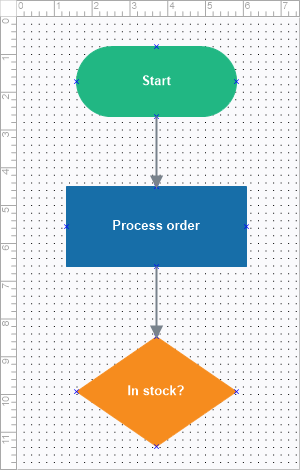
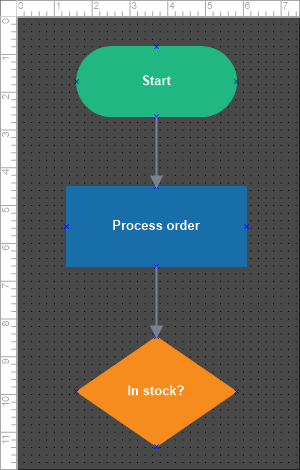
The example below assembles a small flowchart from flow blocks and connects them
— combining element creation, library blocks, the Blox collection, and linking
in one pass:
procedure TForm1.BuildFlowDiagram;
var
  LStart, LAction, LDecision: TTMSFNCBloxBlock;

  function MakeFlowBlock(ABlockClass: TTMSFNCBloxElementClass;
    AText: string; ALeft, ATop: Double; AColor: TTMSFNCGraphicsColor): TTMSFNCBloxBlock;
  begin
    Result := ABlockClass.Create as TTMSFNCBloxBlock;
    Result.Left := ALeft;
    Result.Top := ATop;
    Result.Width := Result.Width + 30;
    Result.Height := Result.Height + 10;
    Result.Text := AText;
    Result.FillColor := AColor;
    Result.StrokeColor := AColor;
    Result.TextColor := gcWhite;
    Result.FontStyle := [xsBold];
    BloxControl1.Blox.Add(Result);
  end;

  procedure Connect(ASource, ATarget: TTMSFNCBloxBlock; ASourcePt, ATargetPt: Integer);
  var
    LLine: TTMSFNCBloxLine;
  begin
    LLine := TTMSFNCBloxDFDDataFlowLine.Create;
    LLine.StrokeColor := MakeGraphicsColor(120, 120, 120);
    LLine.StrokeWidth := 2;
    LLine.SourceLinkPoint.AnchorLink := ASource.LinkPoints[ASourcePt];
    LLine.TargetLinkPoint.AnchorLink := ATarget.LinkPoints[ATargetPt];
    BloxControl1.Blox.Add(LLine);
  end;

begin
  BloxControl1.BeginUpdate;
  try
    BloxControl1.Blox.Clear;
    LStart := MakeFlowBlock(TTMSFNCBloxFlowTerminalBlock, 'Start', 60, 30,
      MakeGraphicsColor(33, 183, 131));
    LAction := MakeFlowBlock(TTMSFNCBloxFlowActionBlock, 'Process order', 50, 170,
      MakeGraphicsColor(23, 110, 168));
    LDecision := MakeFlowBlock(TTMSFNCBloxFlowDecisionBlock, 'In stock?', 50, 320,
      MakeGraphicsColor(246, 140, 30));
    Connect(LStart, LAction, 1, 0);    { Start bottom -> Action top }
    Connect(LAction, LDecision, 1, 0); { Action bottom -> Decision top }
  finally
    BloxControl1.EndUpdate;
  end;
end;
// Blocks are created by the caller (new TTMSFNCBloxFlow...Block) and styled here.
TTMSFNCBloxBlock * __fastcall TForm1::MakeFlowBlock(TTMSFNCBloxBlock *ABlock,
  System::UnicodeString AText, double ALeft, double ATop, TTMSFNCGraphicsColor AColor)
{
  ABlock->Left = ALeft;
  ABlock->Top = ATop;
  ABlock->Width = ABlock->Width + 30;
  ABlock->Height = ABlock->Height + 10;
  ABlock->Text = AText;
  ABlock->FillColor = AColor;
  ABlock->StrokeColor = AColor;
  ABlock->TextColor = gcWhite;
  ABlock->FontStyle = TTMSFNCBloxFontStyles() << Fmx::Tmsfncbloxcoretypes::xsBold;
  BloxControl1->Blox->Add(ABlock);
  return ABlock;
}

void __fastcall TForm1::Connect(TTMSFNCBloxBlock *ASource, TTMSFNCBloxBlock *ATarget,
  int ASourcePt, int ATargetPt)
{
  TTMSFNCBloxLine *LLine = new Fmx::Tmsfncbloxshapesdfd::TTMSFNCBloxDFDDataFlowLine();
  LLine->StrokeColor = MakeGraphicsColor(120, 120, 120);
  LLine->StrokeWidth = 2;
  LLine->SourceLinkPoint->AnchorLink = ASource->LinkPoints->Items[ASourcePt];
  LLine->TargetLinkPoint->AnchorLink = ATarget->LinkPoints->Items[ATargetPt];
  BloxControl1->Blox->Add(LLine);
}

void __fastcall TForm1::BuildFlowDiagram()
{
  TTMSFNCBloxBlock *LStart, *LAction, *LDecision;

  BloxControl1->BeginUpdate();
  __try
  {
    BloxControl1->Blox->Clear();
    LStart = MakeFlowBlock(new Fmx::Tmsfncbloxshapesflowchart::TTMSFNCBloxFlowTerminalBlock(), "Start", 60, 30,
      MakeGraphicsColor(33, 183, 131));
    LAction = MakeFlowBlock(new Fmx::Tmsfncbloxshapesflowchart::TTMSFNCBloxFlowActionBlock(), "Process order", 50, 170,
      MakeGraphicsColor(23, 110, 168));
    LDecision = MakeFlowBlock(new Fmx::Tmsfncbloxshapesflowchart::TTMSFNCBloxFlowDecisionBlock(), "In stock?", 50, 320,
      MakeGraphicsColor(246, 140, 30));
    Connect(LStart, LAction, 1, 0);    // Start bottom -> Action top
    Connect(LAction, LDecision, 1, 0); // Action bottom -> Decision top
  }
  __finally
  {
    BloxControl1->EndUpdate();
  }
}
Pitfalls
- An element must be added before it is visible. Creating a block does
nothing until
Blox.Addhands it to the control. - Do not free an element you added. The control owns added elements; remove
them with
Blox.Remove(frees) orBlox.Extract(detaches without freeing). LinkBetweenBlocksreturnsnilwhen no connector exists — guard the result before using it.
See also
- Working with blocks · Lines and linking
- Custom elements — register your own blocks into the libraries
TTMSFNCBloxControl·TTMSFNCBloxElement