Getting Started with TMS FNC Calendar
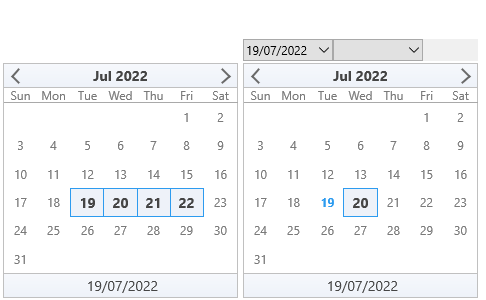
TTMSFNCCalendar is a full-featured calendar control with single and multi-date selection, event badges, navigation modes, and optional year/month popups. TTMSFNCDatePicker wraps the same calendar in a dropdown edit.
Prerequisites
- Delphi with TMS FNC UI Pack installed.
- A VCL, FMX, or WEB application.
Steps
1. Drop the component
Drop a TTMSFNCCalendar onto a form. The calendar displays the current month by default.
2. Select a date in code
TMSFNCCalendar1.SelectADate(Now);
3. Enable multi-select
TMSFNCCalendar1.Interaction.MultiSelect := True;
TMSFNCCalendar1.SelectMultiDates(Now, Now + 6);  // select a week
4. React to selection
procedure TForm1.TMSFNCCalendar1SelectDate(Sender: TObject; ADate: TDate);
begin
  ShowMessage(DateToStr(ADate));
end;
Default styling baseline
The screenshot above is the initial look a freshly dropped calendar has: a
white surface with a silver border, a softly gradient header and footer carrying
a bold dark caption, muted grey day names and dates, today's date picked out in
blue and bold, and the selected date filled with the header's lighter gradient
stop. This baseline was refreshed in version 1.0.3.0 alongside the GlobalFont
support, so a calendar created with an older release and persisted to a .dfm
keeps its stored colours rather than picking up the newer look.
Knowing the baseline is useful in two situations: when you want to rebrand from it (change two or three colours rather than every appearance sub-object), and when you want to get back to it after experimenting. The routine below restates it in code — run it once, then layer your own brand colours on top.
procedure TForm1.ApplyDefaultCalendarLook;
begin
  TMSFNCCalendar1.BeginUpdate;
  try
    { Surface }
    TMSFNCCalendar1.Fill.Kind    := gfkSolid;
    TMSFNCCalendar1.Fill.Color   := gcWhite;
    TMSFNCCalendar1.Stroke.Kind  := gskSolid;
    TMSFNCCalendar1.Stroke.Color := gcSilver;

    { Header - a soft vertical gradient with a bold, dark caption. The footer
      reuses the same fill, stroke and font, minus the bold style. }
    TMSFNCCalendar1.Header.Fill.Kind    := gfkGradient;
    TMSFNCCalendar1.Header.Fill.Color   := $FFF6F8FC;
    TMSFNCCalendar1.Header.Fill.ColorTo := $FFEEF2F9;
    TMSFNCCalendar1.Header.Stroke.Kind  := gskSolid;
    TMSFNCCalendar1.Header.Stroke.Color := gcSilver;
    TMSFNCCalendar1.Header.Font.Color   := $FF454545;
    TMSFNCCalendar1.Header.Font.Style   := [TFontStyle.fsBold];
    TTMSFNCUtils.SetFontSize(TMSFNCCalendar1.Header.Font, 14);
    TMSFNCCalendar1.Header.Arrow.Color  := gcDimgray;

    TMSFNCCalendar1.Footer.Fill.Assign(TMSFNCCalendar1.Header.Fill);
    TMSFNCCalendar1.Footer.Stroke.Assign(TMSFNCCalendar1.Header.Stroke);
    TMSFNCCalendar1.Footer.Font.Assign(TMSFNCCalendar1.Header.Font);
    TMSFNCCalendar1.Footer.Font.Style := [];

    { Day names and week numbers - transparent, muted grey text }
    TMSFNCCalendar1.DayNameAppearance.Fill.Color    := gcNull;
    TMSFNCCalendar1.DayNameAppearance.Stroke.Color  := gcNull;
    TMSFNCCalendar1.DayNameAppearance.Font.Color    := $FF7A7A7A;
    TMSFNCCalendar1.WeekNumberAppearance.Fill.Color   := gcNull;
    TMSFNCCalendar1.WeekNumberAppearance.Stroke.Color := gcNull;
    TMSFNCCalendar1.WeekNumberAppearance.Font.Color   := $FF7A7A7A;

    { Dates - no cell chrome, colour carries the state instead }
    TMSFNCCalendar1.DateAppearance.Fill.Color   := gcNull;
    TMSFNCCalendar1.DateAppearance.Stroke.Color := gcNull;
    TMSFNCCalendar1.DateAppearance.Font.Color   := $FF7A7A7A;
    TMSFNCCalendar1.DateAppearance.TodayFont.Color := $FF2D9BEF;
    TMSFNCCalendar1.DateAppearance.TodayFont.Style := [TFontStyle.fsBold];
    TMSFNCCalendar1.DateAppearance.TodayFill.Color   := gcNull;
    TMSFNCCalendar1.DateAppearance.TodayStroke.Color := gcNull;
    TMSFNCCalendar1.DateAppearance.SelectedFill.Color   := TMSFNCCalendar1.Header.Fill.ColorTo;
    TMSFNCCalendar1.DateAppearance.SelectedStroke.Color := TMSFNCCalendar1.DateAppearance.TodayFont.Color;
    TMSFNCCalendar1.DateAppearance.SelectedFont.Assign(TMSFNCCalendar1.Header.Font);
    TMSFNCCalendar1.DateAppearance.DateBeforeFont.Color := $FFBBBBBB;
    TMSFNCCalendar1.DateAppearance.DateAfterFont.Color  := $FFBBBBBB;
    TMSFNCCalendar1.DateAppearance.DisabledFont.Color   := gcLightgrey;
    TMSFNCCalendar1.DateAppearance.ShowFocus := False;

    { Grid lines }
    TMSFNCCalendar1.LineAppearance.Stroke.Kind  := gskSolid;
    TMSFNCCalendar1.LineAppearance.Stroke.Color := gcDarkgray;
  finally
    TMSFNCCalendar1.EndUpdate;
  end;
end;
void __fastcall TForm1::ApplyDefaultCalendarLook()
{
  TMSFNCCalendar1->BeginUpdate();
  try
  {
    // Surface
    TMSFNCCalendar1->Fill->Kind    = gfkSolid;
    TMSFNCCalendar1->Fill->Color   = gcWhite;
    TMSFNCCalendar1->Stroke->Kind  = gskSolid;
    TMSFNCCalendar1->Stroke->Color = gcSilver;

    // Header - a soft vertical gradient with a bold, dark caption. The footer
    // reuses the same fill, stroke and font, minus the bold style.
    TMSFNCCalendar1->Header->Fill->Kind    = gfkGradient;
    TMSFNCCalendar1->Header->Fill->Color   = (TAlphaColor)0xFFF6F8FC;
    TMSFNCCalendar1->Header->Fill->ColorTo = (TAlphaColor)0xFFEEF2F9;
    TMSFNCCalendar1->Header->Stroke->Kind  = gskSolid;
    TMSFNCCalendar1->Header->Stroke->Color = gcSilver;
    TMSFNCCalendar1->Header->Font->Color   = (TAlphaColor)0xFF454545;
    TMSFNCCalendar1->Header->Font->Style   = TFontStyles() << TFontStyle::fsBold;
    TTMSFNCUtils::SetFontSize(TMSFNCCalendar1->Header->Font, 14);
    TMSFNCCalendar1->Header->Arrow->Color  = gcDimgray;

    TMSFNCCalendar1->Footer->Fill->Assign(TMSFNCCalendar1->Header->Fill);
    TMSFNCCalendar1->Footer->Stroke->Assign(TMSFNCCalendar1->Header->Stroke);
    TMSFNCCalendar1->Footer->Font->Assign(TMSFNCCalendar1->Header->Font);
    TMSFNCCalendar1->Footer->Font->Style = TFontStyles();

    // Day names and week numbers - transparent, muted grey text
    TMSFNCCalendar1->DayNameAppearance->Fill->Color    = gcNull;
    TMSFNCCalendar1->DayNameAppearance->Stroke->Color  = gcNull;
    TMSFNCCalendar1->DayNameAppearance->Font->Color    = (TAlphaColor)0xFF7A7A7A;
    TMSFNCCalendar1->WeekNumberAppearance->Fill->Color   = gcNull;
    TMSFNCCalendar1->WeekNumberAppearance->Stroke->Color = gcNull;
    TMSFNCCalendar1->WeekNumberAppearance->Font->Color   = (TAlphaColor)0xFF7A7A7A;

    // Dates - no cell chrome, colour carries the state instead
    TMSFNCCalendar1->DateAppearance->Fill->Color   = gcNull;
    TMSFNCCalendar1->DateAppearance->Stroke->Color = gcNull;
    TMSFNCCalendar1->DateAppearance->Font->Color   = (TAlphaColor)0xFF7A7A7A;
    TMSFNCCalendar1->DateAppearance->TodayFont->Color = (TAlphaColor)0xFF2D9BEF;
    TMSFNCCalendar1->DateAppearance->TodayFont->Style = TFontStyles() << TFontStyle::fsBold;
    TMSFNCCalendar1->DateAppearance->TodayFill->Color   = gcNull;
    TMSFNCCalendar1->DateAppearance->TodayStroke->Color = gcNull;
    TMSFNCCalendar1->DateAppearance->SelectedFill->Color   = TMSFNCCalendar1->Header->Fill->ColorTo;
    TMSFNCCalendar1->DateAppearance->SelectedStroke->Color = TMSFNCCalendar1->DateAppearance->TodayFont->Color;
    TMSFNCCalendar1->DateAppearance->SelectedFont->Assign(TMSFNCCalendar1->Header->Font);
    TMSFNCCalendar1->DateAppearance->DateBeforeFont->Color = (TAlphaColor)0xFFBBBBBB;
    TMSFNCCalendar1->DateAppearance->DateAfterFont->Color  = (TAlphaColor)0xFFBBBBBB;
    TMSFNCCalendar1->DateAppearance->DisabledFont->Color   = gcLightgrey;
    TMSFNCCalendar1->DateAppearance->ShowFocus = false;

    // Grid lines
    TMSFNCCalendar1->LineAppearance->Stroke->Kind  = gskSolid;
    TMSFNCCalendar1->LineAppearance->Stroke->Color = gcDarkgray;
  }
  __finally
  {
    TMSFNCCalendar1->EndUpdate();
  }
}
To change only the typography and leave every colour alone, use GlobalFont
instead of visiting each font — see
Global font override.