Import & export (CSV)
Read and write CSV/TSV files directly through the grid — no extra component required. Choose the delimiter and the start cell, control quoting and trimming, hook events for custom value parsing.
Overview
CSV support is built into the core grid (no TTMSFNCDataGridExcelIO
needed):
| Operation | Method |
|---|---|
| Load CSV from file | Grid.LoadFromCSVData(FileName) |
| Load CSV from stream | Grid.LoadFromCSVStreamData(Stream) |
| Save CSV to file | Grid.SaveToCSVData(FileName) |
| Save CSV to stream | Grid.SaveToCSVStreamData(Stream) |
The delimiter is controlled by Grid.Options.IO.Delimiter. When it is #0
(the default), the grid auto-detects the delimiter from the first two lines.
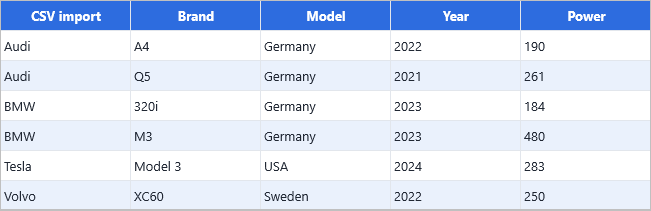
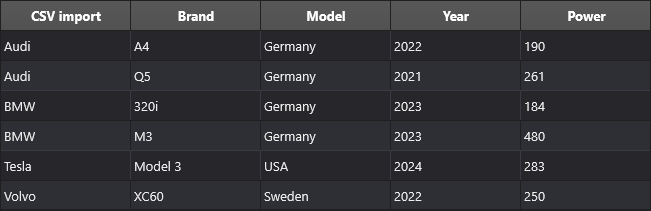
Quick example
procedure TForm1.FormCreate(Sender: TObject);
begin
  // Where in the grid to drop the CSV content
  Grid.Options.IO.StartColumn := 1;
  Grid.Options.IO.StartRow    := 1;

  // Default delimiter is the system list separator. Override per call when needed.
  Grid.LoadFromCSVData('CARS.csv');
end;

procedure TForm1.SaveButtonClick(Sender: TObject);
begin
  // Save with explicit ; delimiter (regardless of OS locale)
  Grid.SaveToCSV('out.csv', ';');
end;
void __fastcall TForm1::FormCreate(TObject *Sender)
{
  // Where in the grid to drop the CSV content
  Grid->Options->IO->StartColumn = 1;
  Grid->Options->IO->StartRow    = 1;

  // Default delimiter is the system list separator. Override it through Options->IO.
  Grid->LoadFromCSVData("CARS.csv");
}

void __fastcall TForm1::SaveButtonClick(TObject *Sender)
{
  // Save with explicit ; delimiter (regardless of OS locale)
  Grid->Options->IO->Delimiter = L';';
  Grid->SaveToCSVData("out.csv");
}
Step by step
1. Choose where the data lands
Grid.Options.IO.StartColumn := 1;      // skip the row-number column
Grid.Options.IO.StartRow    := 1;      // skip the header row
CSV is loaded into the rectangle starting at (StartColumn, StartRow) and
growing right and down. Anything outside that rectangle is preserved.
Set MaxRows to stop loading after a maximum number of rows:
Grid.Options.IO.MaxRows := 10000; // stop after 10 000 data rows
2. Load
Grid.LoadFromCSVData('CARS.csv');              // auto-detect delimiter

// Use a specific delimiter
Grid.Options.IO.Delimiter := ',';
Grid.LoadFromCSVData('CARS.csv');

// TAB-separated
Grid.Options.IO.Delimiter := #9;
Grid.LoadFromCSVData('CARS.tsv');
3. Save
Grid.Options.IO.Delimiter := ';';
Grid.SaveToCSVData('out.csv');
4. Quoting options
Control how the writer quotes cells:
Grid.Options.IO.AlwaysQuotes    := True;   // quote every cell, not just when needed
Grid.Options.IO.QuoteEmptyCells := True;   // write "" for empty cells
5. Trim spaces on import
Grid.Options.IO.TrimSpaces := True; // strip leading/trailing whitespace
Useful when importing files that pad columns with spaces.
6. Auto-open after save
Grid.Options.IO.OpenAfterCreation := True;
When True, the grid asks the OS to open the saved file in its default
handler immediately after writing.
7. Custom value parsing
The CSV reader infers types from the cell content. To override (e.g. parse
"12,34" as a float, not a string), set Formatting.Type per column:
Grid.Columns[2].Formatting.&Type := gdftDateTime;
Grid.Columns[2].AddSetting(gcsFormatting);
8. Transform values during import or export
OnLoadCellData fires for every cell as it is read from the file, letting you
replace or transform the raw string before it is stored. OnSaveCellData fires
during save, letting you override what is written to the file:
// Import: parse a date string that uses a non-standard format
procedure TForm1.GridLoadCellData(Sender: TObject;
  AColumn, ARow: Integer;
  var AValue: TTMSFNCDataGridCellValue);
var
  D: TDateTime;
begin
  if AColumn = DateColumn then
  begin
    if TryStrToDateTime(AValue.AsString, D) then
      AValue := TValue.From<TDateTime>(D);
  end;
end;

// Export: write a custom label instead of the raw boolean value
procedure TForm1.GridSaveCellData(Sender: TObject;
  AColumn, ARow: Integer;
  var AValue: TTMSFNCDataGridCellValue);
begin
  if AColumn = StatusColumn then
  begin
    if AValue.AsBoolean then AValue := TValue.From<string>('Approved')
    else                     AValue := TValue.From<string>('Pending');
  end;
end;
// Import: parse a date string that uses a non-standard format
void __fastcall TForm1::GridLoadCellData(TObject *Sender,
  int AColumn, int ARow,
  TTMSFNCDataGridCellValue &AValue)
{
  TDateTime D;
  if (AColumn == DateColumn)
  {
    if (TryStrToDateTime(AValue.ToString(), D))
      AValue = TValue::From<TDateTime>(D);
  }
}

// Export: write a custom label instead of the raw boolean value
void __fastcall TForm1::GridSaveCellData(TObject *Sender,
  int AColumn, int ARow,
  TTMSFNCDataGridCellValue &AValue)
{
  if (AColumn == StatusColumn)
  {
    if (AValue.AsBoolean())
      AValue = TValue::From<System::UnicodeString>("Approved");
    else
      AValue = TValue::From<System::UnicodeString>("Pending");
  }
}
Both events receive AColumn/ARow and AValue (a TTMSFNCDataGridCellValue = TValue)
by reference — change AValue to override the stored or exported value.
9. Streaming for large files
For multi-million-row imports, prefer the stream variant and wrap it in
BeginUpdate/EndUpdate for best performance:
Grid.Options.IO.Delimiter := ',';
var fs := TFileStream.Create('huge.csv', fmOpenRead);
try
  Grid.BeginUpdate;
  try
    Grid.LoadFromCSVStreamData(fs);
  finally
    Grid.EndUpdate;
  end;
finally
  fs.Free;
end;
Quoting and escaping
CSV reading honours the standard rules: fields containing the delimiter, double-quote, or newline are quoted, with embedded quotes doubled. The writer follows the same convention.
Related API
Grid.LoadFromCSVData(FileName)/LoadFromCSVData(FileName, TEncoding)Grid.LoadFromCSVStreamData(Stream)/LoadFromCSVStreamData(Stream, TEncoding)Grid.SaveToCSVData(FileName)/SaveToCSVData(FileName, TEncoding)Grid.SaveToCSVStreamData(Stream)/SaveToCSVStreamData(Stream, TEncoding)Grid.Options.IO.StartColumn/StartRow/MaxRowsGrid.Options.IO.Delimiter—#0= auto-detect; set to',',';',#9, etc. to forceGrid.Options.IO.AlwaysQuotes/QuoteEmptyCells— quoting behaviourGrid.Options.IO.TrimSpaces— strip whitespace on importGrid.Options.IO.OpenAfterCreation— open in default app after saveGrid.Columns[i].Formatting— type and format string for parsing/displayOnLoadCellData— transform a cell value as it is read from the file.OnSaveCellData— override a cell value as it is written to the file.
See also
- Import & export (XLS) — preserves formatting and images via the FlexCel adapter.
- Large datasets — strategies for huge CSV imports.