Paging
Split large datasets into pages with a built-in footer that shows first/prev/next/last buttons, a page-selector dropdown, and a "Page n of m" label. Or drive paging programmatically.
Overview
Set Grid.Paging := True and the grid renders one page of rows at a time. The footer (if visible) gains a paging toolbar with navigation buttons, a page dropdown, and an info label. Programmatic methods let you wire your own buttons or react to page changes.
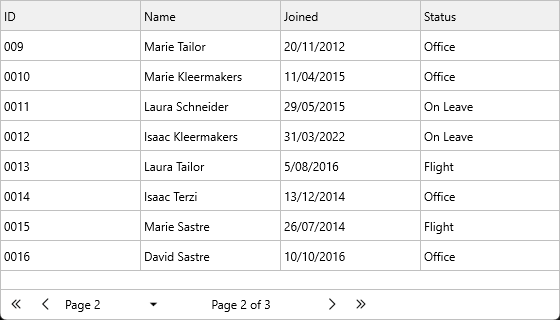
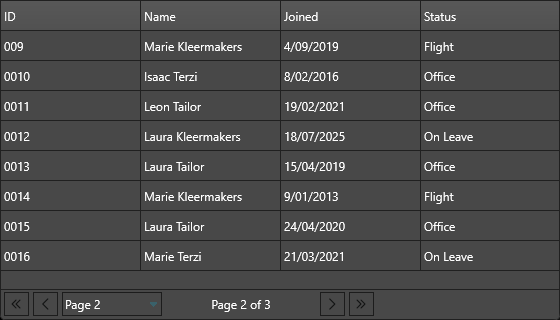
Paging composes cleanly with sorting, filtering, and grouping — they all run on the full data, then paging slices the result.
Quick example
Grid.LoadSampleData;
Grid.Paging := True;

Grid.Footer.Visible        := True;
Grid.Footer.Paging.Visible := True;
Step by step
1. Enable paging
Grid.Paging := True;
2. Configure the footer paging controls
Grid.Footer.Visible        := True;
Grid.Footer.Paging.Visible := True;
Grid.Footer.Paging.Size    := 30;          // height of the paging area

Grid.Footer.Paging.ShowPageSelector      := True;
Grid.Footer.Paging.ShowPageInfo          := True;
Grid.Footer.Paging.ShowNavigationButtons := True;

// widths for each paging control
Grid.Footer.Paging.PageSelectorWidth     := 100;
Grid.Footer.Paging.NavigationButtonWidth := 25;
Grid.Footer.Paging.PageInfoWidth         := 150;

// Customise the label text using %d placeholders
// PageInfoFormat default: 'Page %d of %d'   (%d = current page, %d = total pages)
Grid.Footer.Paging.PageInfoFormat     := 'Page %d / %d';

// PageSelectorFormat default: 'Page %d'   (%d = page number in the dropdown)
Grid.Footer.Paging.PageSelectorFormat := 'p. %d';
3. Navigate programmatically
Grid.FirstPage;
Grid.NextPage;
Grid.PreviousPage;
Grid.LastPage;

Grid.GoToPage(2);                          // 0-based — page 3
Grid.GoToFirstPage;                        // alias for FirstPage
Grid.GoToLastPage;                         // alias for LastPage

Grid.PageIndex := 5;                       // direct assignment
4. Query the current state
var
  CurrentPage, TotalPages: Integer;
begin
  CurrentPage := Grid.PageIndex;           // 0-based
  TotalPages  := Grid.PageCount;

  if CurrentPage = 0 then ShowMessage('First page');
  if CurrentPage = TotalPages - 1 then ShowMessage('Last page');
end;
5. React to page changes
procedure TForm1.GridPageChanged(Sender: TObject;
  AOldPageIndex, ANewPageIndex: Integer);
begin
  Caption := Format('Viewing page %d of %d',
    [ANewPageIndex + 1, Grid.PageCount]);
end;
| Event | When it fires |
|---|---|
OnPageChanged |
After the page has changed. |
OnFooterPageSelectorChange |
The user picked a page from the dropdown. |
OnFooterFirstPageClick |
First-page button clicked. |
OnFooterPreviousPageClick |
Previous-page button clicked. |
OnFooterNextPageClick |
Next-page button clicked. |
OnFooterLastPageClick |
Last-page button clicked. |
6. Customise the paging controls directly
The toolbar controls themselves are exposed for low-level tweaks:
procedure TForm1.CustomisePagingControls;
var
  PageSelector: TTMSFNCToolBarComboBox;
  FirstButton:  TTMSFNCToolBarButton;
begin
  PageSelector := Grid.FooterPageSelector;
  FirstButton  := Grid.FooterFirstPageButton;

  FirstButton.Enabled := Grid.PageIndex > 0;
end;
void __fastcall TForm1::CustomisePagingControls()
{
  TTMSFNCToolBarComboBox *PageSelector = Grid->FooterPageSelector;
  TTMSFNCToolBarButton *FirstButton    = Grid->FooterFirstPageButton;

  FirstButton->Enabled = Grid->PageIndex > 0;
}
| Control | Type |
|---|---|
Grid.FooterPageSelector |
TTMSFNCToolBarComboBox |
Grid.FooterPageInfo |
TTMSFNCHTMLText |
Grid.FooterFirstPageButton |
TTMSFNCToolBarButton |
Grid.FooterPreviousPageButton |
TTMSFNCToolBarButton |
Grid.FooterNextPageButton |
TTMSFNCToolBarButton |
Grid.FooterLastPageButton |
TTMSFNCToolBarButton |
Page size
By default the page size auto-calculates to fit the visible area — resizing the grid changes the page size. To fix a stable page size, set Options.Keyboard.PageScrollSize:
Grid.Options.Keyboard.PageScrollSize := 50; // 50 rows per page
When PageScrollSize is 0 (the default), the grid determines page size from the viewport height automatically.
Custom paging buttons
For a paging UX outside the grid (toolbar, breadcrumb), call the navigation methods from your own buttons. The paging controls in the footer don't have to be visible:
Grid.Footer.Paging.Visible := False;        // hide built-in controls

procedure TForm1.NextButtonClick(Sender: TObject);
begin
  if Grid.PageIndex < Grid.PageCount - 1 then
    Grid.NextPage;
end;
Paging with database adapters
When paging is combined with LoadMode := almBuffered on the database adapter, the grid only fetches the visible page from the dataset — billion-row tables become workable. See Large datasets.
Related API
Grid.Paging— enable/disableGrid.PageIndex,Grid.PageCount— current stateGrid.NextPage,PreviousPage,FirstPage,LastPage,GoToPage(n)Grid.GoToFirstPage,GoToLastPageGrid.Options.Keyboard.PageScrollSize— fixed rows per page (0 = auto from viewport)Grid.Footer.Visible,Grid.Footer.Paging.VisibleGrid.Footer.Paging.ShowPageSelector/ShowPageInfo/ShowNavigationButtonsGrid.Footer.Paging.PageSelectorWidth/NavigationButtonWidth/PageInfoWidthGrid.Footer.Paging.PageInfoFormat—'Page %d of %d'(current, total); default is'Page %d of %d'Grid.Footer.Paging.PageSelectorFormat—'Page %d'(page number); default is'Page %d'Grid.FooterPageSelector,FooterPageInfo,FooterFirstPageButton,FooterPreviousPageButton,FooterNextPageButton,FooterLastPageButtonOnPageChanged,OnFooterPageSelectorChange,OnFooterFirstPageClick,OnFooterPreviousPageClick,OnFooterNextPageClick,OnFooterLastPageClick
See also
- Large datasets — paging is the right pattern for huge datasets.
- Custom icons — replace the first/prev/next/last button glyphs.
- Localization — translate the paging info label.