Custom drawing
When appearance properties are not enough, the navigation panel exposes
before/after draw events for every visual part — items, compact items, badges,
buttons, the options button and the splitter. A Before* event hands you a
var ADefaultDraw: Boolean you can set to False to fully replace the default
rendering; an After* event lets you overlay extra graphics on top. Reach for
these only when a property cannot express the look you need — they run on every
paint, so keep the handlers cheap.
Before and after draw hooks
| Part | Before (can suppress) | After (overlay) |
|---|---|---|
| Item header | OnBeforeDrawItem |
OnAfterDrawItem |
| Compact item | OnBeforeDrawCompactItem |
OnAfterDrawCompactItem |
| Item badge | OnBeforeDrawItemBadge |
OnAfterDrawItemBadge |
| Button | OnBeforeDrawButton |
OnAfterDrawButton |
| Options button | OnBeforeDrawOptionsButton |
OnAfterDrawOptionsButton |
| Splitter | OnBeforeDrawSplitter |
OnAfterDrawSplitter |
Each handler receives the AGraphics surface and the ARect to draw into;
item events also pass the AItem and its AState
(npisNormal, npisHover, npisDown, npisDisabled, npisActive).
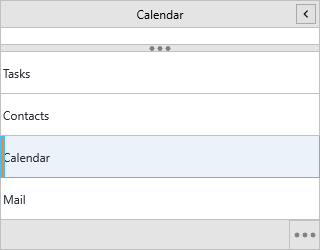
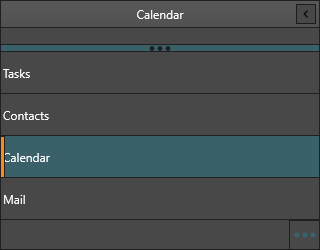
Overlaying an accent on the active item
OnAfterDrawItem paints after the default item, so an overlay never hides the
label. Here it adds a left accent bar to the active header:
procedure TForm1.NavigationPanel1AfterDrawItem(Sender: TObject;
  AGraphics: TTMSFNCGraphics; ARect: TRectF; AItem: TTMSFNCNavigationPanelItem;
  AState: TTMSFNCNavigationPanelItemState);
begin
  // After-draw paints over the default item, so the accent never hides text.
  if AState = npisActive then
  begin
    AGraphics.Fill.Color := gcSteelBlue;
    AGraphics.Fill.Kind := gfkSolid;
    AGraphics.DrawRectangle(RectF(ARect.Left, ARect.Top, ARect.Left + 4, ARect.Bottom));
  end;
end;
void __fastcall TForm1::NavigationPanel1AfterDrawItem(TObject *Sender,
  TTMSFNCGraphics *AGraphics, const TRectF &ARect, TTMSFNCNavigationPanelItem *AItem,
  TTMSFNCNavigationPanelItemState AState)
{
  // After-draw paints over the default item, so the accent never hides text.
  if (AState == npisActive)
  {
    AGraphics->Fill->Color = gcSteelblue;
    AGraphics->Fill->Kind = gfkSolid;
    AGraphics->DrawRectangle(RectF(ARect.Left, ARect.Top, ARect.Left + 4, ARect.Bottom));
  }
}
Replacing the badge
To draw a part from scratch, handle its Before* event and set
ADefaultDraw := False. This replaces the default badge with a filled circle:
procedure TForm1.NavigationPanel1BeforeDrawItemBadge(Sender: TObject;
  AGraphics: TTMSFNCGraphics; ARect: TRectF; AItem: TTMSFNCNavigationPanelItem;
  ABadge: string; var ADefaultDraw: Boolean);
begin
  // Replace the built-in badge entirely.
  ADefaultDraw := False;

  AGraphics.Fill.Color := gcCrimson;
  AGraphics.Fill.Kind := gfkSolid;
  AGraphics.Stroke.Color := gcWhite;
  AGraphics.DrawEllipse(ARect);

  AGraphics.Font.Color := gcWhite;
  AGraphics.DrawText(ARect, ABadge, False, gtaCenter, gtaCenter);
end;
void __fastcall TForm1::NavigationPanel1BeforeDrawItemBadge(TObject *Sender,
  TTMSFNCGraphics *AGraphics, const TRectF &ARect, TTMSFNCNavigationPanelItem *AItem,
  UnicodeString ABadge, bool &ADefaultDraw)
{
  // Replace the built-in badge entirely.
  ADefaultDraw = false;

  AGraphics->Fill->Color = gcCrimson;
  AGraphics->Fill->Kind = gfkSolid;
  AGraphics->Stroke->Color = gcWhite;
  AGraphics->DrawEllipse(ARect);

  AGraphics->Font->Color = gcWhite;
  AGraphics->DrawText(ARect, ABadge, false, gtaCenter, gtaCenter);
}
Combining a custom item and badge
The accent overlay and the custom badge work together — the after-draw item
handler adds the accent while the before-draw badge handler replaces the badge —
giving a fully branded item without losing the default header layout. Because one
is an After* overlay and the other a Before* replacement, they compose
without conflicting:
procedure TForm1.FormCreate(Sender: TObject);
begin
  // Overlay accent on the active item (after-draw) and replace the badge
  // (before-draw) at the same time.
  NavigationPanel1.OnAfterDrawItem := NavigationPanel1AfterDrawItem;
  NavigationPanel1.OnBeforeDrawItemBadge := NavigationPanel1BeforeDrawItemBadge;
end;

procedure TForm1.NavigationPanel1AfterDrawItem(Sender: TObject;
  AGraphics: TTMSFNCGraphics; ARect: TRectF; AItem: TTMSFNCNavigationPanelItem;
  AState: TTMSFNCNavigationPanelItemState);
begin
  if AState = npisActive then
  begin
    AGraphics.Fill.Color := gcSteelBlue;
    AGraphics.Fill.Kind := gfkSolid;
    AGraphics.DrawRectangle(RectF(ARect.Left, ARect.Top, ARect.Left + 4, ARect.Bottom));
  end;
end;

procedure TForm1.NavigationPanel1BeforeDrawItemBadge(Sender: TObject;
  AGraphics: TTMSFNCGraphics; ARect: TRectF; AItem: TTMSFNCNavigationPanelItem;
  ABadge: string; var ADefaultDraw: Boolean);
begin
  ADefaultDraw := False;
  AGraphics.Fill.Color := gcCrimson;
  AGraphics.Fill.Kind := gfkSolid;
  AGraphics.DrawEllipse(ARect);
  AGraphics.Font.Color := gcWhite;
  AGraphics.DrawText(ARect, ABadge, False, gtaCenter, gtaCenter);
end;
void __fastcall TForm1::FormCreate(TObject *Sender)
{
  // Overlay accent on the active item (after-draw) and replace the badge
  // (before-draw) at the same time.
  NavigationPanel1->OnAfterDrawItem = NavigationPanel1AfterDrawItem;
  NavigationPanel1->OnBeforeDrawItemBadge = NavigationPanel1BeforeDrawItemBadge;
}

void __fastcall TForm1::NavigationPanel1AfterDrawItem(TObject *Sender,
  TTMSFNCGraphics *AGraphics, const TRectF &ARect, TTMSFNCNavigationPanelItem *AItem,
  TTMSFNCNavigationPanelItemState AState)
{
  if (AState == npisActive)
  {
    AGraphics->Fill->Color = gcSteelblue;
    AGraphics->Fill->Kind = gfkSolid;
    AGraphics->DrawRectangle(RectF(ARect.Left, ARect.Top, ARect.Left + 4, ARect.Bottom));
  }
}

void __fastcall TForm1::NavigationPanel1BeforeDrawItemBadge(TObject *Sender,
  TTMSFNCGraphics *AGraphics, const TRectF &ARect, TTMSFNCNavigationPanelItem *AItem,
  UnicodeString ABadge, bool &ADefaultDraw)
{
  ADefaultDraw = false;
  AGraphics->Fill->Color = gcCrimson;
  AGraphics->Fill->Kind = gfkSolid;
  AGraphics->DrawEllipse(ARect);
  AGraphics->Font->Color = gcWhite;
  AGraphics->DrawText(ARect, ABadge, false, gtaCenter, gtaCenter);
}
Common mistakes
- Forgetting
ADefaultDraw := False. In aBefore*handler your drawing is layered under the default unless you suppress it, so custom fills look wrong. - Heavy work in a draw handler. These fire on every repaint; precompute colors and avoid allocations inside them.
- Drawing outside
ARect. Stay within the supplied rectangle, or your graphics bleed into neighbouring items.
Related API
TTMSFNCNavigationPanel—OnBeforeDrawItem,OnAfterDrawItem,OnBeforeDrawItemBadge,OnBeforeDrawButton,OnBeforeDrawSplitterTTMSFNCNavigationPanelItem— theAItempassed to item draw events