Theming
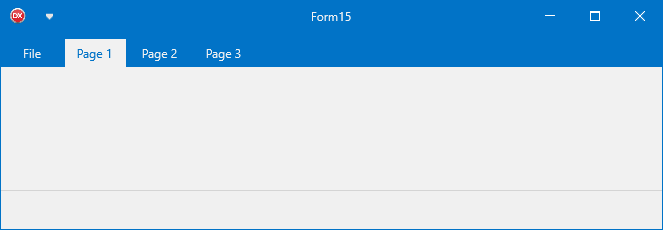
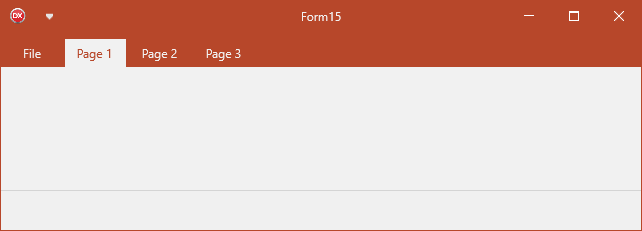
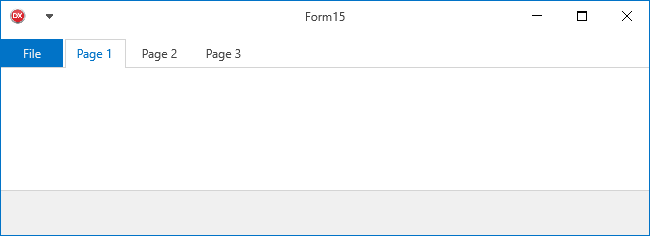
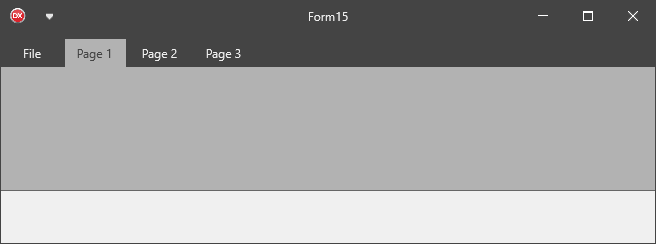
TTMSFNCRibbon ships with 11 predefined themes that colour the entire ribbon — page control, toolbars, QAT, groups, caption, and system menu — in one line of code.
Predefined themes
| Value | Name |
|---|---|
rbtLightBlue |
Default light blue |
rbtBlue |
Deeper blue |
rbtCrimson |
Red accent |
rbtGreen |
Green accent |
rbtSeaGreen |
Teal |
rbtOrange |
Orange accent |
rbtPurple |
Purple |
rbtDarkGray |
Dark grey with accent |
rbtBlack |
Near-black |
rbtWhite |
Light with accent colour |
rbtCustom |
Fully custom |
TMSFNCRibbon1.Theme := rbtLightBlue;
TMSFNCRibbon1->Theme = rbtLightBlue;
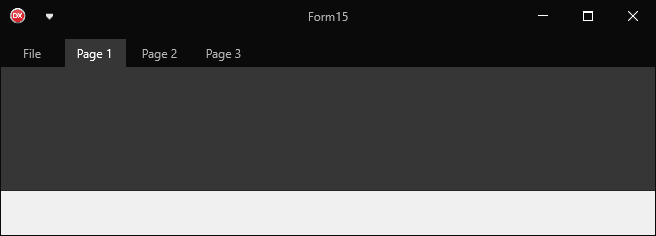
Custom accent colour
rbtWhite, rbtDarkGray, and rbtCustom use CustomThemeColor to tint the file button, groups, and other accent elements:
// Apply a predefined theme
TMSFNCRibbon1.Theme := rbtLightBlue;

// White theme with custom accent color for the file button and groups
TMSFNCRibbon1.Theme := rbtWhite;
TMSFNCRibbon1.CustomThemeColor := gcDarkred;

// Override theming on one group specifically
with TMSFNCRibbon1.Groups.Add do
begin
  Text := 'Group';
  StartPageIndex := 1;
  EndPageIndex := 2;
  UseDefaultAppearance := False;  // opt out of theme-driven fill
  Color := gcLimegreen;
  TextColor := gcWhite;
  BorderColor := gcGreen;
end;

// Implement ITMSFNCRibbonTheme on a custom control
// so it adapts automatically when Theme changes.
type
  TTMSFNCRibbonRectangle = class(TRectangle, ITMSFNCRibbonTheme)
  public
    procedure SetTheme(ATheme: TTMSFNCRibbonTheme;
      ACustomThemeColor: TTMSFNCGraphicsColor);
  end;

procedure TTMSFNCRibbonRectangle.SetTheme(ATheme: TTMSFNCRibbonTheme;
  ACustomThemeColor: TTMSFNCGraphicsColor);
begin
  Fill.Color := GetThemeTabHoverColor(ATheme, ACustomThemeColor);
  Stroke.Color := Fill.Color;
end;
// Apply a predefined theme
void __fastcall TForm1::ThemeDemo()
{
  TMSFNCRibbon1->Theme = rbtLightBlue;

  // White theme with custom accent color for the file button and groups
  TMSFNCRibbon1->Theme = rbtWhite;
  TMSFNCRibbon1->CustomThemeColor = gcDarkred;

  // Override theming on one group specifically
  TTMSFNCRibbonGroup *grp = TMSFNCRibbon1->Groups->Add();
  grp->Text = "Group";
  grp->StartPageIndex = 1;
  grp->EndPageIndex = 2;
  grp->UseDefaultAppearance = false;  // opt out of theme-driven fill
  grp->Color = gcLimegreen;
  grp->TextColor = gcWhite;
  grp->BorderColor = gcGreen;
}

// Implement ITMSFNCRibbonTheme on a custom control
// so it adapts automatically when Theme changes.
class TTMSFNCRibbonRectangle : public TRectangle, public ITMSFNCRibbonTheme
{
public:
  __fastcall TTMSFNCRibbonRectangle(TComponent *AOwner) : TRectangle(AOwner) {}
  void __fastcall SetTheme(TTMSFNCRibbonTheme ATheme,
    TTMSFNCGraphicsColor ACustomThemeColor);
  INTFOBJECT_IMPL_IUNKNOWN(TRectangle)
};

void __fastcall TTMSFNCRibbonRectangle::SetTheme(TTMSFNCRibbonTheme ATheme,
  TTMSFNCGraphicsColor ACustomThemeColor)
{
  Fill->Color = GetThemeTabHoverColor(ATheme, ACustomThemeColor);
  Stroke->Color = Fill->Color;
}
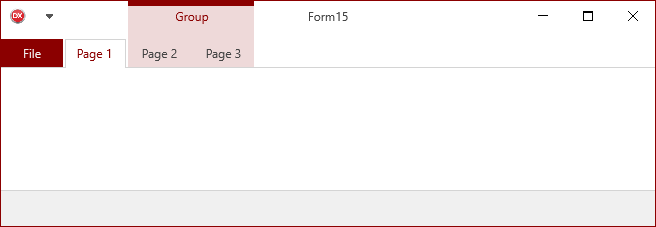

Overriding group colours
Set UseDefaultAppearance := False on a TTMSFNCRibbonGroup to override the theme-driven appearance for that group:
with TMSFNCRibbon1.Groups.Add do
begin
  StartPageIndex := 4;
  EndPageIndex := 6;
  UseDefaultAppearance := False;
  Color := gcLimegreen;
  TextColor := gcWhite;
  BorderColor := gcGreen;
end;
TTMSFNCRibbonGroup *grp = TMSFNCRibbon1->Groups->Add();
grp->StartPageIndex = 4;
grp->EndPageIndex = 6;
grp->UseDefaultAppearance = false;
grp->Color = gcLimegreen;
grp->TextColor = gcWhite;
grp->BorderColor = gcGreen;
Theme events
Assigning Theme (or calling ApplyTheme) walks every child control of the
ribbon and applies the theme colours to each one that supports
ITMSFNCRibbonTheme. The two theme events let you step into that sweep: use
them when a single command must keep a brand colour regardless of the active
theme, or when the theme palette is a good starting point that still needs a
small adjustment.
| Event | Signature | Description |
|---|---|---|
OnBeforeApplyTheme |
(Sender: TObject; AObject: TObject; var ABeforeApplyTheme: Boolean) |
Raised for each control before it is themed. AObject is the control; set ABeforeApplyTheme := False to leave it untouched. |
OnAppliedTheme |
(Sender: TObject; AObject: TObject) |
Raised after AObject has been themed, so any colour assigned here overrides the theme value. |
procedure TForm1.TMSFNCRibbon1BeforeApplyTheme(Sender: TObject;
  AObject: TObject; var ABeforeApplyTheme: Boolean);
begin
  // AObject is the control that is about to be themed. Setting
  // ABeforeApplyTheme to False leaves it exactly as it is, so a
  // brand-coloured command keeps its own appearance in every theme.
  if (AObject is TTMSFNCRibbonToolBarButton) and
     (TTMSFNCRibbonToolBarButton(AObject).Text = 'Publish') then
    ABeforeApplyTheme := False;
end;

procedure TForm1.TMSFNCRibbon1AppliedTheme(Sender: TObject; AObject: TObject);
var
  btn: TTMSFNCRibbonToolBarButton;
begin
  // Raised only for controls that were actually themed. The theme colours
  // are already assigned here, so adjustments made now survive.
  if AObject is TTMSFNCRibbonToolBarButton then
  begin
    btn := TTMSFNCRibbonToolBarButton(AObject);
    btn.Appearance.DownFill.Color := gcDarkslategray;
    btn.Appearance.DownStroke.Color := gcDarkslategray;
  end;
end;

procedure TForm1.FormCreate(Sender: TObject);
begin
  TMSFNCRibbon1.OnBeforeApplyTheme := TMSFNCRibbon1BeforeApplyTheme;
  TMSFNCRibbon1.OnAppliedTheme := TMSFNCRibbon1AppliedTheme;

  // Assigning Theme walks every child control and raises both events.
  TMSFNCRibbon1.Theme := rbtDarkGray;
end;
void __fastcall TForm1::TMSFNCRibbon1BeforeApplyTheme(TObject *Sender,
  TObject *AObject, bool &ABeforeApplyTheme)
{
  // AObject is the control that is about to be themed. Setting
  // ABeforeApplyTheme to false leaves it exactly as it is, so a
  // brand-coloured command keeps its own appearance in every theme.
  TTMSFNCRibbonToolBarButton *b = dynamic_cast<TTMSFNCRibbonToolBarButton*>(AObject);
  if ((b != nullptr) && (b->Text == "Publish"))
    ABeforeApplyTheme = false;
}

void __fastcall TForm1::TMSFNCRibbon1AppliedTheme(TObject *Sender, TObject *AObject)
{
  // Raised only for controls that were actually themed. The theme colours
  // are already assigned here, so adjustments made now survive.
  TTMSFNCRibbonToolBarButton *btn = dynamic_cast<TTMSFNCRibbonToolBarButton*>(AObject);
  if (btn != nullptr)
  {
    btn->Appearance->DownFill->Color = gcDarkslategray;
    btn->Appearance->DownStroke->Color = gcDarkslategray;
  }
}

void __fastcall TForm1::FormCreate(TObject *Sender)
{
  TMSFNCRibbon1->OnBeforeApplyTheme = TMSFNCRibbon1BeforeApplyTheme;
  TMSFNCRibbon1->OnAppliedTheme = TMSFNCRibbon1AppliedTheme;

  // Assigning Theme walks every child control and raises both events.
  TMSFNCRibbon1->Theme = rbtDarkGray;
}
Both events fire once per control, on every theme change. Keep the handlers
short and free of side effects that trigger another ApplyTheme call, and
prefer UseDefaultAppearance := False on a TTMSFNCRibbonGroup when only a
group's colours need to differ — the events are for control-level exceptions.
Shared group label and frame styling
Groups are painted by the ribbon itself, not by the toolbars they span, so
their look is controlled by one object rather than per toolbar: GroupAppearance
holds the font, fill, separator stroke, accent stroke, and text layout used for
every group. Reach for it when the group band should follow your own brand
instead of the active theme, and use a per-group override only for the one or
two groups that must stand out.
procedure TForm1.FormCreate(Sender: TObject);
var
  grp: TTMSFNCRibbonGroup;
begin
  TMSFNCRibbon1.BeginUpdate;
  try
    // GroupAppearance is the single object every group label and frame is
    // painted with, so one assignment restyles all of them.
    TMSFNCRibbon1.GroupAppearance.Font.Name := 'Segoe UI';
    TMSFNCRibbon1.GroupAppearance.Font.Size := 11;
    TMSFNCRibbon1.GroupAppearance.Font.Color := gcWhite;
    TMSFNCRibbon1.GroupAppearance.Fill.Kind := gfkSolid;
    TMSFNCRibbon1.GroupAppearance.Fill.Color := gcDarkslateblue;
    TMSFNCRibbon1.GroupAppearance.Stroke.Color := gcDarkslateblue;

    // BorderStroke is not the outline of the whole group: it paints the
    // narrow accent bar along the top edge, and only in the title-bar
    // toolbar area.
    TMSFNCRibbon1.GroupAppearance.BorderStroke.Color := gcOrange;

    TMSFNCRibbon1.GroupAppearance.TextAlign := gtaCenter;
    TMSFNCRibbon1.GroupAppearance.Trimming := gttWord;
    TMSFNCRibbon1.GroupAppearance.WordWrapping := False;

    grp := TMSFNCRibbon1.Groups.Add;
    grp.Text := 'Review';
    grp.StartPageIndex := 2;
    grp.EndPageIndex := 3;

    // A per-group override replaces the three colours and the text layout,
    // but never the font family or size - those always come from
    // GroupAppearance.Font, whose Color alone is swapped for TextColor.
    grp.UseDefaultAppearance := False;
    grp.Color := gcSeagreen;
    grp.TextColor := gcWhite;
    grp.BorderColor := gcDarkgreen;
    grp.TextAlign := gtaLeading;
  finally
    TMSFNCRibbon1.EndUpdate;
  end;
end;
void __fastcall TForm1::FormCreate(TObject *Sender)
{
  TMSFNCRibbon1->BeginUpdate();
  try
  {
    // GroupAppearance is the single object every group label and frame is
    // painted with, so one assignment restyles all of them.
    TMSFNCRibbon1->GroupAppearance->Font->Name = "Segoe UI";
    TMSFNCRibbon1->GroupAppearance->Font->Size = 11;
    TMSFNCRibbon1->GroupAppearance->Font->Color = gcWhite;
    TMSFNCRibbon1->GroupAppearance->Fill->Kind = gfkSolid;
    TMSFNCRibbon1->GroupAppearance->Fill->Color = gcDarkslateblue;
    TMSFNCRibbon1->GroupAppearance->Stroke->Color = gcDarkslateblue;

    // BorderStroke is not the outline of the whole group: it paints the
    // narrow accent bar along the top edge, and only in the title-bar
    // toolbar area.
    TMSFNCRibbon1->GroupAppearance->BorderStroke->Color = gcOrange;

    TMSFNCRibbon1->GroupAppearance->TextAlign = gtaCenter;
    TMSFNCRibbon1->GroupAppearance->Trimming = gttWord;
    TMSFNCRibbon1->GroupAppearance->WordWrapping = false;

    TTMSFNCRibbonGroup *grp = TMSFNCRibbon1->Groups->Add();
    grp->Text = "Review";
    grp->StartPageIndex = 2;
    grp->EndPageIndex = 3;

    // A per-group override replaces the three colours and the text layout,
    // but never the font family or size - those always come from
    // GroupAppearance.Font, whose Color alone is swapped for TextColor.
    grp->UseDefaultAppearance = false;
    grp->Color = gcSeagreen;
    grp->TextColor = gcWhite;
    grp->BorderColor = gcDarkgreen;
    grp->TextAlign = gtaLeading;
  }
  __finally
  {
    TMSFNCRibbon1->EndUpdate();
  }
}
Two details of the painting order are easy to trip over:
BorderStrokeis not the outline of the group. It fills a narrow accent bar along the top edge of the group rectangle, and only in the title-bar toolbar area - the band drawn behind the tab pages has no accent bar.UseDefaultAppearance := Falseon aTTMSFNCRibbonGroupswaps in that group'sColor,TextColor,BorderColor,TextAlign,WordWrapping, andTrimming. It does not swap the font: the family and size always come fromGroupAppearance.Font, and only the font colour is replaced byTextColor. To give one group a different type size, draw it yourself with the events below.
Custom drawing group backgrounds and labels
The four group draw events let you paint a group yourself when appearance
properties are not enough - a gradient band, a status badge, an icon beside the
label. Use them for decoration that the appearance object cannot express, and
prefer GroupAppearance or a per-group override for anything that is only a
colour change.
| Event | Signature | Fires |
|---|---|---|
OnBeforeDrawGroupBackground |
(Sender: TObject; AGraphics: TTMSFNCGraphics; AGroup: TTMSFNCRibbonGroup; ARect: TRectF; var ADefaultDraw: Boolean) |
Before the group rectangle is filled. Set ADefaultDraw := False to take the background over completely. |
OnAfterDrawGroupBackground |
(Sender: TObject; AGraphics: TTMSFNCGraphics; AGroup: TTMSFNCRibbonGroup; ARect: TRectF) |
After the rectangle and accent bar have been painted. |
OnBeforeDrawGroupText |
(Sender: TObject; AGraphics: TTMSFNCGraphics; AGroup: TTMSFNCRibbonGroup; ARect: TRectF; AText: String; var ADefaultDraw: Boolean) |
Before the group label is drawn. Set ADefaultDraw := False to render the label yourself. |
OnAfterDrawGroupText |
(Sender: TObject; AGraphics: TTMSFNCGraphics; AGroup: TTMSFNCRibbonGroup; ARect: TRectF; AText: String) |
After the label has been drawn. |
procedure TForm1.RibbonBeforeDrawGroupBackground(Sender: TObject;
  AGraphics: TTMSFNCGraphics; AGroup: TTMSFNCRibbonGroup; ARect: TRectF;
  var ADefaultDraw: Boolean);
begin
  if AGroup.Text <> 'Review' then
    Exit;

  AGraphics.Fill.Kind := gfkGradient;
  AGraphics.Fill.Color := gcDarkslateblue;
  AGraphics.Fill.ColorTo := gcMidnightblue;
  AGraphics.DrawRectangle(ARect);

  // False skips the built-in rectangle *and* the accent bar, and the matching
  // OnAfterDrawGroupBackground is not raised for this group either.
  ADefaultDraw := False;
end;

procedure TForm1.RibbonAfterDrawGroupText(Sender: TObject;
  AGraphics: TTMSFNCGraphics; AGroup: TTMSFNCRibbonGroup; ARect: TRectF;
  AText: String);
var
  r: TRectF;
begin
  // DataInteger is free per-group storage; here it carries a pending-item
  // count that is painted as a badge on top of the label the ribbon just drew.
  if AGroup.DataInteger <= 0 then
    Exit;

  r := RectF(ARect.Right - 18, ARect.Top, ARect.Right, ARect.Top + 14);
  AGraphics.Fill.Kind := gfkSolid;
  AGraphics.Fill.Color := gcRed;
  AGraphics.Stroke.Kind := gskNone;
  AGraphics.DrawRectangle(r);

  AGraphics.Font.Color := gcWhite;
  AGraphics.DrawText(r, IntToStr(AGroup.DataInteger), False,
    gtaCenter, gtaCenter, gttNone);
end;

procedure TForm1.FormCreate(Sender: TObject);
begin
  TMSFNCRibbon1.OnBeforeDrawGroupBackground := RibbonBeforeDrawGroupBackground;
  TMSFNCRibbon1.OnAfterDrawGroupText := RibbonAfterDrawGroupText;
end;
void __fastcall TForm1::RibbonBeforeDrawGroupBackground(TObject *Sender,
  TTMSFNCGraphics *AGraphics, TTMSFNCRibbonGroup *AGroup, const TRectF &ARect,
  bool &ADefaultDraw)
{
  if (AGroup->Text != "Review")
    return;

  AGraphics->Fill->Kind = gfkGradient;
  AGraphics->Fill->Color = gcDarkslateblue;
  AGraphics->Fill->ColorTo = gcMidnightblue;
  AGraphics->DrawRectangle(ARect);

  // False skips the built-in rectangle *and* the accent bar, and the matching
  // OnAfterDrawGroupBackground is not raised for this group either.
  ADefaultDraw = false;
}

void __fastcall TForm1::RibbonAfterDrawGroupText(TObject *Sender,
  TTMSFNCGraphics *AGraphics, TTMSFNCRibbonGroup *AGroup, const TRectF &ARect,
  UnicodeString AText)
{
  // DataInteger is free per-group storage; here it carries a pending-item
  // count that is painted as a badge on top of the label the ribbon just drew.
  if (AGroup->DataInteger <= 0)
    return;

  TRectF r = RectF(ARect.Right - 18, ARect.Top, ARect.Right, ARect.Top + 14);
  AGraphics->Fill->Kind = gfkSolid;
  AGraphics->Fill->Color = gcRed;
  AGraphics->Stroke->Kind = gskNone;
  AGraphics->DrawRectangle(r);

  AGraphics->Font->Color = gcWhite;
  AGraphics->DrawText(r, IntToStr(AGroup->DataInteger), false,
    gtaCenter, gtaCenter, gttNone);
}

void __fastcall TForm1::FormCreate(TObject *Sender)
{
  TMSFNCRibbon1->OnBeforeDrawGroupBackground = RibbonBeforeDrawGroupBackground;
  TMSFNCRibbon1->OnAfterDrawGroupText = RibbonAfterDrawGroupText;
}
Pitfalls
- A group is painted twice per repaint: once in the title-bar toolbar area and
once as a band behind the tab pages. The background events therefore fire
twice per group per paint, with a different
ARecteach time. Keep the handlers cheap, and derive any position fromARectrather than caching it. - The two text events fire only for the title-bar pass, because the band behind the tab pages draws no label. A handler that expects one text event per background event will be out of step.
- Setting
ADefaultDraw := FalseinOnBeforeDrawGroupBackgroundalso skips the accent bar and suppressesOnAfterDrawGroupBackgroundfor that group, so do all of the drawing in the before-handler once you take it over. AGraphicsis the live canvas withFill,Stroke, andFontalready loaded fromGroupAppearance. Any change you make to them persists into the next element the ribbon paints, so set every property your drawing depends on instead of assuming a default.
ITMSFNCRibbonTheme interface
Custom controls hosted inside the ribbon can participate in theming by implementing ITMSFNCRibbonTheme:
type
  TMyRibbonControl = class(TRectangle, ITMSFNCRibbonTheme)
  public
    procedure SetTheme(ATheme: TTMSFNCRibbonTheme;
      ACustomThemeColor: TTMSFNCGraphicsColor);
  end;

procedure TMyRibbonControl.SetTheme(ATheme: TTMSFNCRibbonTheme;
  ACustomThemeColor: TTMSFNCGraphicsColor);
begin
  // Use theme helper functions from FMX.TMSFNCRibbon
  Fill.Color := GetThemeTabHoverColor(ATheme, ACustomThemeColor);
  Stroke.Color := Fill.Color;
end;
class TMyRibbonControl : public TRectangle, public ITMSFNCRibbonTheme
{
public:
  __fastcall TMyRibbonControl(TComponent *AOwner) : TRectangle(AOwner) {}
  void __fastcall SetTheme(TTMSFNCRibbonTheme ATheme,
    TTMSFNCGraphicsColor ACustomThemeColor);
  INTFOBJECT_IMPL_IUNKNOWN(TRectangle)
};

void __fastcall TMyRibbonControl::SetTheme(TTMSFNCRibbonTheme ATheme,
  TTMSFNCGraphicsColor ACustomThemeColor)
{
  // Use theme helper functions from FMX.TMSFNCRibbon
  Fill->Color = GetThemeTabHoverColor(ATheme, ACustomThemeColor);
  Stroke->Color = Fill->Color;
}
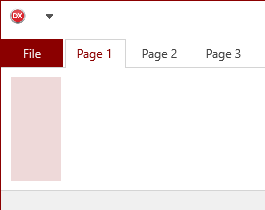
Available theme helper functions:
| Function | Returns |
|---|---|
GetThemeColor |
Primary theme colour. |
GetThemeHoverColor |
Hover state colour. |
GetThemeDownColor |
Pressed state colour. |
GetThemeActiveFontColor |
Active item font colour. |
GetThemeFontColor |
Default font colour. |
GetThemeTabColor |
Page tab background colour. |
GetThemeTabHoverColor |
Page tab hover colour. |
GetThemeTabDownColor |
Page tab pressed colour. |
GetThemeTabFontColor |
Page tab text colour. |
Combining predefined theme with custom accent and per-group override
Apply a named theme, set a custom accent colour, and override one contextual group to make it stand out from the rest:
procedure TForm1.FormCreate(Sender: TObject);
var
  grp: TTMSFNCRibbonGroup;
begin
  // Base theme: white with a dark-red accent on the file button and groups
  TMSFNCRibbon1.Theme := rbtWhite;
  TMSFNCRibbon1.CustomThemeColor := gcDarkRed;

  // After-theme event for fine-tuning the file button
  TMSFNCRibbon1.OnAppliedTheme := DoAfterTheme;

  // One contextual group styled independently from the theme
  grp := TMSFNCRibbon1.Groups.Add;
  grp.StartPageIndex := 2;
  grp.EndPageIndex   := 3;
  grp.Text := 'Drawing Tools';
  grp.UseDefaultAppearance := False;
  grp.Color       := gcLimeGreen;
  grp.TextColor   := gcWhite;
  grp.BorderColor := gcGreen;
end;

procedure TForm1.DoAfterTheme(Sender: TObject);
begin
  // Optionally tighten the accent after the theme engine has run
  TMSFNCRibbon1.FileButton.Appearance.Fill.Color := gcDarkRed;
end;
void __fastcall TForm1::FormCreate(TObject *Sender)
{
  // Base theme: white with a dark-red accent on the file button and groups
  TMSFNCRibbon1->Theme = rbtWhite;
  TMSFNCRibbon1->CustomThemeColor = gcDarkred;

  // After-theme event for fine-tuning the file button
  TMSFNCRibbon1->OnAppliedTheme = DoAfterTheme;

  // One contextual group styled independently from the theme
  TTMSFNCRibbonGroup *grp = TMSFNCRibbon1->Groups->Add();
  grp->StartPageIndex = 2;
  grp->EndPageIndex = 3;
  grp->Text = "Drawing Tools";
  grp->UseDefaultAppearance = false;
  grp->Color = gcLimegreen;
  grp->TextColor = gcWhite;
  grp->BorderColor = gcGreen;
}

void __fastcall TForm1::DoAfterTheme(TObject *Sender, TObject *AObject)
{
  // Optionally tighten the accent after the theme engine has run
  TMSFNCRibbon1->PageControl->FileButton->Appearance->NormalFill->Color = gcDarkred;
}