Nodes
Node configuration
The NodesAppearance property on TTMSFNCTreeView controls the visual style of all nodes. Individual columns can override these defaults by setting UseDefaultAppearance = False on a TTMSFNCTreeViewColumn. Set the shared appearance once, inside a BeginUpdate / EndUpdate pair:
uses
  FMX.TMSFNCGraphicsTypes, FMX.TMSFNCCustomTreeView, FMX.TMSFNCTreeView;

procedure TForm1.ConfigureNodes;
begin
  TreeView1.BeginUpdate;

  // Defaults shared by every node
  TreeView1.NodesAppearance.HeightMode := tnhmFixed;
  TreeView1.NodesAppearance.FixedHeight := 28;
  TreeView1.NodesAppearance.LevelIndent := 20;
  TreeView1.NodesAppearance.ShowLines := True;
  TreeView1.NodesAppearance.SelectionArea := tsaFull;
  TreeView1.NodesAppearance.SelectedFill.Kind := gfkSolid;
  TreeView1.NodesAppearance.SelectedFill.Color := gcSteelblue;
  TreeView1.NodesAppearance.SelectedFontColor := gcWhite;

  // A column can opt out of the defaults and use its own font
  TreeView1.Columns[0].UseDefaultAppearance := False;
  TreeView1.Columns[0].Font.Color := gcPurple;

  TreeView1.EndUpdate;
end;
void __fastcall TForm1::ConfigureNodes()
{
  TreeView1->BeginUpdate();

  // Defaults shared by every node
  TreeView1->NodesAppearance->HeightMode = tnhmFixed;
  TreeView1->NodesAppearance->FixedHeight = 28;
  TreeView1->NodesAppearance->LevelIndent = 20;
  TreeView1->NodesAppearance->ShowLines = true;
  TreeView1->NodesAppearance->SelectionArea = tsaFull;
  TreeView1->NodesAppearance->SelectedFill->Kind = gfkSolid;
  TreeView1->NodesAppearance->SelectedFill->Color = gcSteelblue;
  TreeView1->NodesAppearance->SelectedFontColor = gcWhite;

  // A column can opt out of the defaults and use its own font
  TreeView1->Columns->Items[0]->UseDefaultAppearance = false;
  TreeView1->Columns->Items[0]->Font->Color = gcPurple;

  TreeView1->EndUpdate();
}
Adding, inserting, and removing nodes
Both collection-based and virtual modes are covered in Modes. The snippets here use collection-based mode.
uses
  FMX.TMSFNCTreeView;

procedure TForm1.ResetTree;
begin
  TreeView1.BeginUpdate;
  TreeView1.ClearNodeList;
  TreeView1.ClearNodes;
  TreeView1.ClearColumns;
  TreeView1.Columns.Add.Text := 'Column 1';
  TreeView1.EndUpdate;
end;
void __fastcall TForm1::ResetTree()
{
  TreeView1->BeginUpdate();
  TreeView1->ClearNodeList();
  TreeView1->ClearNodes();
  TreeView1->ClearColumns();
  TreeView1->Columns->Add()->Text = "Column 1";
  TreeView1->EndUpdate();
}
Add a root node and a child under it:
uses
  FMX.TMSFNCTreeView;

procedure TForm1.AddNodes;
var
  root, child: TTMSFNCTreeViewNode;
begin
  // Root node
  root := TreeView1.AddNode;
  root.Text[0] := 'Root Node';

  // Child node — pass the parent to AddNode
  child := TreeView1.AddNode(root);
  child.Text[0] := 'Child Node';

  TreeView1.ExpandNode(root);
end;
void __fastcall TForm1::AddNodes()
{
  // Root node
  TTMSFNCTreeViewNode *root = TreeView1->AddNode();
  root->Text[0] = "Root Node";

  // Child node - pass the parent to AddNode
  TTMSFNCTreeViewNode *child = TreeView1->AddNode(root);
  child->Text[0] = "Child Node";

  TreeView1->ExpandNode(root);
}
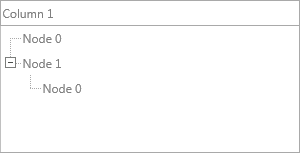
Insert a node at a specific position, or remove nodes in several ways:
uses
  FMX.TMSFNCTreeView;

procedure TForm1.InsertNodeExample;
begin
  TreeView1.InsertNode(1, nil); // insert at index 1 at root level
end;

procedure TForm1.RemoveNodeExamples(AParent: TTMSFNCTreeViewNode);
begin
  // By method
  TreeView1.RemoveNode(TreeView1.FocusedNode);

  // By freeing the collection item — same result
  TreeView1.FocusedNode.Free;

  // Remove all children of a node
  TreeView1.RemoveNodeChildren(AParent);

  // Remove all selected nodes
  TreeView1.RemoveSelectedNodes;
end;
void __fastcall TForm1::InsertNodeExample()
{
  TreeView1->InsertNode(1, nullptr); // insert at index 1 at root level
}

void __fastcall TForm1::RemoveNodeExamples(TTMSFNCTreeViewNode *AParent)
{
  // By method
  TreeView1->RemoveNode(TreeView1->FocusedNode);

  // By freeing the collection item - same result
  delete TreeView1->FocusedNode;

  // Remove all children of a node
  TreeView1->RemoveNodeChildren(AParent);

  // Remove all selected nodes
  TreeView1->RemoveSelectedNodes();
}
Fixed vs variable node height
Fixed height (default)
All nodes share the same height, set by NodesAppearance.FixedHeight. Icons and text that exceed this height are clipped.
uses
  FMX.TMSFNCTreeView;

procedure TForm1.SetFixedNodeHeight;
begin
  TreeView1.NodesAppearance.FixedHeight := 40;
end;
void __fastcall TForm1::SetFixedNodeHeight()
{
  TreeView1->NodesAppearance->FixedHeight = 40;
}
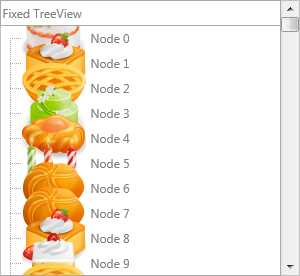
Variable height
Set NodesAppearance.HeightMode to tnhmVariable to let each node height expand to fit its content (icon size or wrapped text). The NodesAppearance.VariableMinimumHeight sets the minimum height for scroll calculations.
// Variable node height — nodes adapt to icon/text content
procedure TForm1.SetupVariableHeight;
begin
  TreeView1.BeginUpdate;
  TreeView1.ClearNodeList;
  TreeView1.ClearNodes;
  TreeView1.ClearColumns;
  TreeView1.Columns.Add.Text := 'Variable TreeView';
  TreeView1.Columns[0].WordWrapping := True;
  TreeView1.NodesAppearance.HeightMode := tnhmVariable;
  TreeView1.EndUpdate;
end;
// Variable node height - nodes adapt to icon/text content
void __fastcall TForm1::SetupVariableHeight()
{
  TreeView1->BeginUpdate();
  TreeView1->ClearNodeList();
  TreeView1->ClearNodes();
  TreeView1->ClearColumns();
  TreeView1->Columns->Add()->Text = "Variable TreeView";
  TreeView1->Columns->Items[0]->WordWrapping = true;
  TreeView1->NodesAppearance->HeightMode = tnhmVariable;
  TreeView1->EndUpdate();
}
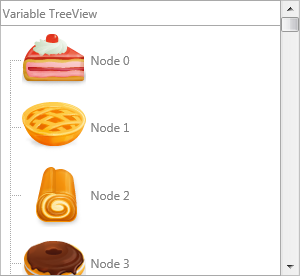
With word wrapping enabled, long text also drives the node height:
uses
  FMX.TMSFNCTreeView;

procedure TForm1.EnableWordWrap;
begin
  TreeView1.Columns[0].WordWrapping := True;
  TreeView1.NodesAppearance.HeightMode := tnhmVariable;
end;
void __fastcall TForm1::EnableWordWrap()
{
  TreeView1->Columns->Items[0]->WordWrapping = true;
  TreeView1->NodesAppearance->HeightMode = tnhmVariable;
}
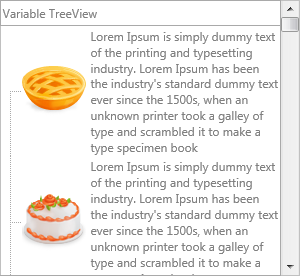
Checkbox and radiobutton support
Each node column can display a checkbox or radiobutton independently via the CheckTypes property:
// Checkbox and radiobutton nodes
procedure TForm1.SetupCheckNodes;
var
  n: TTMSFNCTreeViewNode;
  I: Integer;
begin
  TreeView1.BeginUpdate;
  TreeView1.ClearNodeList;
  TreeView1.ClearNodes;
  TreeView1.ClearColumns;
  TreeView1.Columns.Add.Text := 'Checkbox / radiobutton';

  for I := 0 to 3 do
  begin
    n := TreeView1.Nodes.Add;
    n.Text[0] := 'CheckBox ' + IntToStr(I);
    n.CheckTypes[0] := tvntCheckBox;
    if Odd(I) then
      n.Checked[0] := True;
  end;

  for I := 0 to 3 do
  begin
    n := TreeView1.Nodes.Add;
    n.Text[0] := 'Radiobutton ' + IntToStr(I);
    n.CheckTypes[0] := tvntRadioButton;
    if I = 2 then
      n.Checked[0] := True;
  end;

  TreeView1.EndUpdate;
end;
// Checkbox and radiobutton nodes
void __fastcall TForm1::SetupCheckNodes()
{
  TreeView1->BeginUpdate();
  TreeView1->ClearNodeList();
  TreeView1->ClearNodes();
  TreeView1->ClearColumns();
  TreeView1->Columns->Add()->Text = "Checkbox / radiobutton";

  for (int I = 0; I < 4; I++)
  {
    TTMSFNCTreeViewNode *n = TreeView1->Nodes->Add();
    n->Text[0] = "CheckBox " + IntToStr(I);
    n->CheckTypes[0] = tvntCheckBox;
    if (I % 2 == 1)
      n->Checked[0] = true;
  }

  for (int I = 0; I < 4; I++)
  {
    TTMSFNCTreeViewNode *n = TreeView1->Nodes->Add();
    n->Text[0] = "Radiobutton " + IntToStr(I);
    n->CheckTypes[0] = tvntRadioButton;
    if (I == 2)
      n->Checked[0] = true;
  }

  TreeView1->EndUpdate();
}
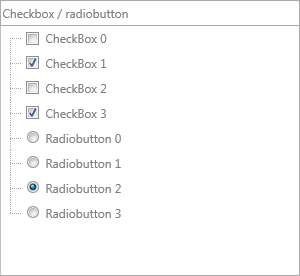
To use virtual mode for checkboxes, implement OnGetNodeCheckType and OnIsNodeChecked.
Toggle check state programmatically:
uses
  FMX.TMSFNCTreeView;

procedure TForm1.ToggleChecks(ANode: TTMSFNCTreeViewNode;
  AVirtualNode: TTMSFNCTreeViewVirtualNode);
begin
  TreeView1.ToggleCheckNode(ANode, 0);         // collection-based
  TreeView1.CheckVirtualNode(AVirtualNode, 0); // virtual
end;
void __fastcall TForm1::ToggleChecks(TTMSFNCTreeViewNode *ANode,
  TTMSFNCTreeViewVirtualNode *AVirtualNode)
{
  TreeView1->ToggleCheckNode(ANode, 0);         // collection-based
  TreeView1->CheckVirtualNode(AVirtualNode, 0); // virtual
}
Extended nodes
An extended node spans all columns and displays text from column 0 only. Extended nodes are not selectable or editable by default; this can be changed via Interaction.ExtendedSelectable and Interaction.ExtendedEditable.
Use extended nodes as section headers within a flat list:
// Extended nodes that span all columns
procedure TForm1.SetupExtendedNodes;
var
  n, pn: TTMSFNCTreeViewNode;
  I: Integer;
begin
  TreeView1.BeginUpdate;
  TreeView1.ClearNodeList;
  TreeView1.ClearNodes;
  TreeView1.ClearColumns;
  TreeView1.Columns.Add.Text := 'Column 1';
  TreeView1.Columns.Add.Text := 'Column 2';

  pn := TreeView1.Nodes.Add;
  pn.Text[0] := 'Normal Node';

  pn := TreeView1.Nodes.Add;
  pn.Text[0] := 'Extended Group Header';
  pn.Extended := True;

  for I := 0 to 3 do
  begin
    n := TreeView1.AddNode(pn);
    if I = 1 then
    begin
      n.Text[0] := 'Sub-header ' + IntToStr(I);
      n.Extended := True;
    end
    else
    begin
      n.Text[0] := 'Normal Node Column 1 ' + IntToStr(I);
      n.Text[1] := 'Normal Node Column 2 ' + IntToStr(I);
    end;
  end;

  TreeView1.EndUpdate;
end;
// Extended nodes that span all columns
void __fastcall TForm1::SetupExtendedNodes()
{
  TreeView1->BeginUpdate();
  TreeView1->ClearNodeList();
  TreeView1->ClearNodes();
  TreeView1->ClearColumns();
  TreeView1->Columns->Add()->Text = "Column 1";
  TreeView1->Columns->Add()->Text = "Column 2";

  TTMSFNCTreeViewNode *pn = TreeView1->Nodes->Add();
  pn->Text[0] = "Normal Node";

  pn = TreeView1->Nodes->Add();
  pn->Text[0] = "Extended Group Header";
  pn->Extended = true;

  for (int I = 0; I < 4; I++)
  {
    TTMSFNCTreeViewNode *n = TreeView1->AddNode(pn);
    if (I == 1)
    {
      n->Text[0] = "Sub-header " + IntToStr(I);
      n->Extended = true;
    }
    else
    {
      n->Text[0] = "Normal Node Column 1 " + IntToStr(I);
      n->Text[1] = "Normal Node Column 2 " + IntToStr(I);
    }
  }

  TreeView1->EndUpdate();
}
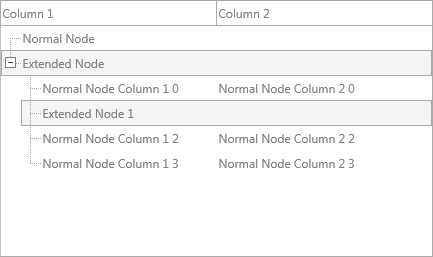
In virtual mode, return True from OnIsNodeExtended to mark a node as extended.
NodesAppearance reference
| Property | Description |
|---|---|
FixedHeight |
Node height when HeightMode = tnhmFixed |
HeightMode |
tnhmFixed or tnhmVariable |
VariableMinimumHeight |
Minimum height for variable-height nodes (default 25) |
Font.Color |
Default node text color |
Font |
Default node font |
Fill, Stroke |
Default node background and border |
SelectedFill, SelectedFontColor |
Selected state style |
DisabledFill, DisabledFontColor |
Disabled state style |
LevelIndent |
Pixel indent per nesting level |
ShowLines |
Draw tree connector lines |
ShowFocus |
Draw focus indicator |
ExpandWidth, ExpandHeight |
Size of the expand/collapse icon area |
SelectionArea |
tsaFull — full row, or tsaText — text only |
Combining height modes, extended nodes and checkboxes
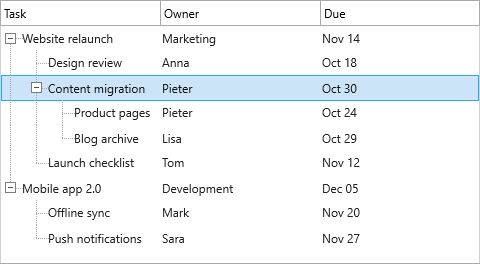
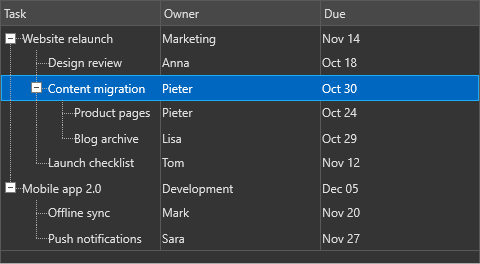
The node features in this guide are independent, so they combine freely. Variable height lets wrapped text grow a row, extended nodes provide full-width section headers, and per-node check types turn the children into a checklist. Use the combination for task lists, settings panels or any grouped list where item text has an unpredictable length. The sample builds a selectable "Open tasks" header with four word-wrapped checkbox children and expands it.
uses
  System.SysUtils, FMX.TMSFNCCustomTreeView, FMX.TMSFNCTreeView;

procedure TForm1.SetupCombinedNodes;
var
  hdr, n: TTMSFNCTreeViewNode;
  I: Integer;
begin
  TreeView1.BeginUpdate;
  TreeView1.ClearNodeList;
  TreeView1.ClearNodes;
  TreeView1.ClearColumns;
  TreeView1.Columns.Add.Text := 'Task';
  TreeView1.Columns[0].WordWrapping := True;

  // Variable height lets wrapped text grow the node
  TreeView1.NodesAppearance.HeightMode := tnhmVariable;
  // Allow the extended header to be selected
  TreeView1.Interaction.ExtendedSelectable := True;

  hdr := TreeView1.AddNode;
  hdr.Text[0] := 'Open tasks';
  hdr.Extended := True;

  for I := 0 to 3 do
  begin
    n := TreeView1.AddNode(hdr);
    n.Text[0] := 'Task ' + IntToStr(I) +
      ': a longer description that wraps onto several lines';
    n.CheckTypes[0] := tvntCheckBox;
    n.Checked[0] := Odd(I);
  end;

  TreeView1.ExpandNode(hdr);
  TreeView1.EndUpdate;
end;
void __fastcall TForm1::SetupCombinedNodes()
{
  TreeView1->BeginUpdate();
  TreeView1->ClearNodeList();
  TreeView1->ClearNodes();
  TreeView1->ClearColumns();
  TreeView1->Columns->Add()->Text = "Task";
  TreeView1->Columns->Items[0]->WordWrapping = true;

  // Variable height lets wrapped text grow the node
  TreeView1->NodesAppearance->HeightMode = tnhmVariable;
  // Allow the extended header to be selected
  TreeView1->Interaction->ExtendedSelectable = true;

  TTMSFNCTreeViewNode *hdr = TreeView1->AddNode();
  hdr->Text[0] = "Open tasks";
  hdr->Extended = true;

  for (int I = 0; I < 4; I++)
  {
    TTMSFNCTreeViewNode *n = TreeView1->AddNode(hdr);
    n->Text[0] = "Task " + IntToStr(I) +
      ": a longer description that wraps onto several lines";
    n->CheckTypes[0] = tvntCheckBox;
    n->Checked[0] = (I % 2 == 1);
  }

  TreeView1->ExpandNode(hdr);
  TreeView1->EndUpdate();
}
Related API
TTMSFNCTreeView—AddNode,InsertNode,RemoveNode,ExpandNode,NodesAppearanceTTMSFNCTreeViewData—TTMSFNCTreeViewNode,TTMSFNCTreeViewVirtualNode
See also
- Modes — virtual vs collection-based approach
- Interaction — editing nodes, filtering, sorting