Calculations
Compute sums, averages, mins, maxes, counts, distinct values, and standard deviations across rows or columns. Display results live in a footer row, or call the calculation API directly.
Overview
Three flavours of calculation:
| Flavour | API | Use it for |
|---|---|---|
| One-shot column or row | Grid.ColumnSum, RowAverage, … |
A button or status bar that shows "total of selected rows". |
| Live footer-row calculations | Grid.ColumnCalculations[Col, Name] |
A persistent totals row that updates as the user edits. |
| Group summary | Grid.GroupSum, GroupAverage, … |
Per-group aggregations under each group header. (See Grouping.) |
All three accept a column or row range; pass -1 for "all rows" or "all columns".
Quick example
Grid.RowCount               := 20;
Grid.FixedBottomRowCount    := 1;
Grid.RandomFill(False, 100);

Grid.ColumnCalculations[0, 'SUM']     := [CreateNormalColumnCalculation(gcmSum)];
Grid.ColumnCalculations[1, 'AVERAGE'] := [CreateNormalColumnCalculation(gcmAverage)];
Grid.ColumnCalculations[2, 'MIN']     := [CreateNormalColumnCalculation(gcmMin)];
Grid.ColumnCalculations[3, 'MAX']     := [CreateNormalColumnCalculation(gcmMax)];
The footer row now shows live totals; editing any cell automatically refreshes the corresponding calculation.
Step by step
Built-in column calculations
Every method takes the column index plus an optional FromRow / ToRow range:
| Method | Returns |
|---|---|
Grid.ColumnSum(ACol, FromRow, ToRow) |
Sum of values. |
Grid.ColumnAverage(ACol, FromRow, ToRow) |
Arithmetic mean. |
Grid.ColumnMin(ACol, FromRow, ToRow) |
Smallest value. |
Grid.ColumnMax(ACol, FromRow, ToRow) |
Largest value. |
Grid.ColumnDistinct(ACol, FromRow, ToRow) |
Count of distinct values. |
Grid.ColumnStandardDeviation(ACol, FromRow, ToRow) |
Standard deviation. |
Grid.ColumnCustomCalculation(ACol, FromRow, ToRow) |
Calls OnCustomColumnCalculation for a user-defined formula. |
Defaulting FromRow = -1, ToRow = -1 includes all rows.
Built-in row calculations
The same set, but on the row axis:
var Total := Grid.RowSum(5);             // sum of every column in row 5
var Avg   := Grid.RowAverage(5, 1, 4);   // average of columns 1..4 in row 5
Available: RowSum, RowAverage, RowMin, RowMax, RowDistinct, RowStandardDeviation, RowCustomCalculation.
Live footer calculations
Grid.ColumnCalculations[Col, Name] assigns one or more calculations to a column. The result appears in the bottom fixed row (FixedBottomRowCount ≥ 1). Use a name string so you can reference each calculation later if needed.
Available calculation kinds (TTMSFNCDataGridCalculationMode):
| Constant | Meaning |
|---|---|
gcmSum |
Sum of the column. |
gcmAverage |
Arithmetic mean. |
gcmCount |
Row count. |
gcmMin / gcmMax |
Min / max value. |
gcmDistinct |
Distinct value count. |
gcmStandardDeviation |
Standard deviation. |
gcmCustom |
Result from OnCustomColumnCalculation. |
Multiple calculations on one column are added by passing an array:
Grid.ColumnCalculations[3, 'STATS'] := [
  CreateNormalColumnCalculation(gcmSum),
  CreateNormalColumnCalculation(gcmAverage)
];
Custom calculations via events
For non-standard formulas — weighted averages, percentile, anything domain-specific — use gcmCustom and hook OnCustomColumnCalculation (or OnCustomRowCalculation). Both are functions that return the result directly:
function TForm1.GridCustomColumnCalculation(Sender: TObject;
  AColumn, ALevel: Integer; AFromRow, AToRow: Integer): Double;
var
  i: Integer; Total, Weight: Double;
begin
  Total := 0; Weight := 0;
  for i := AFromRow to AToRow do
  begin
    Total  := Total  + Grid.Floats[AColumn, i] * Grid.Floats[WeightCol, i];
    Weight := Weight + Grid.Floats[WeightCol, i];
  end;
  if Weight > 0 then Result := Total / Weight
  else Result := 0;
end;
Refreshing calculations
The grid recalculates automatically when cell values change through user
editing. After a programmatic change — assigning Floats[]/Cells[],
loading data, or a bulk update — the default behaviour is to leave the totals
untouched until you refresh them manually:
Grid.UpdateCalculations;                      // every column
Grid.UpdateColumnCalculation(3, 'SUM');       // just the 'SUM' calculation on column 3
Grid.UpdateRowCalculation(7, 'TOTAL');        // just the 'TOTAL' calculation on row 7
Auto-updating calculations on data change
To make calculations refresh after any cell-data change — including
programmatic Floats[]/Cells[] assignments, not just user edits — enable
Options.Calculations.AutoUpdate (default False). With it on you no longer
call UpdateCalculations after changing values in code; the affected row and
column calculations recompute as the data changes:
procedure TForm1.SetupAutoUpdatingTotals;
var
  r: Integer;
begin
  Grid.BeginUpdate;
  try
    Grid.FixedRowCount := 1;
    Grid.FixedBottomRowCount := 1;
    Grid.ColumnCount := 4;
    Grid.RowCount := 5;

    // With AutoUpdate on, any later change to a cell value - including the
    // programmatic Floats[] assignments below - refreshes the affected row and
    // column calculations automatically. With the default (False) you would have
    // to call UpdateCalculations yourself after each change.
    Grid.Options.Calculations.AutoUpdate := True;

    Grid.Columns[3].Header := 'Row total';
    Grid.RowTypes[Grid.RowCount - 1] := grtSummary;

    // Per-row totals across columns 0..2, and per-column sums in the footer row.
    for r := 1 to 3 do
      Grid.RowCalculations[r, 'ROW_TOTAL'] := [CreateRowCalculation(gcmSum, nil, nil, 0, 2, 3)];
    Grid.ColumnCalculations[0, 'SUM'] := [CreateNormalColumnCalculation(gcmSum)];
    Grid.ColumnCalculations[1, 'SUM'] := [CreateNormalColumnCalculation(gcmSum)];
    Grid.ColumnCalculations[2, 'SUM'] := [CreateNormalColumnCalculation(gcmSum)];

    Grid.Floats[0, 1] := 10;  Grid.Floats[1, 1] := 15;  Grid.Floats[2, 1] := 25;
    Grid.Floats[0, 2] := 12;  Grid.Floats[1, 2] := 20;  Grid.Floats[2, 2] := 28;
    Grid.Floats[0, 3] := 14;  Grid.Floats[1, 3] := 22;  Grid.Floats[2, 3] := 30;
  finally
    Grid.EndUpdate;
  end;
end;

procedure TForm1.ChangeValue;
begin
  // No UpdateCalculations call needed: the Q2/row-2 total and the Q2 column sum
  // both refresh as soon as the cell value changes, because AutoUpdate is on.
  Grid.Floats[1, 2] := 40;
end;
void __fastcall TForm1::SetupAutoUpdatingTotals()
{
  Grid->BeginUpdate();
  try
  {
    Grid->FixedRowCount = 1;
    Grid->FixedBottomRowCount = 1;
    Grid->ColumnCount = 4;
    Grid->RowCount = 5;

    // With AutoUpdate on, any later change to a cell value - including the
    // programmatic Floats[] assignments below - refreshes the affected row and
    // column calculations automatically. With the default (False) you would have
    // to call UpdateCalculations yourself after each change.
    Grid->Options->Calculations->AutoUpdate = true;

    Grid->Columns->Items[3]->Header = "Row total";
    Grid->RowTypes[Grid->RowCount - 1] = grtSummary;

    // Per-row totals across columns 0..2, and per-column sums in the footer row.
    for (int r = 1; r <= 3; r++)
    {
      DynamicArray<TTMSFNCDataGridDataRowCalculation> RowCalc;
      RowCalc.Length = 1;
      RowCalc[0] = CreateRowCalculation(gcmSum, _di_TTMSFNCDataGridDataGetRowCalculationOptionsCallback(),
        _di_TTMSFNCDataGridDataCustomRowCalculationCallback(), 0, 2, 3);
      Grid->RowCalculations[r]["ROW_TOTAL"] = RowCalc;
    }
    for (int c = 0; c <= 2; c++)
    {
      DynamicArray<TTMSFNCDataGridDataColumnCalculation> ColCalc;
      ColCalc.Length = 1;
      ColCalc[0] = CreateNormalColumnCalculation(gcmSum);
      Grid->ColumnCalculations[c]["SUM"] = ColCalc;
    }

    Grid->Floats[0][1] = 10;  Grid->Floats[1][1] = 15;  Grid->Floats[2][1] = 25;
    Grid->Floats[0][2] = 12;  Grid->Floats[1][2] = 20;  Grid->Floats[2][2] = 28;
    Grid->Floats[0][3] = 14;  Grid->Floats[1][3] = 22;  Grid->Floats[2][3] = 30;
  }
  __finally
  {
    Grid->EndUpdate();
  }
}

void __fastcall TForm1::ChangeValue()
{
  // No UpdateCalculations call needed: the Q2/row-2 total and the Q2 column sum
  // both refresh as soon as the cell value changes, because AutoUpdate is on.
  Grid->Floats[1][2] = 40;
}
Tip
AutoUpdate is ideal for live dashboards and grids that receive frequent
programmatic updates. For a one-off bulk load where you change thousands of
cells at once, leave it False and call UpdateCalculations once at the end
— a single recompute is cheaper than recomputing on every assignment.
Calculation output options
Per-calculation format via inline callback
CreateNormalColumnCalculation and the GroupSum/GroupAverage/… methods accept an optional ACalculationOptionsCallback parameter. Use this to control the number format and merge behaviour for one specific calculation without affecting anything else:
procedure TForm1.AddRevenueCalculation;
begin
  Grid.ColumnCalculations[2, 'REVENUE'] := [
    CreateNormalColumnCalculation(gcmSum,
      procedure(AColumn, ALevel: Integer;
                var AOptions: TTMSFNCDataGridDataColumnCalculationOptions)
      begin
        AOptions.CalculationFormat     := '€ %.2f';
        AOptions.CalculationFormatType := gcfFloat;
        AOptions.MergeSummary          := True;     // span the summary cell
      end)
  ];
end;
class TRevenueFormat : public TCppInterfacedObject<TTMSFNCDataGridDataGetColumnCalculationOptionsCallback>
{
public:
  void __fastcall Invoke(int AColumn, int ALevel,
    TTMSFNCDataGridDataColumnCalculationOptions &AOptions)
  {
    AOptions.CalculationFormat     = System::UnicodeString(wchar_t(0x20AC)) + " %.2f";
    AOptions.CalculationFormatType = gcfFloat;
    AOptions.MergeSummary          = true;     // span the summary cell
  }
};

void __fastcall TForm1::AddRevenueCalculation()
{
  DynamicArray<TTMSFNCDataGridDataColumnCalculation> Calc;
  Calc.Length = 1;
  Calc[0] = CreateNormalColumnCalculation(gcmSum,
    _di_TTMSFNCDataGridDataGetColumnCalculationOptionsCallback(new TRevenueFormat()));
  Grid->ColumnCalculations[2]["REVENUE"] = Calc;
}
The same pattern works for group calculations:
procedure TForm1.AddGroupSum;
begin
  Grid.GroupSum(5,
    procedure(AColumn, ALevel: Integer;
              var AOptions: TTMSFNCDataGridDataColumnCalculationOptions)
    begin
      AOptions.CalculationFormat := '%.0f kg';
      AOptions.CalculationFormatType := gcfFloat;
    end);
end;
class TGroupSumFormat : public TCppInterfacedObject<TTMSFNCDataGridDataGetColumnCalculationOptionsCallback>
{
public:
  void __fastcall Invoke(int AColumn, int ALevel,
    TTMSFNCDataGridDataColumnCalculationOptions &AOptions)
  {
    AOptions.CalculationFormat = "%.0f kg";
    AOptions.CalculationFormatType = gcfFloat;
  }
};

void __fastcall TForm1::AddGroupSum()
{
  Grid->GroupSum(5, _di_TTMSFNCDataGridDataGetColumnCalculationOptionsCallback(new TGroupSumFormat()));
}
Grid-wide format via event
For uniform formatting across all calculations, hook OnGetColumnCalculationOptions (or OnGetRowCalculationOptions) instead of repeating a callback everywhere:
procedure TForm1.GridGetColumnCalculationOptions(Sender: TObject;
  AColumn, ALevel: Integer;
  var AOptions: TTMSFNCDataGridDataColumnCalculationOptions);
begin
  if AColumn in [3, 4, 5] then   // monetary columns
  begin
    AOptions.CalculationFormat     := '%.2f';
    AOptions.CalculationFormatType := gcfFloat;
  end;
end;
void __fastcall TForm1::GridGetColumnCalculationOptions(TObject *Sender,
  int AColumn, int ALevel,
  TTMSFNCDataGridDataColumnCalculationOptions &AOptions)
{
  if (AColumn == 3 || AColumn == 4 || AColumn == 5)   // monetary columns
  {
    AOptions.CalculationFormat     = "%.2f";
    AOptions.CalculationFormatType = gcfFloat;
  }
}
TTMSFNCDataGridDataColumnCalculationOptions fields:
| Field | Type | Description |
|---|---|---|
CalculationFormat |
string |
Format string passed to Format() for the result. |
CalculationFormatType |
gcfNumber / gcfFloat |
Whether to format as integer or floating-point. |
MergeSummary |
Boolean |
Span the summary cell across all columns. |
SummaryInHeader |
Boolean |
Embed the result in the group header row instead of a separate row. |
TTMSFNCDataGridDataRowCalculationOptions has the same CalculationFormat and CalculationFormatType fields (without MergeSummary/SummaryInHeader).
Including or excluding hidden rows
By default, all calculations — column sums, row averages, group totals — include hidden and filtered-out rows. Change this with Options.Calculations.IncludeHiddenRows:
Grid.Options.Calculations.IncludeHiddenRows    := False;  // exclude rows hidden by filter
Grid.Options.Calculations.IncludeHiddenColumns := False;  // exclude hidden columns
Grid.UpdateCalculations;                                  // recalculate after changing the flag
When IncludeHiddenRows is False, the live footer total changes every time a filter is applied or cleared — the sum reflects only the rows the user currently sees. This is the expected behaviour for "totals of visible rows" scenarios.
Formatting the footer cell
The footer-row cell is just a regular cell; format it via the column's Formatting:
Grid.Columns[3].Formatting.&Type  := gdftFloat;
Grid.Columns[3].Formatting.Format := '%.2f';
Grid.Columns[3].AddSetting(gcsFormatting);
For currency or percentages, hook OnGetCellFormatting for the footer row (ACell.Row = Grid.RowCount - 1 when FixedBottomRowCount = 1).
Combining column calculations, hidden-row exclusion, and footer formatting
This example adds a Sum and Average column calculation to the salary column, excludes filtered-out rows from the totals, and formats the footer cell as currency — covering calculation output, inclusion options, and formatting in one setup:
procedure TForm1.FormCreate(Sender: TObject);
begin
  // Reserve a bottom fixed row for footer totals
  Grid.FixedBottomRowCount := 1;

  // Add Sum and Average to the salary column
  Grid.Columns[SalaryColumn].Calculations.Add('SUM');
  Grid.Columns[SalaryColumn].Calculations.Add('AVG');

  // Exclude filtered/hidden rows from the totals
  Grid.Options.Calculations.IncludeHiddenRows := False;

  // Format the footer cell as currency
  Grid.Columns[SalaryColumn].Formatting.&Type  := gdftCurrency;
  Grid.Columns[SalaryColumn].Formatting.Format := '$#,##0.00';
  Grid.Columns[SalaryColumn].AddSetting(gcsFormatting);

  // Apply filtering — totals will recalculate automatically
  Grid.Options.Filtering.Enabled := True;
end;
Combining group totals with a grand-total footer
Grouping gives you a subtotal under each group; a footer column calculation
gives you a single total for the whole grid. An analytical "totals at every
level" view wants both at once — per-group sums in each group's summary row,
and one grand total in the fixed bottom row — formatted the same way so the
numbers line up. Group aggregations (GroupSum/GroupAverage) and footer
calculations (ColumnCalculations) are independent systems, so you simply set
up each and they coexist:
procedure TForm1.BuildTotalsView;
begin
  // ---- Per-group totals: group by region, then sum + average the amount ----
  Grid.Group([RegionColumn]);
  Grid.GroupSum(AmountColumn);
  Grid.GroupAverage(AmountColumn);
  Grid.Options.Grouping.Summary               := True;     // summary row per group
  Grid.Options.Grouping.CalculationFormat     := '%.2f';
  Grid.Options.Grouping.CalculationFormatType := gcfFloat;

  // ---- Grand total: a footer row with the whole-grid sum of the same column ----
  Grid.FixedBottomRowCount := 1;
  Grid.ColumnCalculations[AmountColumn, 'GRAND'] :=
    [CreateNormalColumnCalculation(gcmSum,
      procedure(AColumn, ALevel: Integer;
        var AOptions: TTMSFNCDataGridDataColumnCalculationOptions)
      begin
        AOptions.CalculationFormat     := '%.2f';
        AOptions.CalculationFormatType := gcfFloat;
        AOptions.MergeSummary          := True;
      end)];

  Grid.UpdateCalculations;
end;
// Anonymous-method callback of the grand total: formats the summary cell.
class TGrandTotalFormat : public TCppInterfacedObject<TTMSFNCDataGridDataGetColumnCalculationOptionsCallback>
{
public:
  void __fastcall Invoke(int AColumn, int ALevel,
    TTMSFNCDataGridDataColumnCalculationOptions &AOptions)
  {
    AOptions.CalculationFormat     = "%.2f";
    AOptions.CalculationFormatType = gcfFloat;
    AOptions.MergeSummary          = true;
  }
};

void __fastcall TForm1::BuildTotalsView()
{
  // ---- Per-group totals: group by region, then sum + average the amount ----
  Grid->Group(RegionColumn);
  Grid->GroupSum(AmountColumn);
  Grid->GroupAverage(AmountColumn);
  Grid->Options->Grouping->Summary               = true;     // summary row per group
  Grid->Options->Grouping->CalculationFormat     = "%.2f";
  Grid->Options->Grouping->CalculationFormatType = gcfFloat;

  // ---- Grand total: a footer row with the whole-grid sum of the same column ----
  Grid->FixedBottomRowCount = 1;
  DynamicArray<TTMSFNCDataGridDataColumnCalculation> Total;
  Total.Length = 1;
  Total[0] = CreateNormalColumnCalculation(gcmSum,
    _di_TTMSFNCDataGridDataGetColumnCalculationOptionsCallback(new TGrandTotalFormat()));
  Grid->ColumnCalculations[AmountColumn]["GRAND"] = Total;

  Grid->UpdateCalculations();
}
The grid groups by Department, shows a per-group sum of Amount in each group's summary row (585, 795, …), and repeats the formatting in the fixed bottom row as a single grand total (2,340):
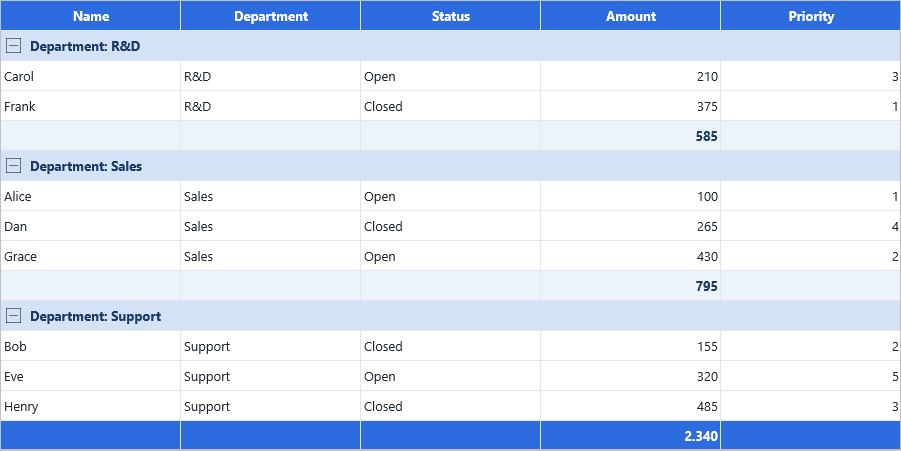
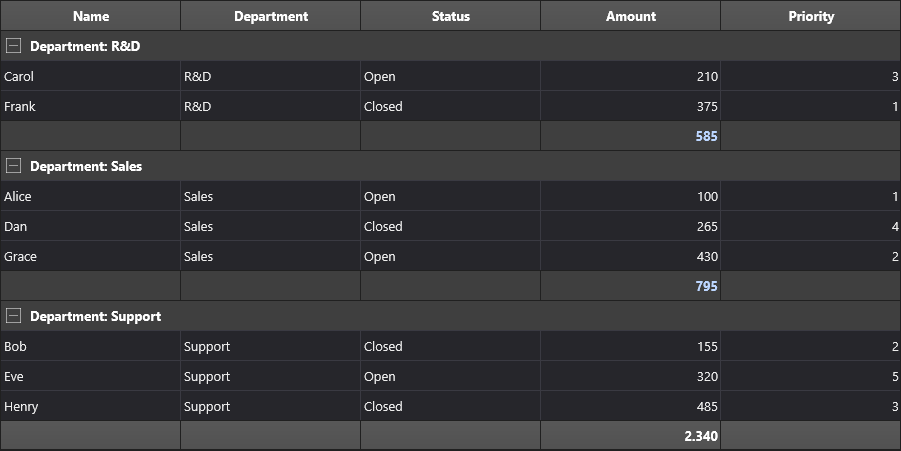
The per-group format comes from Options.Grouping.CalculationFormat; the footer
format comes from the per-calculation options callback (or
OnGetColumnCalculationOptions). Use the same format string in both so the
group subtotals and the grand total read consistently. Because both systems
recalculate on edit, the grand total and every group total stay in sync as the
user changes data. See Grouping for the grouping side.
Related API
Grid.ColumnSum/ColumnAverage/ColumnMin/ColumnMax/ColumnDistinct/ColumnStandardDeviation/ColumnCustomCalculationGrid.RowSum/RowAverage/RowMin/RowMax/RowDistinct/RowStandardDeviation/RowCustomCalculationGrid.ColumnCalculations[Col, Name]— live footer calculations.Grid.UpdateCalculations/UpdateColumnCalculation(ACol, AName)/UpdateRowCalculation(ARow, AName)OnCustomColumnCalculation/OnCustomRowCalculation— custom calculation callbacks (functions returningDouble).Grid.FixedBottomRowCount— number of bottom fixed rows used for footer totals.Grid.GroupSum/GroupAverage/GroupCount/GroupMin/GroupMax— per-group aggregations.OnGetColumnCalculationOptions— grid-wide event: format and merge options for column calculations.OnGetRowCalculationOptions— grid-wide event: format options for row calculations.TTMSFNCDataGridDataColumnCalculationOptions—CalculationFormat,CalculationFormatType,MergeSummary,SummaryInHeader.TTMSFNCDataGridDataRowCalculationOptions—CalculationFormat,CalculationFormatType.Grid.Options.Calculations.AutoUpdate— recalculate automatically after programmatic cell-data changes, not just user edits (defaultFalse).Grid.Options.Calculations.IncludeHiddenRows— include or exclude hidden/filtered rows in calculations (defaultTrue).Grid.Options.Calculations.IncludeHiddenColumns— include or exclude hidden columns in calculations (defaultTrue).
See also
- Grouping — group-level aggregations.
- Data, formatting & conversion — display formatting for footer cells.