Data, formatting & conversion
How the grid stores cell values, how
OnGetCellFormattinglets you display them differently from how they're stored, and how to convert between cell values and Delphi types.
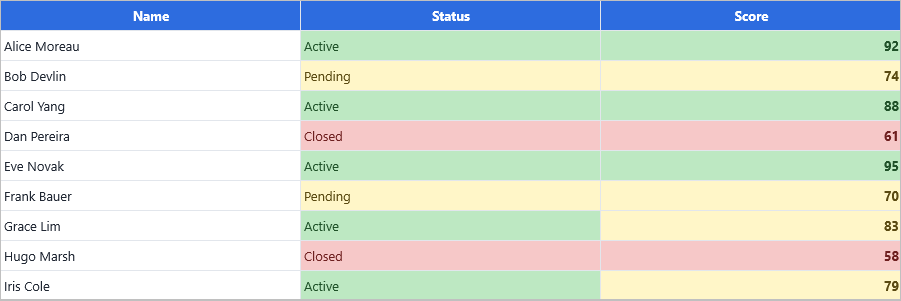

Cells store TValue
Every cell holds a Delphi TValue — the same variant-like type used by RTTI. That means Grid.Cells[col, row] accepts any Delphi value:
Grid.Cells[0, 1] := 1;                  // Integer
Grid.Cells[1, 1] := 'John Doe';         // string
Grid.Cells[2, 1] := True;               // Boolean
Grid.Cells[3, 1] := Now;                // TDateTime
Grid.Cells[4, 1] := 1.23456789;         // Double
Typed setters/getters are slightly faster and more readable:
Grid.Ints[0, 1]     := 42;
Grid.Floats[1, 1]   := 3.14;
Grid.Booleans[2, 1] := True;
Display formatting per column
Grid.Columns[i].Formatting controls how stored values are rendered for that column. Set Type and an optional format string, and call AddSetting(gcsFormatting) so the column owns its formatting:
procedure TForm1.ConfigureColumnFormatting;
begin
  Grid.Columns[0].Formatting.&Type  := gdftNumber;
  Grid.Columns[0].Formatting.Format := '%.2f';
  Grid.Columns[0].AddSetting(gcsFormatting);

  Grid.Columns[1].Formatting.&Type := gdftDateTime;
  Grid.Columns[1].AddSetting(gcsFormatting);
end;
void __fastcall TForm1::ConfigureColumnFormatting()
{
  Grid->Columns->Items[0]->Formatting->Type   = gdftNumber;
  Grid->Columns->Items[0]->Formatting->Format = "%.2f";
  Grid->Columns->Items[0]->AddSetting(gcsFormatting);

  Grid->Columns->Items[1]->Formatting->Type = gdftDateTime;
  Grid->Columns->Items[1]->AddSetting(gcsFormatting);
}
Available format types (TTMSFNCDataGridDataFormattingType):
| Type | Renders as |
|---|---|
gdftDefault |
No conversion applied — the raw string value is used as-is (default). |
gdftNumber |
Integer with thousand separators. |
gdftFloat |
Floating-point with Format applied. |
gdftDate / gdftTime / gdftDateTime |
Date/time using Format and locale settings. |
gdftBoolean |
True/false text (configurable via BooleanTrueText / BooleanFalseText). |
Per-cell formatting via OnGetCellFormatting
For dynamic per-row formatting (e.g. dates from a string column, custom currency symbol per row, condition-based displays), hook OnGetCellFormatting. The event fires for every cell on every paint:
procedure TForm1.GridGetCellFormatting(Sender: TObject;
  ACell: TTMSFNCDataGridCellCoord;
  AData: TTMSFNCDataGridCellValue;
  var AFormatting: TTMSFNCDataGridDataFormatting;
  var AConvertSettings: TFormatSettings;
  var ACanFormat: Boolean);
begin
  if ACell.Row = 0 then        // skip header row
    Exit;

  ACanFormat := True;

  case ACell.Column of
    1: begin                   // dates as yyyy/mm/dd
         AFormatting.&Type := gdftDate;
         AFormatting.Format := 'yyyy/mm/dd';
         AConvertSettings.DateSeparator := '/';
       end;

    2: begin                   // booleans as Approved/Pending
         AFormatting.&Type := gdftBoolean;
         AFormatting.BooleanTrueText  := 'Approved';
         AFormatting.BooleanFalseText := 'Pending';
       end;

    4: begin                   // currency
         AFormatting.&Type   := gdftFloat;
         AFormatting.Format  := '#,##0.00';
         AConvertSettings.CurrencyString    := '$';
         AConvertSettings.DecimalSeparator  := '.';
         AConvertSettings.ThousandSeparator := ',';
       end;
  end;
end;
void __fastcall TForm1::GridGetCellFormatting(TObject *Sender,
  const TTMSFNCDataGridCellCoord &ACell,
  const TTMSFNCDataGridCellValue &AData,
  TTMSFNCDataGridDataFormatting &AFormatting,
  System::Sysutils::TFormatSettings &AConvertSettings,
  bool &ACanFormat)
{
  TTMSFNCDataGridCellCoord Cell = ACell;  // ACell is const; its getters are not
  if (Cell.Row == 0)        // skip header row
    return;

  ACanFormat = true;

  switch (Cell.Column)
  {
    case 1:                  // dates as yyyy/mm/dd
      AFormatting.Type = gdftDate;
      AFormatting.Format = "yyyy/mm/dd";
      AConvertSettings.DateSeparator = L'/';
      break;

    case 2:                  // booleans as Approved/Pending
      AFormatting.Type = gdftBoolean;
      AFormatting.BooleanTrueText  = "Approved";
      AFormatting.BooleanFalseText = "Pending";
      break;

    case 4:                  // currency
      AFormatting.Type   = gdftFloat;
      AFormatting.Format = "#,##0.00";
      AConvertSettings.CurrencyString    = "$";
      AConvertSettings.DecimalSeparator  = L'.';
      AConvertSettings.ThousandSeparator = L',';
      break;
  }
}
| Parameter | What it carries |
|---|---|
ACell |
The cell being formatted (Col, Row). |
AData |
The actual stored value as TTMSFNCDataGridCellValue. |
AFormatting |
The formatting record — set its Type, Format, BooleanTrueText, BooleanFalseText. |
AConvertSettings |
A TFormatSettings record. Adjust to control date separator, currency symbol, etc. |
ACanFormat |
Set True to enable formatting; defaults False for fixed cells. |
Overriding the rendered text: OnGetCellDisplayValue
OnGetCellFormatting controls how a stored value is formatted. OnGetCellDisplayValue goes one step further: it lets you replace the entire rendered string without changing what is stored in the cell.
This is useful when:
- You need to combine values from multiple columns into one rendered cell.
- You want to inject HTML markup into cells without storing HTML in the data layer.
- You store a code internally (
'M') but want to display a label ('Male').
procedure TForm1.GridGetCellDisplayValue(Sender: TObject;
  ACell: TTMSFNCDataGridCellCoord;
  AData: TTMSFNCDataGridCellValue;
  var AValue: string);
begin
  if ACell.Row <= 0 then Exit;      // skip header row

  case ACell.Column of
    0: begin
         // Combine first-name (col 0) and last-name (col 1) into one cell
         AValue := Grid.Strings[0, ACell.Row]
                 + ' ' + Grid.Strings[1, ACell.Row];
       end;
    2: begin
         // Render a stored status code as a descriptive label
         if AData.AsString = 'O' then AValue := 'Open'
         else if AData.AsString = 'C' then AValue := 'Closed'
         else AValue := AData.AsString;
       end;
    3: begin
         // Inject bold HTML without storing HTML
         AValue := '<b>' + FormatDateTime('dd-mmm-yyyy',
                   Grid.Floats[ACell.Column, ACell.Row]) + '</b>';
       end;
  end;
end;
void __fastcall TForm1::GridGetCellDisplayValue(TObject *Sender,
  const TTMSFNCDataGridCellCoord &ACell,
  const TTMSFNCDataGridCellValue &AData,
  System::UnicodeString &AValue)
{
  TTMSFNCDataGridCellCoord Cell = ACell;  // ACell is const; its getters are not
  if (Cell.Row <= 0)
    return;      // skip header row

  switch (Cell.Column)
  {
    case 0:
      // Combine first-name (col 0) and last-name (col 1) into one cell
      AValue = Grid->Strings[0][Cell.Row] + " " + Grid->Strings[1][Cell.Row];
      break;
    case 2:
      // Render a stored status code as a descriptive label
      if (TValue(AData).ToString() == "O")
        AValue = "Open";
      else if (TValue(AData).ToString() == "C")
        AValue = "Closed";
      else
        AValue = TValue(AData).ToString();
      break;
    case 3:
      // Inject bold HTML without storing HTML
      AValue = "<b>" + FormatDateTime("dd-mmm-yyyy",
               Grid->Floats[Cell.Column][Cell.Row]) + "</b>";
      break;
  }
}
The override is display-only. The stored value, sorting behaviour, filter evaluation, and what the editor receives are all based on the original
AData, not the overridden string. SetGrid.OnGetCellDisplayValue := GridGetCellDisplayValueto wire the event.
For adapter-connected grids, see the same event discussed in the data-binding guide.
Reading cell values back
To read a cell value back from the grid, fetch it as TValue and use the appropriate accessor:
var V: TValue;
V := Grid.Cells[1, 1];

if V.IsType<Integer> then
  Showmessage(IntToStr(V.AsInteger));

ShowMessage(V.ToString);    // works for any kind
Typed getters skip the TValue machinery:
var I := Grid.Ints[0, 1];
var F := Grid.Floats[1, 1];
var S := Grid.Strings[2, 1];
Type-checking and converting cell values
When writing rendering or calculation code that works with TTMSFNCDataGridCellValue directly — especially in OnGetCellLayout, custom cell classes, or the headless data layer — the TTMSFNCDataGridData class provides a family of class methods for safe type-checking and conversion without touching RTTI directly:
Type-check methods (return Boolean):
| Method | Returns True when… |
|---|---|
ValueIsBoolean(V) |
The value is a Boolean. |
ValueIsFloat(V) |
The value is a floating-point number. |
ValueIsInteger(V) |
The value is an integer. |
ValueIsDateTime(V) |
The value is a TDateTime. |
ValueIsString(V) |
The value is a string. |
Conversion methods (return the typed value, or a sensible default on mismatch):
| Method | Returns |
|---|---|
ValueToBoolean(V) |
Boolean — parses strings 'true'/'false' too. |
ValueToFloat(V) |
Double. |
ValueToFloat(V, FmtSettings) |
Double, using the supplied locale for decimal separator. |
ValueToInt64(V) |
Int64. |
ValueToInteger(V) |
Integer. |
ValueToString(V) |
String representation. |
ValueToDateTime(V) |
TDateTime. |
procedure TForm1.TintNegativeAmount(ARow: Integer; ALayout: TTMSFNCDataGridCellLayout);
var
  V: TTMSFNCDataGridCellValue;
  Amount: Double;
begin
  // In a custom column calculation or cell drawing handler:
  V := Grid.Cells[AmountCol, ARow];
  if TTMSFNCDataGridData.ValueIsFloat(V) then
  begin
    Amount := TTMSFNCDataGridData.ValueToFloat(V);
    if Amount < 0 then
      ALayout.Fill.Color := gcLightCoral;
  end;
end;
void __fastcall TForm1::TintNegativeAmount(int ARow, TTMSFNCDataGridCellLayout *ALayout)
{
  // In a custom column calculation or cell drawing handler:
  TTMSFNCDataGridCellValue V = Grid->Cells[AmountCol][ARow];
  if (TTMSFNCDataGridData::ValueIsFloat(V))
  {
    double Amount = TTMSFNCDataGridData::ValueToFloat(V);
    if (Amount < 0)
      ALayout->Fill->Color = gcLightcoral;
  }
}
All methods are class function — call them on the class name, not on an instance.
Parsing strings as dates
A common case: data comes in as strings ('31-12-2023'), but you want the grid to treat it as a date for sorting and display. Set AConvertSettings to interpret the input format, and AFormatting to display the output format:
procedure TForm1.GridGetCellFormatting(Sender: TObject;
  ACell: TTMSFNCDataGridCellCoord;
  AData: TTMSFNCDataGridCellValue;
  var AFormatting: TTMSFNCDataGridDataFormatting;
  var AConvertSettings: TFormatSettings;
  var ACanFormat: Boolean);
begin
  if ACell.Column = 1 then
  begin
    AConvertSettings.ShortDateFormat := 'dd-mm-yyyy';   // input format
    AConvertSettings.DateSeparator   := '-';

    AFormatting.&Type  := gdftDate;
    AFormatting.Format := 'yyyy/mm/dd';                 // display format
    ACanFormat := True;
  end;
end;
void __fastcall TForm1::GridGetCellFormatting(TObject *Sender,
  const TTMSFNCDataGridCellCoord &ACell,
  const TTMSFNCDataGridCellValue &AData,
  TTMSFNCDataGridDataFormatting &AFormatting,
  System::Sysutils::TFormatSettings &AConvertSettings,
  bool &ACanFormat)
{
  TTMSFNCDataGridCellCoord Cell = ACell;  // ACell is const; its getters are not
  if (Cell.Column == 1)
  {
    AConvertSettings.ShortDateFormat = "dd-mm-yyyy";   // input format
    AConvertSettings.DateSeparator   = L'-';

    AFormatting.Type   = gdftDate;
    AFormatting.Format = "yyyy/mm/dd";                 // display format
    ACanFormat = true;
  }
}
Storage vs display
Two principles:
- Storage drives sorting and filtering. Sorting a column with
Formatting.Type := gdftFloatorders by numeric value, even if the display format hides decimals. - Display drives the user experience. Two cells with the same stored value can render differently based on their column, format, or
OnGetCellFormattinglogic.
Keep numeric and date data in their native types whenever possible — the conversion-from-string path is slower and brittle.
Attaching application data to cells: Objects and ManagedObjects
Every cell can carry an arbitrary TObject reference alongside its display value. Two properties provide this:
| Property | Ownership | Use it for |
|---|---|---|
Grid.Objects[col, row]: TObject |
You keep ownership — the grid never frees it. | Pointer back to a domain record or list item. |
Grid.ManagedObjects[col, row]: TObject |
Grid owns it — freed when the cell is cleared or the grid is destroyed. | Temporary helper objects that should live exactly as long as the cell. |
// Tag a row with a record pointer (not owned by grid)
Grid.Objects[0, 3] := MyRecordList[3];

// Retrieve it in an event
procedure TForm1.GridCellClick(Sender: TObject; AColumn, ARow: Integer);
var R: TMyRecord;
begin
  R := TMyRecord(Grid.Objects[0, ARow]);
  if R <> nil then
    ShowMessage(R.Description);
end;
Objects[]stores a plain pointer cast; the grid does no type-checking. Always check fornilbefore dereferencing.
Typed application-data slots on extended cell items
Objects[] and ManagedObjects[] carry an untyped TObject. When you need tightly-typed per-cell storage without boxing through a class, the extended cell item exposes five typed slots:
| Property | Type | Notes |
|---|---|---|
DataBoolean |
Boolean |
Any boolean flag (e.g. "row is dirty"). |
DataInteger |
NativeInt |
Any integer tag (e.g. a database record ID). |
DataString |
string |
Any short string (e.g. a key or label). |
DataObject |
TObject |
Object pointer, not owned — same semantics as Objects[]. |
DataPointer |
Pointer |
Raw pointer for interop. |
All five are application-use slots — the grid never reads or writes them during normal operation.
// Store a record ID on column 0 of each row without boxing it in a TObject
for var R := Grid.FixedRowCount to Grid.RowCount - 1 do
begin
  var Item := Grid.CellData[0, R].AsExtended;
  if Assigned(Item) then
    Item.DataInteger := MyRecords[R - Grid.FixedRowCount].ID;
end;

// Retrieve in an event
procedure TForm1.GridCellClick(Sender: TObject; AColumn, ARow: Integer);
var Item := Grid.CellData[0, ARow].AsExtended;
begin
  if Assigned(Item) then
    EditRecord(Item.DataInteger);
end;
CellData[col, row]returnsnilfor empty cells.AsExtendedreturnsnilif the cell item is not an extended instance. Always check fornil.
Accessing stored vs displayed cell content
| Property | What it returns |
|---|---|
Grid.Cells[col, row] |
The raw TValue stored in the cell — the source of truth for sorting, filtering, and editing. |
Grid.Strings[col, row] |
String representation of Cells[], formatted if a column format is set. |
Grid.StoredCells[col, row] |
The value exactly as it was last committed (before any in-flight edit). Useful when you need to compare the current stored value against what was there before an edit started. |
Grid.StrippedCells[col, row] |
The cell text with all HTML tags removed. Use this when you need to export or search the plain text of a cell that may contain HTML markup. |
// Safe plain-text export from a column that may contain HTML
for var R := Grid.FixedRowCount to Grid.RowCount - 1 do
  Lines.Add(Grid.StrippedCells[0, R]);

// Compare stored vs currently edited value
if Grid.StoredCells[AColumn, ARow] <> Grid.Cells[AColumn, ARow] then
  MarkAsModified(ARow);
Clearing cell data
Three methods erase stored values with different scope:
| Method | What it clears |
|---|---|
Grid.ClearData |
All cell values in the entire grid — fast single call. Row/column count, widths, heights, and layouts are preserved. |
Grid.ClearCells(Range) |
Values in a specific rectangular cell range only. Pass a TTMSFNCDataGridCellCoordRange built with MakeCellRange(col1, row1, col2, row2). |
Grid.ClearDataForColumn(col) |
All values in a single column. Pass AllRowTypes (the default) to include group and summary rows too. |
Grid.ClearDataForRow(row) |
All values in a single row. Same AllRowTypes parameter. |
// Erase everything and reload
Grid.ClearData;
Grid.LoadFromCSVData('fresh.csv');

// Erase a rectangular block (columns 2–4, rows 5–9)
Grid.ClearCells(MakeCellRange(2, 5, 4, 9));

// Erase one column before re-populating it
Grid.ClearDataForColumn(3);
for var R := Grid.FixedRowCount to Grid.RowCount - 1 do
  Grid.Cells[3, R] := ComputeValue(R);
ClearDataonly removes values from the internal dictionary — it does not resetRowCount,ColumnCount,RowHeights, orColumnWidths. To reset the full grid structure, setRowCountandColumnCountafter callingClearData.
See also
- Editing cells — inplace editors and how they interact with formatting.
- Sorting — how the data layer compares typed values.
- Layout priority — formatting is independent of appearance, but they interact.
- Tree mode — using
Objects[]to tag tree rows for lazy loading. - Data binding —
OnGetCellDisplayValuein adapter-connected grids.