Data binding
Bind a
TTMSFNCDataGridto anyTDataSet(FireDAC, ClientDataSet, BDE, StellarDS, …) via the dedicatedTTMSFNCDataGridDatabaseAdaptercomponent. No code is required for the basic case — drop, wire, open.
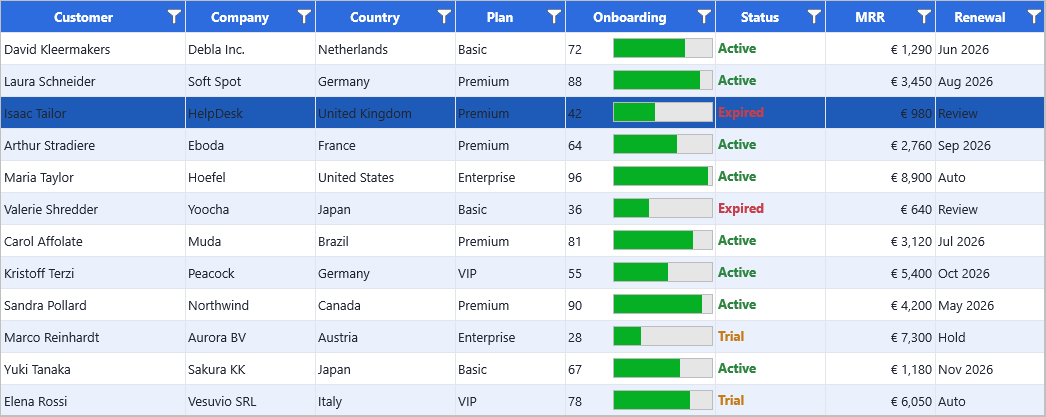
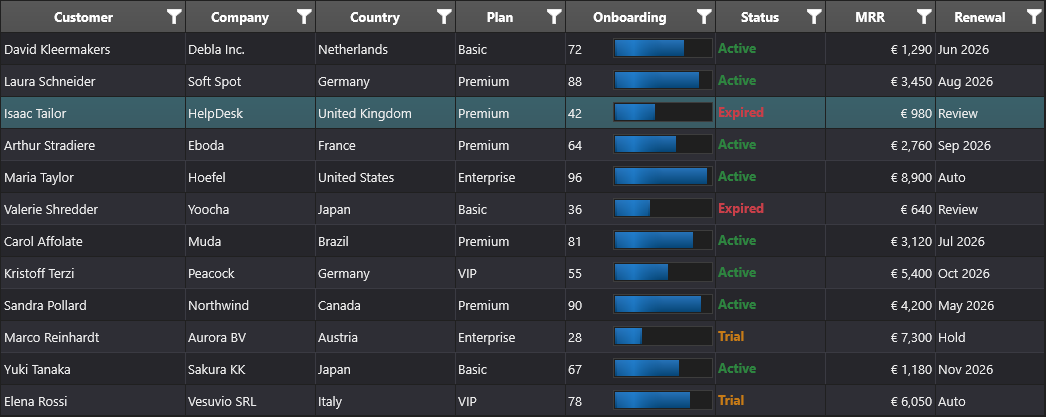
Overview
The database adapter is the bridge between the dataset world (records, fields, navigation) and the grid world (columns, cells, layouts). It listens for dataset events and synchronises the grid in both directions: edits in the grid go back to the dataset, and navigation in the dataset moves the selected grid row.
| Capability | API |
|---|---|
| Auto-create columns from fields | AutoCreateColumns := True |
| Pick which fields appear | Adapter.Columns[i] collection |
| Buffered (lazy) loading for huge datasets | LoadMode := almBuffered |
| HTML templates per cell | Adapter.Columns[i].HTMLTemplate |
| BLOB fields rendered as images | Adapter.Columns[i].PictureField := True |
| Numeric fields rendered as progress bars | Adapter.Columns[i].ProgressField := True |
| Lookup fields rendered as drop-downs | Adapter.Columns[i].UseLookupEditor := True |
| Custom field-to-cell conversion | OnFieldToData / OnDataToField |
| Dynamic HTML template per cell | OnGetHTMLTemplate / OnGetHTMLTemplateData |
Quick example
procedure TForm1.FormCreate(Sender: TObject);
begin
  // Wire up the adapter
  Adapter.DataGrid    := Grid;
  Adapter.DataSource  := DataSource1;        // TDataSource attached to FDTable1

  // Auto-create one column per dataset field; remove columns when fields go away.
  Adapter.AutoCreateColumns := True;
  Adapter.AutoRemoveColumns := True;

  // Open the dataset — the grid populates itself.
  FDTable1.Active := True;

  // Optional: shrink the row-number column after the data loads.
  Grid.ColumnWidths[0] := 30;
  Grid.AutoSizeColumns;
end;
void __fastcall TForm1::FormCreate(TObject *Sender)
{
  // Wire up the adapter
  Grid->Adapter       = Adapter;  // the adapter is attached from the grid side
  Adapter->DataSource = DataSource1;        // TDataSource attached to FDTable1

  // Auto-create one column per dataset field; remove columns when fields go away.
  Adapter->AutoCreateColumns = true;
  Adapter->AutoRemoveColumns = true;

  // Open the dataset - the grid populates itself.
  FDTable1->Active = true;

  // Optional: shrink the row-number column after the data loads.
  Grid->ColumnWidths[0] = 30;
  Grid->AutoSizeColumns();
}
Step by step
1. Drop the adapter
Place a TTMSFNCDataGridDatabaseAdapter next to the grid on the form. Set:
Adapter.DataGrid   := Grid;
Adapter.DataSource := DataSource1;
2. Choose how columns are created
| Mode | What you get |
|---|---|
AutoCreateColumns := True (default) |
One column per dataset field. Headers from DisplayLabel. |
Manual: Adapter.Columns.Add |
Pick exactly which fields to expose, in which order. |
3. Open the dataset
FDTable1.Active := True; // grid populates immediately
4. Customise individual adapter columns
Adapter.Columns[2].HTMLTemplate  := '<b><#Name></b>';
Adapter.Columns[3].PictureField  := True;          // BLOB → embedded image
Adapter.Columns[4].ProgressField := True;          // numeric → progress bar
Adapter.Columns[5].UseLookupEditor := True;        // lookup field → drop-down
5. Dynamic HTML templates
For cell-level HTML where the template depends on the row data, use the event
instead of a fixed HTMLTemplate:
procedure TForm1.AdapterGetHTMLTemplate(Sender: TObject;
  ACol, ARow: Integer; var AHTMLTemplate: string; AFields: TFields);
begin
  if ACol = StatusColumn then
    AHTMLTemplate := '<font color="<#StatusColor>"><#Status></font>';
end;
6. Override field/cell conversion (optional)
procedure TForm1.AdapterFieldToData(Sender: TObject; ACell: TTMSFNCDataGridCellCoord;
  AMasterField, AField: TField; var ACellValue: TTMSFNCDataGridCellValue;
  var Handled: Boolean);
begin
  if AField.FieldName = 'Salary' then
  begin
    ACellValue := FormatCurr('$#,##0.00', AField.AsCurrency);
    Handled := True;
  end;
end;
void __fastcall TForm1::AdapterFieldToData(TObject *Sender, const TTMSFNCDataGridCellCoord &ACell,
  TField *AMasterField, TField *AField, TTMSFNCDataGridCellValue &ACellValue,
  bool &Handled)
{
  if (AField->FieldName == "Salary")
  {
    ACellValue = TValue::From<System::UnicodeString>(FormatCurr("$#,##0.00", AField->AsCurrency));
    Handled = true;
  }
}
Buffered vs all-at-once loading
LoadMode |
When to use |
|---|---|
almAllRecords (default) |
Datasets up to ~50k records. Enables full client-side sort/group. |
almBuffered |
Larger datasets. Only the visible window is kept in memory. |
In buffered mode, sorting and grouping become server-side concerns — let the underlying SQL handle them.
// All-at-once (default) — full client-side sort and group available
Adapter.LoadMode := almAllRecords;
Adapter.LoadAll;

// Buffered — only the visible window is kept in memory
// Sort and group via the SQL ORDER BY / GROUP BY instead
Adapter.LoadMode := almBuffered;
Overriding the displayed value: OnGetCellDisplayValue
The adapter writes the field value into the cell (via OnFieldToData or the default mapping). Sometimes you want the grid to display something different without changing what is stored — for example, combining fields, applying custom formatting, or injecting HTML.
Hook OnGetCellDisplayValue on the grid (not the adapter):
procedure TForm1.GridGetCellDisplayValue(Sender: TObject;
  ACell: TTMSFNCDataGridCellCoord;
  AData: TTMSFNCDataGridCellValue;          // stored value
  var AValue: string);                     // override what is rendered
begin
  if ACell.Row <= 0 then Exit;             // skip header row

  if ACell.Column = 2 then
    // Combine first name (col 0) and last name (col 1) into column 2
    AValue := Grid.Strings[0, ACell.Row] + ' ' + Grid.Strings[1, ACell.Row];
end;
void __fastcall TForm1::GridGetCellDisplayValue(TObject *Sender,
  const TTMSFNCDataGridCellCoord &ACell,
  const TTMSFNCDataGridCellValue &AData,
  System::UnicodeString &AValue)
{
  TTMSFNCDataGridCellCoord Cell = ACell;  // ACell is const; its getters are not
  if (Cell.Row <= 0)
    return;             // skip header row

  if (Cell.Column == 2)
    // Combine first name (col 0) and last name (col 1) into column 2
    AValue = Grid->Strings[0][Cell.Row] + " " + Grid->Strings[1][Cell.Row];
}
OnGetCellDisplayValue also enables HTML in adapter-connected cells. The stored
value remains the raw field text; the displayed value can be an HTML string:
// Display a date field as bold HTML without storing HTML in the dataset
if ACell.Column = DateColumn then
  AValue := '<b>' + FormatDateTime('dd-mmm-yyyy',
              Grid.Floats[ACell.Column, ACell.Row]) + '</b>';
The overridden display value is used for rendering only. The stored value (
AData) and the data the adapter writes back to the dataset are not affected.
DynamicRecordCount
For server-side paging where the exact record count is not known upfront, set DynamicRecordCount on the database adapter:
Adapter.DynamicRecordCount := True;
When enabled, the adapter does not call RecordCount on the dataset. This avoids a potentially expensive full-table scan on databases that don't have a cheap record-count operation. Combine with LoadMode := almBuffered and Grid.Paging for a full server-side paging setup.
Combining adapter loading, conversion, and display overrides
Real database grids often need more than a straight field-to-column mapping. This setup keeps the adapter in buffered mode for a large query, formats the stored currency value before it reaches the cell, and still uses OnGetCellDisplayValue for render-only markup that should not be written back to the dataset.
procedure TForm1.FormCreate(Sender: TObject);
begin
  Adapter.DataGrid := Grid;
  Adapter.DataSource := DataSource1;
  Adapter.AutoCreateColumns := True;
  Adapter.LoadMode := almBuffered;
  Adapter.DynamicRecordCount := True;
  Adapter.OnFieldToData := AdapterFieldToData;

  Grid.OnGetCellDisplayValue := GridGetCellDisplayValue;

  FDQuery1.Active := True;
end;

procedure TForm1.AdapterFieldToData(Sender: TObject;
  ACell: TTMSFNCDataGridCellCoord; AMasterField, AField: TField;
  var ACellValue: TTMSFNCDataGridCellValue; var Handled: Boolean);
begin
  if AField.FieldName = 'Amount' then
  begin
    ACellValue := FormatCurr('#,##0.00', AField.AsCurrency);
    Handled := True;
  end;
end;

procedure TForm1.GridGetCellDisplayValue(Sender: TObject;
  ACell: TTMSFNCDataGridCellCoord; AData: TTMSFNCDataGridCellValue;
  var AValue: string);
begin
  if (ACell.Row > 0) and (ACell.Column = StatusColumn) then
    AValue := '<b>' + AValue + '</b>';
end;
void __fastcall TForm1::FormCreate(TObject *Sender)
{
  Grid->Adapter = Adapter;  // the adapter is attached from the grid side
  Adapter->DataSource = DataSource1;
  Adapter->AutoCreateColumns = true;
  Adapter->LoadMode = almBuffered;
  Adapter->DynamicRecordCount = true;
  Adapter->OnFieldToData = AdapterFieldToData;

  Grid->OnGetCellDisplayValue = GridGetCellDisplayValue;

  FDQuery1->Active = true;
}

void __fastcall TForm1::AdapterFieldToData(TObject *Sender,
  const TTMSFNCDataGridCellCoord &ACell, TField *AMasterField, TField *AField,
  TTMSFNCDataGridCellValue &ACellValue, bool &Handled)
{
  if (AField->FieldName == "Amount")
  {
    ACellValue = TValue::From<System::UnicodeString>(FormatCurr("#,##0.00", AField->AsCurrency));
    Handled = true;
  }
}

void __fastcall TForm1::GridGetCellDisplayValue(TObject *Sender,
  const TTMSFNCDataGridCellCoord &ACell, const TTMSFNCDataGridCellValue &AData,
  System::UnicodeString &AValue)
{
  TTMSFNCDataGridCellCoord Cell = ACell;  // ACell is const; its getters are not
  if ((Cell.Row > 0) && (Cell.Column == StatusColumn))
    AValue = "<b>" + AValue + "</b>";
}
Related API
TTMSFNCDataGridDatabaseAdapterAdapter.DataSource,Adapter.DataGrid,Adapter.AutoCreateColumnsAdapter.Columns[i]—FieldName,Header,HTMLTemplate,PictureField,CheckBoxField,ProgressField,UseLookupEditorAdapter.LoadMode(almBuffered/almAllRecords)Adapter.DynamicRecordCount— skipRecordCountcall for server-side pagingOnGetCellDisplayValue— override the rendered text per cell without changing stored dataOnFieldToData/OnDataToFieldOnGetHTMLTemplate/OnGetHTMLTemplateData
See also
- Master-detail — link two grids via the dataset hierarchy.
- Large datasets — buffered loading patterns.
- Demo:
Demo/FMX/DataGrid/Database/Customers_FireDac_SQLite - Demo:
Demo/FMX/DataGrid/Database/Biolife_ClientDataSet - Demo:
Demo/FMX/DataGrid/Database/StellarDS