Master-detail
Show two related datasets together — selecting an order in the master grid updates the detail grid (or an embedded detail panel) to show only that order's items.
Overview
TTMSFNCDataGridDatabaseAdapter integrates with Delphi's standard dataset master-detail mechanism. Each grid pairs with its own adapter; the adapter binds to a TDataSet whose MasterSource / MasterFields link drives the detail refresh.
Three flavours are supported:
| Pattern | When to use | API |
|---|---|---|
| Two side-by-side grids | Master and detail visible at the same time, each with its own grid. | Two TTMSFNCDataGridDatabaseAdapter instances, dataset-linked via MasterSource. |
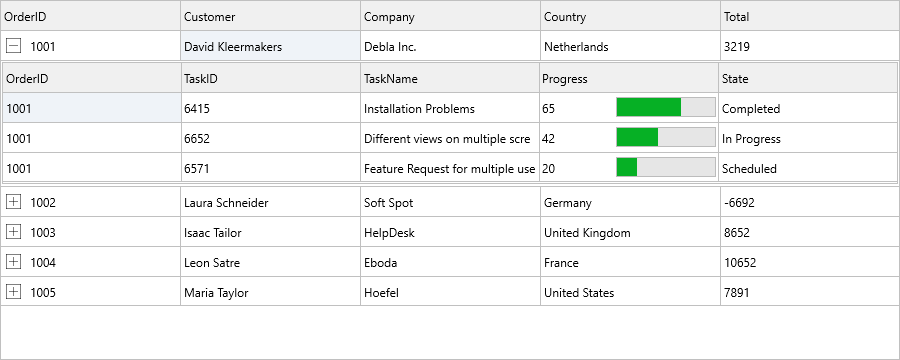
| Inline detail control | One grid; each master row expands to reveal its detail control underneath. | MasterAdapter.DetailControl := DetailControl. |
| Nested sub-grid | Each cell hosts a fully functional sub-grid for that record's children. | Grid.AddGrid(AColumn, ARow). See Cell controls. |
| Custom synchronisation | Data sources that aren't TDataSet-based (REST, in-memory list). |
Sync via OnSelectCell. |
Quick example
procedure TForm1.FormCreate(Sender: TObject);
begin
  // Master grid bound to FDTable1 (orders)
  MasterAdapter.DataGrid    := MasterGrid;
  MasterAdapter.DataSource  := DataSource1;
  MasterAdapter.AutoCreateColumns := True;

  // Detail grid bound to FDTable2 (order items). The dataset itself does the
  // linking via MasterSource + MasterFields, configured at design time.
  DetailAdapter.DataGrid    := DetailGrid;
  DetailAdapter.DataSource  := DataSource2;
  DetailAdapter.AutoCreateColumns := True;

  // Open both — the detail dataset filters automatically as the master row
  // changes because of the master/detail FireDAC linkage.
  FDTable1.Active := True;
  FDTable2.Active := True;
end;
void __fastcall TForm1::FormCreate(TObject *Sender)
{
  // Master grid bound to FDTable1 (orders)
  MasterGrid->Adapter     = MasterAdapter;
  MasterAdapter->DataSource = DataSource1;
  MasterAdapter->AutoCreateColumns = true;

  // Detail grid bound to FDTable2 (order items). The dataset itself does the
  // linking via MasterSource + MasterFields, configured at design time.
  DetailGrid->Adapter     = DetailAdapter;
  DetailAdapter->DataSource = DataSource2;
  DetailAdapter->AutoCreateColumns = true;

  // Open both - the detail dataset filters automatically as the master row
  // changes because of the master/detail FireDAC linkage.
  FDTable1->Active = true;
  FDTable2->Active = true;
}
Side-by-side grids
1. Set up the datasets
| Dataset | Property | Value |
|---|---|---|
MasterTable (e.g. FDTable1) |
TableName |
Orders |
DetailTable (e.g. FDTable2) |
TableName |
OrderDetails |
DetailTable |
MasterSource |
MasterDataSource |
DetailTable |
MasterFields |
OrderID (the foreign-key field) |
DetailTable |
IndexFieldNames |
OrderID (ensures detail rows are ordered) |
MasterFields and IndexFieldNames are the link the detail dataset uses to filter itself when the master cursor moves.
procedure TForm1.ConfigureMasterDetailDatasets;
begin
  MasterTable.TableName := 'Orders';
  DetailTable.TableName := 'OrderDetails';

  MasterDataSource.DataSet := MasterTable;
  DetailDataSource.DataSet := DetailTable;

  DetailTable.MasterSource := MasterDataSource;
  DetailTable.MasterFields := 'OrderID';
  DetailTable.IndexFieldNames := 'OrderID';
end;
void __fastcall TForm1::ConfigureMasterDetailDatasets()
{
  MasterTable->TableName = "Orders";
  DetailTable->TableName = "OrderDetails";

  MasterDataSource->DataSet = MasterTable;
  DetailDataSource->DataSet = DetailTable;

  DetailTable->MasterSource = MasterDataSource;
  DetailTable->MasterFields = "OrderID";
  DetailTable->IndexFieldNames = "OrderID";
}
2. Drop two TDataSource components
MasterDataSource.DataSet := MasterTable;
DetailDataSource.DataSet := DetailTable;
3. Drop two grids and two adapters
MasterAdapter.DataGrid   := MasterGrid;
MasterAdapter.DataSource := MasterDataSource;

DetailAdapter.DataGrid   := DetailGrid;
DetailAdapter.DataSource := DetailDataSource;
With AutoCreateColumns := True (the default), each grid auto-generates one column per dataset field.
4. Open both datasets
MasterTable.Active := True;
DetailTable.Active := True;
The master grid populates immediately. As soon as the user selects a master row, the detail grid shows the matching child records — selection synchronisation, refresh on edit, and re-filtering on master navigation all happen automatically through the dataset layer.
Inline detail with Adapter.DetailControl
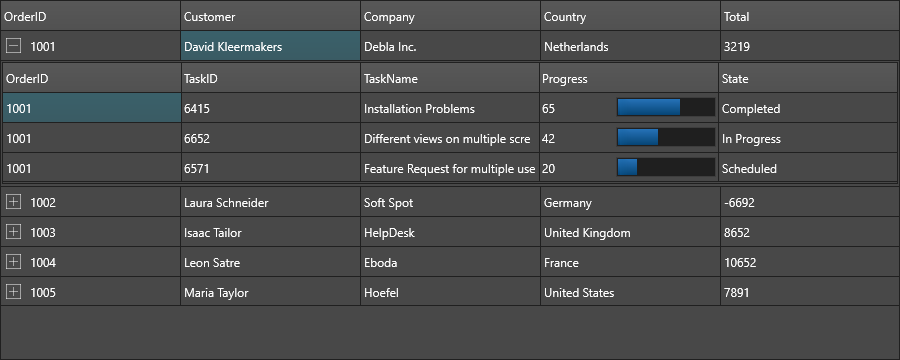
MasterAdapter.DetailControl embeds the detail control directly inside the master grid. Each master row gains an expand/collapse triangle, and the assigned control appears underneath when expanded:
MasterAdapter.DetailControl := DetailGrid;
DetailControl accepts any TControl — another grid, a panel of fields, a chart, a tree — so the inline detail can be whatever fits the data best.
Nested sub-grid in a cell
To host a sub-grid inside a single cell of the master grid (rather than a separate row that expands), call AddGrid:
SubGrid := MasterGrid.AddGrid(DetailColumn, ARow);
SubGrid.ColumnCount := 4;
// populate or bind SubGrid like any other grid
Sub-grids are full TTMSFNCDataGridRenderer instances — they support sorting, filtering, editing, and even further nesting. See Cell controls.
Synchronising non-dataset sources
To wire master-detail across data sources that aren't TDataSet based (REST API, in-memory list, custom store), drive the detail refresh from the master grid's OnSelectCell:
procedure TForm1.MasterGridSelectCell(Sender: TObject;
  AColumn, ARow: Integer);
var OrderID: Integer;
begin
  OrderID := MasterGrid.Ints[OrderIDColumn, ARow];
  ReloadDetailGrid(OrderID);
end;
ReloadDetailGrid queries the data source and refills the detail grid. The grid layer treats this exactly like dataset-driven master-detail — every grid feature (sorting, filtering, paging) works on the result.
Combining side-by-side grids, inline detail, and manual synchronization
The same form can expose a conventional detail grid, an inline detail control, and a small amount of custom selection logic. Keep the dataset link responsible for filtering child records, then use OnSelectCell only for extra UI refresh work that is not part of the dataset relationship.
procedure TForm1.FormCreate(Sender: TObject);
begin
  ConfigureMasterDetailDatasets;

  MasterAdapter.DataGrid := MasterGrid;
  MasterAdapter.DataSource := MasterDataSource;
  MasterAdapter.DetailControl := DetailGrid;

  DetailAdapter.DataGrid := DetailGrid;
  DetailAdapter.DataSource := DetailDataSource;

  MasterGrid.OnSelectCell := MasterGridSelectCell;

  MasterTable.Active := True;
  DetailTable.Active := True;
end;

procedure TForm1.MasterGridSelectCell(Sender: TObject;
  AStartCell, AEndCell, AFocusedCell: TTMSFNCDataGridCellCoord);
begin
  DetailGrid.AutoSizeColumns;
end;
void __fastcall TForm1::FormCreate(TObject *Sender)
{
  ConfigureMasterDetailDatasets();

  MasterGrid->Adapter = MasterAdapter;
  MasterAdapter->DataSource = MasterDataSource;
  MasterAdapter->DetailControl = DetailGrid;

  DetailGrid->Adapter = DetailAdapter;
  DetailAdapter->DataSource = DetailDataSource;

  MasterGrid->OnSelectCell = MasterGridSelectCell;

  MasterTable->Active = true;
  DetailTable->Active = true;
}

void __fastcall TForm1::MasterGridSelectCell(TObject *Sender,
  const TTMSFNCDataGridCellCoord &AStartCell, const TTMSFNCDataGridCellCoord &AEndCell,
  const TTMSFNCDataGridCellCoord &AFocusedCell)
{
  DetailGrid->AutoSizeColumns();
}
Related API
TTMSFNCDataGridDatabaseAdapter— adapter classAdapter.DataSource,Adapter.DataGridAdapter.DetailControl— embed a control as inline detail under each master rowGrid.AddGrid(AColumn, ARow)— create a sub-grid inside a cellOnSelectCell— synchronise master and detail without aTDataSet- Underlying dataset link:
TFDTable.MasterSource,MasterFields,IndexFieldNames(FireDAC);TClientDataSet.MasterSource,IndexFieldNames(DataSnap);TDataSetField(Interbase nested datasets)
See also
- Architecture — why each grid needs its own renderer.
- Data binding — single-dataset binding fundamentals.
- Cell controls —
AddGridfor nested-in-cell sub-grids. - Demo:
Demo/FMX/DataGrid/Database/Master_Detail_FireDac_SQLite