Conditional formatting: scope and priority
A grid with one rule needs none of this chapter. A grid with a dozen does,
because two questions decide what a reader actually sees: which cells is a rule
even considered for, and — when several rules match the same cell — which one
wins. Scope answers the first. Priority and StopIfTrue answer the second, and
they behave in a way that is easy to get backwards, so it is worth being precise.
Rule scope
Every rule has a Scope (TTMSFNCDataGridFormatRuleScope) that determines which
cells it is even considered for:
| Scope | Meaning | Related properties |
|---|---|---|
grsColumn (default) |
A single column, all data rows. | Column |
grsColumnRange |
A contiguous range of columns, all data rows. | Column, ColumnTo |
grsCellRange |
An explicit rectangular block of cells. | CellRange |
grsGrid |
Every data cell in the grid. | — |
Aggregate rule types (color scale, top/bottom, average, unique/duplicate) compute
their statistics — min/max, mean, standard deviation, rank order — per scope,
not per column in isolation, so a grsGrid color scale spreads its gradient across
every cell in the grid rather than recomputing it per column. The engine caches
these statistics and only recomputes them when the grid calls InvalidateStats.
ApplyToEntireRow := True is a separate axis from scope: it extends a matching
rule's appearance to every cell in the row, while the rule still evaluates the
triggering column's value. That distinction is what makes "highlight the whole row
for the top 5 by Sales" expressible — see the ForEntireRow note in
the fluent API.
How overlapping rules merge
When more than one rule's scope contains a cell, the rules are evaluated in
ascending Priority order — lowest value first — and each rule may only set
appearance aspects that no earlier rule has already claimed.
Important
The first matching rule wins, not the last. A rule that must override
another needs a lower Priority value, so it is evaluated earlier and
claims the aspect first. Later rules are not ignored — they still contribute any
aspect nobody claimed yet — but they can never repaint one that is taken. The
design-time editor states the same rule in its own words: "The top rule wins.
Rules below it only add the appearance it leaves unset."
Because merging is per aspect rather than per rule, two rules that set different things both take effect regardless of order: a low-priority rule that only sets a fill and a higher-priority rule that only sets bold text combine cleanly. Conflict only arises where both set the same aspect. Which aspects a rule claims is described in the fluent API.
StopIfTrue := True takes this further: once that rule matches a cell, evaluation
for that cell stops entirely and no later rule runs at all, whether or not it
would have claimed a free aspect. Use it for mutually-exclusive states — a
"Churned" account should not also pick up the generic styling every other row
gets.
- Overlay rules (data bar, icon set) do not participate in appearance merging —
only one overlay rule applies per cell (
OverlayRuleForreturns the first match by priority), since a cell can show one bar or icon set, not several.
procedure TForm1.ApplyPriorityRules;
var
  Rule: TTMSFNCDataGridFormatRuleItem;
begin
  Grid.ConditionalFormatting.BeginUpdate;
  try
    { Evaluated first (lowest Priority value), so it claims the fill on the top
      three rows and the colour scale below cannot repaint them. }
    Rule := Grid.ConditionalFormatting.AddTopBottomRule(COL_SALES, rkTop, 3)
      .ForEntireRow(COL_SALES)
      .Highlight(gcHoneydew, gcDarkgreen, True);
    Rule.Priority := 10;

    { Evaluated second: paints only the Sales cells the highlight left unclaimed. }
    Rule := Grid.ConditionalFormatting.AddColorScale(COL_SALES,
      gcMistyrose, gcLightgoldenrodyellow, gcHoneydew);
    Rule.Priority := 100;

    { StopIfTrue: a churned cell stops evaluation here, so the border rule below
      never runs for it. }
    Rule := Grid.ConditionalFormatting.AddTextRule(COL_STATUS, gfcEqual, 'Churned')
      .Highlight(gcMistyrose, gcDarkred, True);
    Rule.Priority := 10;
    Rule.StopIfTrue := True;

    { Borders every other Status cell - the churned ones already stopped. }
    Rule := Grid.ConditionalFormatting.AddTextRule(COL_STATUS, gfcNotEqual, '')
      .WithBorder(gcDarkorange);
    Rule.Priority := 50;
  finally
    Grid.ConditionalFormatting.EndUpdate;
  end;
end;
void __fastcall TForm1::ApplyPriorityRules()
{
  Grid->ConditionalFormatting->BeginUpdate();
  try
  {
    /* Evaluated first (lowest Priority value), so it claims the fill on the top
       three rows and the colour scale below cannot repaint them. */
    TTMSFNCDataGridFormatRuleItem *Rule = Grid->ConditionalFormatting->AddTopBottomRule(COL_SALES, rkTop, 3)
      ->ForEntireRow(COL_SALES)
      ->Highlight(gcHoneydew, gcDarkgreen, true);
    Rule->Priority = 10;

    /* Evaluated second: paints only the Sales cells the highlight left unclaimed. */
    Rule = Grid->ConditionalFormatting->AddColorScale(COL_SALES,
      gcMistyrose, gcLightgoldenrodyellow, gcHoneydew);
    Rule->Priority = 100;

    /* StopIfTrue: a churned cell stops evaluation here, so the border rule below
       never runs for it. */
    Rule = Grid->ConditionalFormatting->AddTextRule(COL_STATUS, gfcEqual, "Churned")
      ->Highlight(gcMistyrose, gcDarkred, true);
    Rule->Priority = 10;
    Rule->StopIfTrue = true;

    /* Borders every other Status cell - the churned ones already stopped. */
    Rule = Grid->ConditionalFormatting->AddTextRule(COL_STATUS, gfcNotEqual, "")
      ->WithBorder(gcDarkorange);
    Rule->Priority = 50;
  }
  __finally
  {
    Grid->ConditionalFormatting->EndUpdate();
  }
}
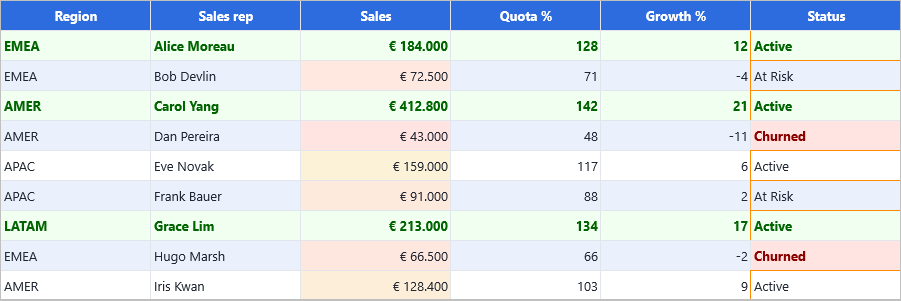
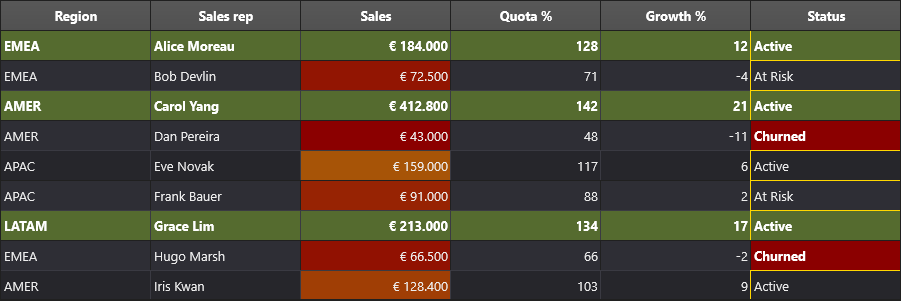
Both mechanisms in one capture. The top-3 rule runs at Priority := 10 and the
color scale at 100, so the three highlighted rows keep their green fill including
their Sales cells — the scale could not repaint them and fills only the six rows
left unclaimed. In the Status column, the Churned rule sets StopIfTrue, so
the later border rule never runs for those two cells: every other status cell has
an orange border, and the churned ones do not.
Tip
If a highlight is not showing through a color scale, its Priority is
numerically too high. Lower it below the scale's so it is evaluated first.
Combining rules
Rule types are meant to be layered: a scope-wide color scale for an at-a-glance
heat map, a value rule for a hard threshold, and a row-level highlight for a
ranked subset can all target different columns of the same grid at once. The
Conditional Formatting demo (Demo/FMX/DataGrid/Advanced/Conditional Formatting)
builds a sales dashboard this way across eight columns:
- a 3-color scale on
Sales, - a top-5
grtTopBottomrule onSaleswithApplyToEntireRow := True, given a lowerPrioritythan the scale so the row tint claims the fill first, - a data bar plus a below-target
grtCellValuerule combined onQuota %, - an icon set alongside two
grtCellValuerules (positive/negative font color) onGrowth %, - and three
grtTextrules onStatus(Active/At Risk/Churned), each with its own fill and font color.
Most of these do not conflict at all, because each targets its own column. The
only genuine overlap is on Sales, where the scale and the top-5 highlight both
want the fill — and that is settled by giving the highlight the lower Priority
value so it is evaluated first.
procedure TForm1.BuildSalesDashboard;
const
  COL_SALES = 3;
  COL_QUOTA = 4;
begin
  Grid.ConditionalFormatting.BeginUpdate;
  try
    { Base heat map, evaluated first - a LOW Priority number runs earlier. }
    Grid.ConditionalFormatting.AddColorScale(COL_SALES, gcRed, gcYellow,
      gcLimegreen).Priority := 100;

    { Row highlight for the top 5. Its Priority number is HIGHER, so it is
      evaluated after the scale and its fill wins on the cells it claims. }
    with Grid.ConditionalFormatting.AddTopBottomRule(COL_SALES, rkTop, 5) do
    begin
      Priority := 10;
      ApplyToEntireRow := True;
      Appearance.Fill.Color := gcLightgoldenrodyellow;
      Appearance.Font.Style := [TFontStyle.fsBold];
    end;

    { An overlay on a DIFFERENT column: data bars and icon sets do not merge
      with appearance rules and only one overlay is drawn per cell. }
    Grid.ConditionalFormatting.AddDataBar(COL_QUOTA, gcCornflowerblue);
    Grid.ConditionalFormatting.AddCellValueRule(COL_QUOTA, gfcLess, '100')
      .Appearance.Font.Color := gcCrimson;
  finally
    Grid.ConditionalFormatting.EndUpdate;
  end;
end;
void __fastcall TForm1::BuildSalesDashboard()
{
  const int COL_SALES = 3;
  const int COL_QUOTA = 4;

  Grid->ConditionalFormatting->BeginUpdate();
  try
  {
    /* Base heat map, evaluated first - a LOW Priority number runs earlier. */
    Grid->ConditionalFormatting->AddColorScale(COL_SALES, gcRed, gcYellow,
      gcLimegreen)->Priority = 100;

    /* Row highlight for the top 5. Its Priority number is HIGHER, so it is
       evaluated after the scale and its fill wins on the cells it claims. */
    TTMSFNCDataGridFormatRuleItem *Rule = Grid->ConditionalFormatting->AddTopBottomRule(COL_SALES, rkTop, 5);
    Rule->Priority = 10;
    Rule->ApplyToEntireRow = true;
    Rule->Appearance->Fill->Color = gcLightgoldenrodyellow;
    Rule->Appearance->Font->Style = TFontStyles() << TFontStyle::fsBold;

    /* An overlay on a DIFFERENT column: data bars and icon sets do not merge
       with appearance rules and only one overlay is drawn per cell. */
    Grid->ConditionalFormatting->AddDataBar(COL_QUOTA, gcCornflowerblue);
    Grid->ConditionalFormatting->AddCellValueRule(COL_QUOTA, gfcLess, "100")
      ->Appearance->Font->Color = gcCrimson;
  }
  __finally
  {
    Grid->ConditionalFormatting->EndUpdate();
  }
}
See also
- Conditional formatting overview
- The fluent API — the scope helpers
- Designing rules in the IDE — reordering rules visually
- API reference: TTMSFNCDataGridConditionalFormatting