Drawing & grid events
Customize empty space, draw overlays after the grid, and initialize rows or columns as they are inserted or appended.
Overview
Most visual customization belongs in Appearance and theming, Custom cells, or Cell controls. Use the drawing and structural events in this chapter when you need to customize areas outside normal cells or react immediately to row/column structure changes.
Empty space drawing
When the grid does not fill the full component area, empty space can appear to the right of the last column or below the last row. TTMSFNCDataGridEmptySpaceKind tells you which area is being drawn.
| Value | Area |
|---|---|
gekColumnTop |
Empty columns above the data rows. |
gekColumnBottom |
Empty columns below the last data row. |
gekRowLeft |
Empty rows to the left of the data columns. |
gekRowRight |
Empty rows to the right of the last data column. |
gekColumnBottomRowRight |
Bottom-right corner area. |
Use OnBeforeDrawEmptySpace to replace the default fill:
procedure TForm1.GridBeforeDrawEmptySpace(Sender: TObject;
  AGraphics: TTMSFNCGraphics; ARect: TRectF;
  AKind: TTMSFNCDataGridEmptySpaceKind; var ACanDraw: Boolean);
begin
  if AKind = gekColumnBottom then
  begin
    AGraphics.Fill.Color := gcLightgray;
    AGraphics.Fill.Kind := gfkSolid;
    AGraphics.DrawRectangle(ARect);
    ACanDraw := False;
  end;
end;
void __fastcall TForm1::GridBeforeDrawEmptySpace(TObject *Sender,
  TTMSFNCGraphics *AGraphics, const TRectF &ARect,
  TTMSFNCDataGridEmptySpaceKind AKind, bool &ACanDraw)
{
  if (AKind == gekColumnBottom)
  {
    AGraphics->Fill->Color = gcLightgray;
    AGraphics->Fill->Kind = gfkSolid;
    AGraphics->DrawRectangle(ARect);
    ACanDraw = false;
  }
}
Use OnAfterDrawEmptySpace to draw on top of the default background:
procedure TForm1.GridAfterDrawEmptySpace(Sender: TObject;
  AGraphics: TTMSFNCGraphics; ARect: TRectF;
  AKind: TTMSFNCDataGridEmptySpaceKind);
begin
  if AKind = gekColumnBottomRowRight then
  begin
    AGraphics.Font.Color := gcSilver;
    AGraphics.DrawText(ARect, 'No more data', False, gtaCenter, gtaCenter);
  end;
end;
void __fastcall TForm1::GridAfterDrawEmptySpace(TObject *Sender,
  TTMSFNCGraphics *AGraphics, const TRectF &ARect,
  TTMSFNCDataGridEmptySpaceKind AKind)
{
  if (AKind == gekColumnBottomRowRight)
  {
    AGraphics->Font->Color = gcSilver;
    AGraphics->DrawText(ARect, "No more data", false, gtaCenter, gtaCenter);
  }
}
Post-paint overlays
Use OnAfterDrawGrid for overlays that are not tied to one cell: watermarks, drag feedback, selection summaries, diagnostics, or empty-state messages. Keep this handler light; it runs every time the grid repaints.
A watermark is the canonical example — large faded text drawn diagonally across the whole grid rectangle after the cells have painted:
procedure TForm1.GridAfterDrawGrid(Sender: TObject;
  AGraphics: TTMSFNCGraphics; ARect: TRectF);
begin
  // Drawn after the cells paint, so it reads as a watermark over the data.
  AGraphics.SetFontSize(44);
  AGraphics.SetFontColor($55C0392B);                 // ~33% opacity brick red
  AGraphics.DrawText(ARect, 'CONFIDENTIAL', False,
    gtaCenter, gtaCenter, gttNone, -28);             // -28 degree diagonal
end;
void __fastcall TForm1::GridAfterDrawGrid(TObject *Sender,
  TTMSFNCGraphics *AGraphics, const TRectF &ARect)
{
  // Drawn after the cells paint, so it reads as a watermark over the data.
  AGraphics->SetFontSize(44);
  AGraphics->SetFontColor((TTMSFNCGraphicsColor)0x55C0392B);   // ~33% opacity brick red
  AGraphics->DrawText(ARect, "CONFIDENTIAL", false,
    gtaCenter, gtaCenter, gttNone, -28);                       // -28 degree diagonal
}
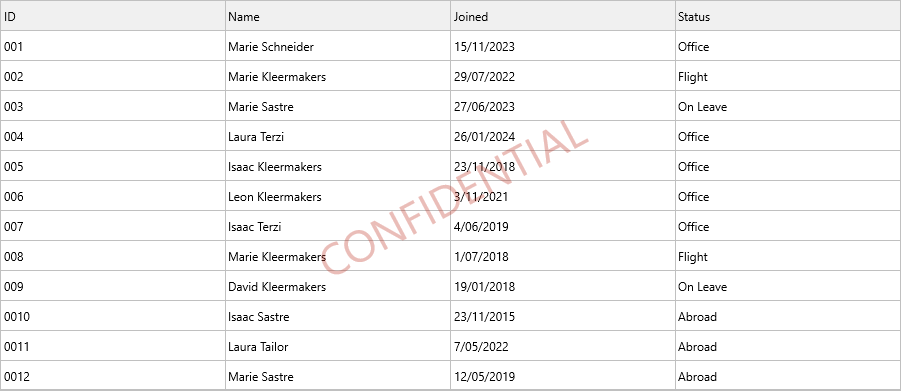
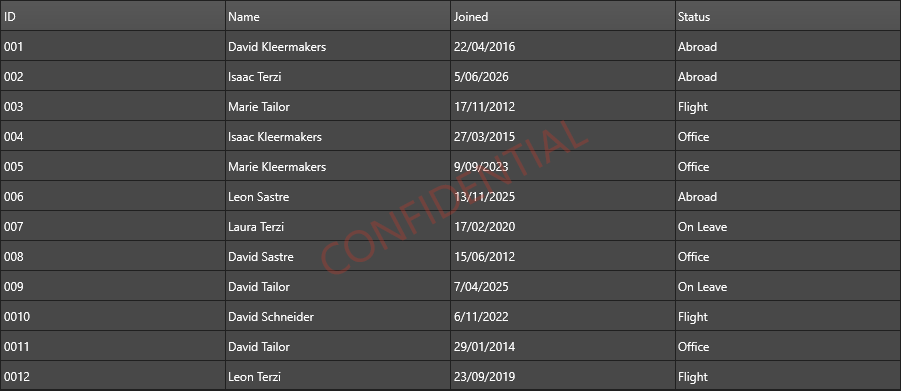
The same event also handles empty-state messages — draw centered text only when the grid has no data rows:
procedure TForm1.GridAfterDrawGrid(Sender: TObject;
  AGraphics: TTMSFNCGraphics; ARect: TRectF);
begin
  if Grid.RowCount = Grid.FixedRowCount then
  begin
    AGraphics.Font.Color := gcSilver;
    AGraphics.DrawText(ARect, 'No rows', False, gtaCenter, gtaCenter);
  end;
end;
void __fastcall TForm1::GridAfterDrawGrid(TObject *Sender,
  TTMSFNCGraphics *AGraphics, const TRectF &ARect)
{
  if (Grid->RowCount == Grid->FixedRowCount)
  {
    AGraphics->Font->Color = gcSilver;
    AGraphics->DrawText(ARect, "No rows", false, gtaCenter, gtaCenter);
  }
}
Append row and column events
Append events fire after new rows or columns are added at the end of the grid.
procedure TForm1.GridAppendRow(Sender: TObject; ARow: Integer);
begin
  Grid.Cells[0, ARow] := DateToStr(Now);
  Grid.Cells[1, ARow] := 'New entry';
end;
procedure TForm1.GridAppendColumn(Sender: TObject; AColumn: Integer);
begin
  Grid.Columns[AColumn].Header.Caption := Format('Column %d', [AColumn]);
end;
Use insert events when rows or columns are inserted at a specific position. Use append events when the new row or column is always added after the current end.
Insert row and column events
Use the OnCanInsertRow / OnInsertRow and OnCanInsertColumn / OnInsertColumn pairs to validate or initialize insertions at arbitrary positions. The "can" variant fires before insertion and exposes a var ACanInsert guard; the plain variant fires after the row or column is added.
procedure TForm1.GridCanInsertRow(Sender: TObject;
  ARow: Integer; var ACanInsert: Boolean);
begin
  ACanInsert := not ReadOnlyMode;
end;
Cell control support callbacks
For advanced cell-control scenarios, the grid can ask whether a real control should be used and which extra properties should be applied:
| Event | Use it for |
|---|---|
OnGetCellSupportsRealControl |
Decide whether a cell can host a live framework control. |
OnGetCellControlExtraProperties |
Supply extra cache keys or control-specific properties. |
OnGetCellProperties |
Customize cell elements before rendering. |
These events are useful when a column contains controls with different visual state, owner data, or behavior that cannot be derived from the cell value alone.
Related API
OnBeforeDrawEmptySpaceOnAfterDrawEmptySpaceOnAfterDrawGridOnAppendRow/OnAppendColumnOnCanInsertRow/OnInsertRowOnCanInsertColumn/OnInsertColumnOnGetCellSupportsRealControlOnGetCellControlExtraPropertiesOnGetCellPropertiesTTMSFNCDataGridEmptySpaceKind
See also
- Appearance and theming - normal cell layout customization.
- Custom cells - cell subclasses and custom rendering.
- Cell controls - live controls inside cells.