HTML, anchors & highlighting
Cells render a useful subset of HTML — bold/italic, font and colour changes, anchors, lists, images. Anchors fire a click event you can route however you like. Use the same engine to mark search hits.
Overview
TTMSFNCDataGrid cells can render HTML-formatted strings via a small built-in HTML engine. It is not a browser — it doesn't do CSS, JavaScript, or layout — but it covers the common needs: text styling, fonts, anchors, lists, images. The grid renders any string that contains HTML tags as HTML automatically.
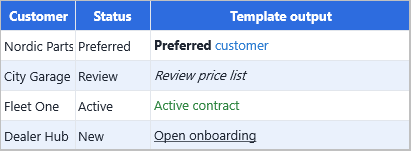
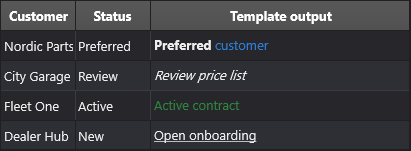
Grid.Cells[1, 1] := 'Hello, <b>world</b>!';
Grid.Cells[2, 1] := '<font color="gcRed">Error</font>';
Grid.Cells[3, 1] := 'Visit <a href="https://www.tmssoftware.com">TMS</a>';
Supported tags
Text styling
| Tag | Effect |
|---|---|
<B> … </B> |
Bold |
<I> … </I> |
Italic |
<U> … </U> |
Underline |
<S> … </S> |
Strike-through |
<SUB> … </SUB> |
Subscript |
<SUP> … </SUP> |
Superscript |
<SHAD> … </SHAD> |
Shadow |
<Z> … </Z> |
Hidden text (renders as a marker) |
Font and colour
<FONT face="Arial" size="12" color="gcRed" bgcolor="#FFFF00">
  highlighted text
</FONT>
| Attribute | Accepts |
|---|---|
face |
Font name |
size |
HTML size 1–7, or pointsize for values ≥ 5 |
color |
Hex (#RRGGBB) or named colour (gcRed, gcWhite, …) |
bgcolor |
Same |
Body / cell background
<BODY bgcolor="gcYellow">                 — solid yellow cell background
<BODY background="file://c:\bg.bmp">      — tiled image
<BODY bgcolor="gcYellow" bgcolorto="gcWhite" dir="v">    — vertical gradient
Layout
| Tag | Effect |
|---|---|
<BR> |
Line break |
<HR> |
Horizontal line + line break |
<IND x="75"> |
Indents 75 pixels |
<UL> … </UL> |
Unordered list |
<LI type="square" color="gcBlue"> |
List item with custom bullet |
Images
<IMG src="bitmapname" align="middle" width="32" height="32">
src references a bitmap registered in the grid's BitmapContainer. align accepts top, middle (default bottom). alt provides a different image when the cursor hovers (when used inside <A> tags).
Anchors (hyperlinks)
<A href="https://www.tmssoftware.com">TMS Software</A>
<A href="mailto:support@tmssoftware.com">Contact us</A>
<A href="custom-action-name">Click for custom action</A>
URLs (with http, https, ftp, mailto, file protocol) are passed to ShellExecute. Any other anchor value fires OnCellAnchorClick with the value as a string — useful for app-internal navigation.
Special characters
| Entity | Renders as |
|---|---|
< > |
< > |
& |
& |
" |
" |
|
non-breaking space |
™ © € § ¶ |
trademark, copyright, euro, section, paragraph |
Reacting to anchor clicks
procedure TForm1.GridCellAnchorClick(Sender: TObject;
  AColumn, ARow: Integer; AAnchor: string);
begin
  if AAnchor.StartsWith('row:') then
    Grid.GoToCell(MakeCell(0, AAnchor.Substring(4).ToInteger));
end;
Hyperlinks render in blue and underlined by default; OnCellAnchorClick fires when the user clicks them.
Highlighting and marking
Because the engine renders arbitrary HTML, it doubles as a highlight mechanism for search hits, validation errors, etc.:
function HighlightMatch(const Text, Term: string): string;
begin
  Result := Text.Replace(Term,
    '<B><FONT bgcolor="gcYellow">' + Term + '</FONT></B>',
    [rfReplaceAll, rfIgnoreCase]);
end;

Grid.Cells[1, 5] := HighlightMatch('Smith, John', SearchTerm);
The same approach works for error indicators:
Grid.Cells[1, 5] := '<FONT color="gcRed">' + InvalidValue + ' ⚠</FONT>';
Rendering plain text only
If you have user-supplied content that may contain < and >, escape it to prevent HTML interpretation:
function EscapeHTML(const S: string): string;
begin
Result := S.Replace('&', '&')
.Replace('<', '<')
.Replace('>', '>');
end;
HTML in headers, hints, and templates
The HTML engine works anywhere the grid renders text:
- Column headers (
Grid.Columns[i].Header) - Cell hints (
Grid.Hints[col, row]) - Cell comments (
Grid.Comments[col, row]) - Database-bound cells via
Adapter.Columns[i].HTMLTemplate
For database templates with field substitution, see Data binding.
URL auto-detection
The grid can automatically detect plain-text URLs and open them without any HTML markup. Enable it in Options.URL:
Grid.Options.URL.AutoDetect := True;    // detect http, https, ftp, file, www, mailto
Grid.Options.URL.AutoOpen   := True;    // open in default application on click
When AutoDetect is True, any cell value that starts with http://, https://, ftp://, file://, www, or mailto: is rendered as a hyperlink automatically. When AutoOpen is also True, clicking the cell launches the URL in the system's default application (browser, mail client, etc.).
For full control over link appearance and click handling, use the explicit <a href="..."> HTML syntax instead. OnCellAnchorClick fires for both explicit anchors and auto-detected links.
Related API
Grid.Options.URL.AutoDetect— automatically detect URLs in plain-text cells.Grid.Options.URL.AutoOpen— open detected URLs on cell click.OnCellAnchorClick— fires when an anchor is clicked.Grid.BitmapContainer— registers bitmaps used by<IMG src="name">.Adapter.Columns[i].HTMLTemplate— per-cell HTML template with field substitution.
See also
- Hints & comments — HTML works inside hint and comment text too.
- Data binding —
HTMLTemplatelets you compose HTML from dataset fields.