Custom drawing
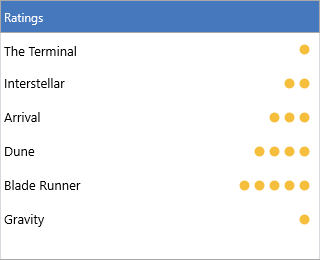
When appearance properties are not enough — a per-row badge, a rating, a
progress indicator, a custom icon layout — the list box exposes drawing events
that hand you the TTMSFNCGraphics context and the item rectangle. You can draw
after the default rendering (the common case, to add decoration on top) or
before it (to replace or suppress the default drawing). Owner drawing pairs
naturally with the per-item data fields from Items: store a value on
each item, then read it back in the draw handler.
Drawing on top of items
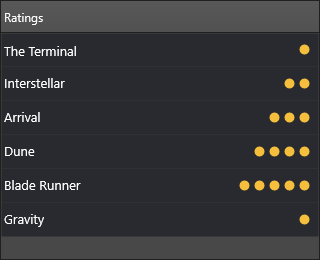
OnAfterDrawItem runs once the default item has been painted, so anything you
draw appears above it. The snippet below seeds each item with a 1–5 rating in
DataInteger, then draws that many gold dots at the right edge of every row:
procedure TForm1.SeedRatings;
var
  I: Integer;
begin
  // Store a 1..5 rating on each item for the drawing handler to read.
  for I := 0 to ListBox1.Items.Count - 1 do
    ListBox1.Items[I].DataInteger := (I mod 5) + 1;
end;

procedure TForm1.ListBox1AfterDrawItem(Sender: TObject;
  AGraphics: TTMSFNCGraphics; ARect: TRectF; AItem: TTMSFNCListBoxItem);
var
  Rating, I: Integer;
  Dot: TRectF;
  X: Single;
const
  DotSize = 10;
  Gap = 4;
begin
  Rating := AItem.DataInteger;
  AGraphics.Fill.Color := gcGold;
  AGraphics.Stroke.Color := gcGoldenrod;

  X := ARect.Right - Gap;
  for I := 1 to Rating do
  begin
    X := X - DotSize - Gap;
    Dot := RectF(X, ARect.Top + (ARect.Height - DotSize) / 2,
      X + DotSize, ARect.Top + (ARect.Height - DotSize) / 2 + DotSize);
    AGraphics.DrawEllipse(Dot);
  end;
end;
void __fastcall TForm1::SeedRatings()
{
  // Store a 1..5 rating on each item for the drawing handler to read.
  for (int I = 0; I < ListBox1->Items->Count; I++)
    ListBox1->Items->Items[I]->DataInteger = (I % 5) + 1;
}

void __fastcall TForm1::ListBox1AfterDrawItem(TObject *Sender,
  TTMSFNCGraphics *AGraphics, const TRectF &ARect, TTMSFNCListBoxItem *AItem)
{
  const int DotSize = 10;
  const int Gap = 4;

  int Rating = AItem->DataInteger;
  AGraphics->Fill->Color = gcGold;
  AGraphics->Stroke->Color = gcGoldenrod;

  float X = ARect.Right - Gap;
  for (int I = 1; I <= Rating; I++)
  {
    X = X - DotSize - Gap;
    TRectF Dot = RectF(X, ARect.Top + (ARect.Height() - DotSize) / 2,
      X + DotSize, ARect.Top + (ARect.Height() - DotSize) / 2 + DotSize);
    AGraphics->DrawEllipse(Dot);
  }
}
Drawing hooks
| Event | Runs | Use it to |
|---|---|---|
OnBeforeDrawItem / OnAfterDrawItem |
Around the whole item | Replace or decorate the row (ADefaultDraw, AAllow) |
OnBeforeDrawItemText / OnAfterDrawItemText |
Around the item text | Recolor or replace text rendering |
OnBeforeDrawItemIcon / OnAfterDrawItemIcon |
Around the item icon | Swap or annotate the icon |
OnBeforeDrawSortIndicator / OnAfterDrawSortIndicator |
Around the header sort triangle | Customize the sort indicator |
The OnBefore… drawing events expose a var ADefaultDraw (and AAllow)
parameter — set ADefaultDraw := False to take over the rendering entirely, or
leave it True to draw alongside the default.
Suppressing the default text
OnBeforeDrawItemText can suppress the built-in text drawing for specific rows
— for example to skip rendering for a sentinel "separator" row:
procedure TForm1.ListBox1BeforeDrawItemText(Sender: TObject;
  AGraphics: TTMSFNCGraphics; ARect: TRectF; AItem: TTMSFNCListBoxItem;
  AText: String; var AAllow: Boolean);
begin
  AAllow := AItem.DataString <> 'separator';   // skip text for separators
end;
void __fastcall TForm1::ListBox1BeforeDrawItemText(TObject *Sender,
  TTMSFNCGraphics *AGraphics, const TRectF &ARect, TTMSFNCListBoxItem *AItem,
  UnicodeString AText, bool &AAllow)
{
  AAllow = AItem->DataString != "separator";   // skip text for separators
}
Combining owner drawing with item data
Because the draw handlers read straight from the item, you can combine the
rating dots with a data-driven text color: store the rating once, draw the dots
in OnAfterDrawItem, and tint high-rated rows in OnBeforeDrawItemText — both
handlers read the same DataInteger:
procedure TForm1.ListBox1AfterDrawItem(Sender: TObject;
  AGraphics: TTMSFNCGraphics; ARect: TRectF; AItem: TTMSFNCListBoxItem);
var
  I: Integer;
  X: Single;
  Dot: TRectF;
begin
  AGraphics.Fill.Color := gcGold;
  AGraphics.Stroke.Color := gcGoldenrod;
  X := ARect.Right - 4;
  for I := 1 to AItem.DataInteger do
  begin
    X := X - 14;
    Dot := RectF(X, ARect.Top + (ARect.Height - 10) / 2,
      X + 10, ARect.Top + (ARect.Height - 10) / 2 + 10);
    AGraphics.DrawEllipse(Dot);
  end;
end;

procedure TForm1.ListBox1BeforeDrawItemText(Sender: TObject;
  AGraphics: TTMSFNCGraphics; ARect: TRectF; AItem: TTMSFNCListBoxItem;
  AText: String; var AAllow: Boolean);
begin
  // Tint top-rated rows; the same DataInteger drives both handlers.
  if AItem.DataInteger >= 4 then
    AItem.TextColor := gcGoldenrod
  else
    AItem.TextColor := gcBlack;
end;
void __fastcall TForm1::ListBox1AfterDrawItem(TObject *Sender,
  TTMSFNCGraphics *AGraphics, const TRectF &ARect, TTMSFNCListBoxItem *AItem)
{
  AGraphics->Fill->Color = gcGold;
  AGraphics->Stroke->Color = gcGoldenrod;
  float X = ARect.Right - 4;
  for (int I = 1; I <= AItem->DataInteger; I++)
  {
    X = X - 14;
    TRectF Dot = RectF(X, ARect.Top + (ARect.Height() - 10) / 2,
      X + 10, ARect.Top + (ARect.Height() - 10) / 2 + 10);
    AGraphics->DrawEllipse(Dot);
  }
}

void __fastcall TForm1::ListBox1BeforeDrawItemText(TObject *Sender,
  TTMSFNCGraphics *AGraphics, const TRectF &ARect, TTMSFNCListBoxItem *AItem,
  UnicodeString AText, bool &AAllow)
{
  // Tint top-rated rows; the same DataInteger drives both handlers.
  if (AItem->DataInteger >= 4)
    AItem->TextColor = gcGoldenrod;
  else
    AItem->TextColor = gcBlack;
}
Keep drawing handlers fast: they run for every visible row on each repaint, so avoid allocations and file access inside them.
Pitfalls
OnAfterDrawItemdraws over the default content;OnBeforeDrawItemdraws under it. Pick the event that matches whether your decoration should sit on top.- Drawing handlers fire on every repaint and for every visible item — keep them allocation-free.
- Construct colors with the graphics color constants (
gcGold,gcGoldenrod, …) so they render identically on every platform.
Related API
TTMSFNCListBox—OnBeforeDrawItem,OnAfterDrawItem,OnBeforeDrawItemText,OnAfterDrawItemText,OnBeforeDrawItemIcon,OnAfterDrawItemIcon
See also
- Items — the data fields the draw handlers read
- Appearance — property-based styling that avoids owner drawing
- Events — the full event catalog