Events
The list box raises events across the item lifecycle: selection and clicks,
pointer enter/leave, scrolling, and the clipboard, reorder, and drop
operations. Handlers receive the affected TTMSFNCListBoxItem directly, and
the OnBefore… clipboard and drag events expose a var flag you set to cancel
the operation. Wire these when the application must react to user actions —
updating a detail panel on selection, vetoing a paste in a read-only list, or
persisting a new order after a reorder.
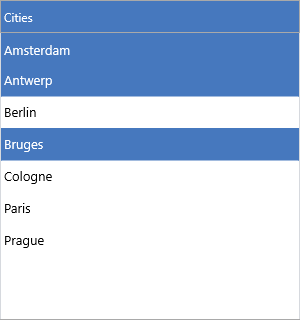
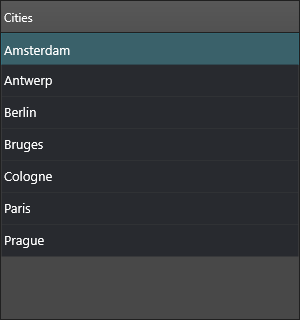
Selection, click, and hover
OnItemSelected fires when the selection changes; OnItemClick and
OnItemDblClick fire on pointer activation; OnItemMouseEnter/OnItemMouseLeave
track hover. All pass the TTMSFNCListBoxItem involved:
procedure TForm1.ListBox1ItemSelected(Sender: TObject;
  AItem: TTMSFNCListBoxItem);
begin
  StatusLabel.Text := 'Selected: ' + AItem.Text;
end;

procedure TForm1.ListBox1ItemClick(Sender: TObject;
  AItem: TTMSFNCListBoxItem);
begin
  StatusLabel.Text := 'Clicked: ' + AItem.Text;
end;

procedure TForm1.ListBox1ItemDblClick(Sender: TObject;
  AItem: TTMSFNCListBoxItem);
begin
  ShowMessage('Open ' + AItem.Text);
end;

procedure TForm1.ListBox1ItemMouseEnter(Sender: TObject;
  AItem: TTMSFNCListBoxItem);
begin
  AItem.TextColor := gcDodgerblue;
end;

procedure TForm1.ListBox1ItemMouseLeave(Sender: TObject;
  AItem: TTMSFNCListBoxItem);
begin
  AItem.TextColor := gcBlack;
end;

procedure TForm1.ListBox1VScroll(Sender: TObject; APosition: Single);
begin
  StatusLabel.Text := Format('Scroll: %.0f', [APosition]);
end;

// Veto a paste, e.g. when the list is read-only.
procedure TForm1.ListBox1BeforePasteFromClipboard(Sender: TObject;
  var ACanPaste: Boolean);
begin
  ACanPaste := not ReadOnlyCheckBox.IsChecked;
end;
void __fastcall TForm1::ListBox1ItemSelected(TObject *Sender,
  TTMSFNCListBoxItem *AItem)
{
  StatusLabel->Text = "Selected: " + AItem->Text;
}

void __fastcall TForm1::ListBox1ItemClick(TObject *Sender,
  TTMSFNCListBoxItem *AItem)
{
  StatusLabel->Text = "Clicked: " + AItem->Text;
}

void __fastcall TForm1::ListBox1ItemDblClick(TObject *Sender,
  TTMSFNCListBoxItem *AItem)
{
  ShowMessage("Open " + AItem->Text);
}

void __fastcall TForm1::ListBox1ItemMouseEnter(TObject *Sender,
  TTMSFNCListBoxItem *AItem)
{
  AItem->TextColor = gcDodgerblue;
}

void __fastcall TForm1::ListBox1ItemMouseLeave(TObject *Sender,
  TTMSFNCListBoxItem *AItem)
{
  AItem->TextColor = gcBlack;
}

void __fastcall TForm1::ListBox1VScroll(TObject *Sender, float APosition)
{
  StatusLabel->Text = Format("Scroll: %.0f", ARRAYOFCONST(((Extended)APosition)));
}

// Veto a paste, e.g. when the list is read-only.
void __fastcall TForm1::ListBox1BeforePasteFromClipboard(TObject *Sender,
  bool &ACanPaste)
{
  ACanPaste = !ReadOnlyCheckBox->IsChecked;
}
The snippet's OnItemMouseEnter/OnItemMouseLeave handlers recolor the hovered
item's text, and the OnBeforePasteFromClipboard handler vetoes a paste when a
read-only check box is ticked.
Reference table
| Event | Fires when | Cancelable |
|---|---|---|
OnItemSelected |
The selected item changes | — |
OnItemClick |
An item is clicked | — |
OnItemDblClick |
An item is double-clicked | — |
OnItemMouseEnter / OnItemMouseLeave |
The pointer enters/leaves an item | — |
OnVScroll |
The vertical scroll position changes | — |
OnBeforeCopyToClipboard / OnAfterCopyToClipboard |
A copy operation runs | Before: ACanCopy |
OnBeforeCutToClipboard / OnAfterCutToClipboard |
A cut operation runs | Before: ACanCut |
OnBeforePasteFromClipboard / OnAfterPasteFromClipboard |
A paste operation runs | Before: ACanPaste |
OnBeforeReorderItem / OnAfterReorderItem |
An item is reordered in the list | Before: ACanReorder |
OnBeforeDropItem / OnAfterDropItem |
An item is dropped (drag-and-drop) | Before: ACanDrop |
OnItemCompare |
Two items are compared during sorting | — |
OnNeedFilterDropDownData |
The header filter needs its values | — |
OnFilterSelect |
A filter value is chosen | Adjust ACondition |
OnItemAnchorClick / OnHeaderAnchorClick |
An HTML anchor is clicked | — |
Cancelling and adjusting operations
The OnBefore… events pass a var Boolean — set it to False to veto the
operation. OnBeforeReorderItem and OnBeforeDropItem also receive the source
and target items, so you can allow or block specific moves. OnItemCompare
replaces the default text comparison with your own ordering — for example
sorting by a numeric value stored in DataInteger:
procedure TForm1.ListBox1BeforeReorderItem(Sender: TObject;
  AFromItem, AToItem: TTMSFNCListBoxItem; var ACanReorder: Boolean);
begin
  ACanReorder := AToItem.Index > 0;   // never let anything move above row 0
end;

procedure TForm1.ListBox1ItemCompare(Sender: TObject;
  Item1, Item2: TTMSFNCListBoxItem; var ACompareResult: Integer);
begin
  // Sort by the year stored on each item instead of by text.
  ACompareResult := Item1.DataInteger - Item2.DataInteger;
end;
void __fastcall TForm1::ListBox1BeforeReorderItem(TObject *Sender,
  TTMSFNCListBoxItem *AFromItem, TTMSFNCListBoxItem *AToItem, bool &ACanReorder)
{
  ACanReorder = AToItem->Index > 0;   // never let anything move above row 0
}

void __fastcall TForm1::ListBox1ItemCompare(TObject *Sender,
  TTMSFNCListBoxItem *Item1, TTMSFNCListBoxItem *Item2, int &ACompareResult)
{
  // Sort by the year stored on each item instead of by text.
  ACompareResult = Item1->DataInteger - Item2->DataInteger;
}
Putting it together
A typical screen wires several events at once — update a status label on selection and scroll, and copy the selection through a guarded clipboard action that reports completion:
procedure TForm1.ListBox1ItemSelected(Sender: TObject;
  AItem: TTMSFNCListBoxItem);
begin
  StatusLabel.Text := Format('%d selected (last: %s)',
    [ListBox1.SelectedItemCount, AItem.Text]);
end;

procedure TForm1.ListBox1VScroll(Sender: TObject; APosition: Single);
begin
  StatusLabel.Text := Format('Scroll: %.0f', [APosition]);
end;

procedure TForm1.CopyButtonClick(Sender: TObject);
begin
  if ListBox1.SelectedItemCount > 0 then
    ListBox1.CopyToClipboard(False);   // requires ClipboardMode <> lcmNone
end;

procedure TForm1.ListBox1AfterCopyToClipboard(Sender: TObject);
begin
  StatusLabel.Text := 'Copied to clipboard';
end;
void __fastcall TForm1::ListBox1ItemSelected(TObject *Sender,
  TTMSFNCListBoxItem *AItem)
{
  StatusLabel->Text = Format("%d selected (last: %s)",
    ARRAYOFCONST((ListBox1->SelectedItemCount(), AItem->Text)));
}

void __fastcall TForm1::ListBox1VScroll(TObject *Sender, float APosition)
{
  StatusLabel->Text = Format("Scroll: %.0f", ARRAYOFCONST(((Extended)APosition)));
}

void __fastcall TForm1::CopyButtonClick(TObject *Sender)
{
  if (ListBox1->SelectedItemCount() > 0)
    ListBox1->CopyToClipboard(false);   // requires ClipboardMode <> lcmNone
}

void __fastcall TForm1::ListBox1AfterCopyToClipboard(TObject *Sender)
{
  StatusLabel->Text = "Copied to clipboard";
}
Related API
TTMSFNCListBox—OnItemSelected,OnItemClick,OnItemDblClick,OnItemMouseEnter,OnItemMouseLeave,OnVScroll,OnBeforePasteFromClipboard,OnBeforeReorderItem,OnItemCompare
See also
- Interaction — the selection, reorder, and clipboard features these events report on
- Custom drawing — the
OnBeforeDraw…/OnAfterDraw…drawing events - Filtering —
OnNeedFilterDropDownDataandOnFilterSelect