Interaction
The Interaction property groups everything about how the user manipulates the
list at runtime: multiple selection, header-click sorting, reordering,
drag-and-drop between lists, clipboard cut/copy/paste, keyboard type-ahead
lookup, and touch scrolling. Each option is independent, so enable only what a
given screen needs. This guide shows each option with its real property type —
several are enums or separate Booleans rather than the single flag you might
expect — and ends with a combined setup.
Configuring interaction options
All interaction options live under Interaction and can be set together. The
setup below turns on each one with its real property type and adds two buttons
that sort and clear from code:
procedure TForm1.ConfigureInteraction;
begin
  // Multiple selection with Ctrl/Shift+click.
  ListBox1.Interaction.MultiSelect := True;

  // Header-click sorting is an enum, not a Boolean.
  ListBox1.Interaction.Sorting := lcsNormal;          // lcsNone | lcsNormal | lcsNormalCaseSensitive

  // Reorder within the list is a separate Boolean.
  ListBox1.Interaction.Reorder := True;

  // Drag items between list boxes; the source item is moved or copied.
  ListBox1.Interaction.DragDropMode := ldmMove;       // ldmNone | ldmMove | ldmCopy

  // Clipboard support.
  ListBox1.Interaction.ClipboardMode := lcmFull;      // lcmNone | lcmTextOnly | lcmFull

  // Keyboard type-ahead lookup.
  ListBox1.Interaction.Lookup.Enabled := True;
  ListBox1.Interaction.Lookup.Incremental := True;
  ListBox1.Interaction.Lookup.AutoSelect := True;
  ListBox1.Interaction.Lookup.CaseSensitive := False;

  ListBox1.Interaction.TouchScrolling := True;
end;

procedure TForm1.SortDescendingButtonClick(Sender: TObject);
begin
  // Sort programmatically, independent of the header click.
  ListBox1.Sort(False, ismDescending);
end;

procedure TForm1.ClearSortButtonClick(Sender: TObject);
begin
  ListBox1.ClearSorting;
end;
void __fastcall TForm1::ConfigureInteraction()
{
  // Multiple selection with Ctrl/Shift+click.
  ListBox1->Interaction->MultiSelect = true;

  // Header-click sorting is an enum, not a Boolean.
  ListBox1->Interaction->Sorting = lcsNormal;          // lcsNone | lcsNormal | lcsNormalCaseSensitive

  // Reorder within the list is a separate Boolean.
  ListBox1->Interaction->Reorder = true;

  // Drag items between list boxes; the source item is moved or copied.
  ListBox1->Interaction->DragDropMode = ldmMove;       // ldmNone | ldmMove | ldmCopy

  // Clipboard support.
  ListBox1->Interaction->ClipboardMode = lcmFull;      // lcmNone | lcmTextOnly | lcmFull

  // Keyboard type-ahead lookup.
  ListBox1->Interaction->Lookup->Enabled = true;
  ListBox1->Interaction->Lookup->Incremental = true;
  ListBox1->Interaction->Lookup->AutoSelect = true;
  ListBox1->Interaction->Lookup->CaseSensitive = false;

  ListBox1->Interaction->TouchScrolling = true;
}

void __fastcall TForm1::SortDescendingButtonClick(TObject *Sender)
{
  // Sort programmatically, independent of the header click.
  ListBox1->Sort(false, ismDescending);
}

void __fastcall TForm1::ClearSortButtonClick(TObject *Sender)
{
  ListBox1->ClearSorting();
}
The sections below explain each option in turn.
Multi-select
{ Inside a method of your form: }
ListBox1.Interaction.MultiSelect := True;
With MultiSelect enabled, the user selects ranges with Shift+click and toggles
individual rows with Ctrl+click. Read the result with SelectedItemCount and
the SelectedItems[] array, or select from code with SelectItem(AIndex) and
SelectItems(AArray).
Sorting
Interaction.Sorting is an enum, not a Boolean — it controls whether
clicking the header sorts and how case is treated:
| Value | Description |
|---|---|
lcsNone |
Header clicks do not sort |
lcsNormal |
Header click sorts case-insensitively |
lcsNormalCaseSensitive |
Header click sorts case-sensitively |
You can also sort from code with Sort(ACaseSensitive, ASortingMode) (where
ASortingMode is ismAscending or ismDescending) and clear an active sort
with ClearSorting:
{ Inside a method of your form: }
ListBox1.Interaction.Sorting := lcsNormal;  // sort on header click
ListBox1.Sort(False, ismDescending);        // or sort from code
ListBox1.ClearSorting;                       // clear the active sort
Reorder and drag-and-drop
Reordering within one list and dragging between lists are two separate settings:
Interaction.Reorder(Boolean) — drag a selected item to a new position in the same list.Interaction.DragDropMode(enum) — drag items to another list box:
| Value | Description |
|---|---|
ldmNone |
Drag-and-drop disabled |
ldmMove |
Dragging moves the item to the target list |
ldmCopy |
Dragging copies the item, leaving the original |
Note
Drag-and-drop takes precedence over reordering. With Reorder := True,
touch scrolling is suspended on the selected item while a drag is in
progress, but remains active elsewhere in the list.
Clipboard
Interaction.ClipboardMode enables Ctrl+X / Ctrl+C / Ctrl+V:
| Value | Description |
|---|---|
lcmNone |
Clipboard disabled |
lcmTextOnly |
Only item text is copied |
lcmFull |
All item data and appearance are copied |
The matching CutToClipboard, CopyToClipboard, and PasteFromClipboard
methods (and their OnBefore…/OnAfter… events) are covered in
Events and Data & persistence.
Keyboard lookup
Interaction.Lookup enables type-ahead navigation: typing while the list has
focus scrolls to the first matching item.
| Property | Description |
|---|---|
Enabled |
Turn type-ahead lookup on or off |
Incremental |
Extend the search string with each keystroke |
CaseSensitive |
Match case when comparing |
AutoSelect |
Select the matched item automatically |
LookupItem(AText, ACaseSensitive, AAutoSelect) performs the same lookup from
code and returns the matching item.
Touch scrolling
{ Inside a method of your form: }
ListBox1.Interaction.TouchScrolling := True;
Using a list box as a control picker's drop-down content
TTMSFNCCustomListBox implements the ITMSFNCControlPickerFull interface, so a
TTMSFNCListBox instance can be hosted directly as the drop-down content of a
TTMSFNCControlPicker. Reach for this instead
of a plain combo box when the drop-down needs list-box features such as
multi-select, filtering, custom item drawing, or a header — a combo box only
offers a flat, single-select item list. Assign the list box through the
picker's Control property; no adapter or manual synchronization code is
required because the interface implementation reports selection, item count,
filtering, and sizing back to the picker automatically.
procedure TForm1.FormCreate(Sender: TObject);
begin
  ListBox1.BeginUpdate;
  try
    ListBox1.Items.Clear;
    ListBox1.Items.Add.Text := 'Small';
    ListBox1.Items.Add.Text := 'Medium';
    ListBox1.Items.Add.Text := 'Large';
    ListBox1.Items.Add.Text := 'Extra Large';
  finally
    ListBox1.EndUpdate;
  end;

  // TTMSFNCCustomListBox implements ITMSFNCControlPickerFull, so it can be
  // hosted directly as a control picker's drop-down content.
  TMSFNCControlPicker1.Control := ListBox1;
  TMSFNCControlPicker1.DropDownWidthMode := cwmControl;
  TMSFNCControlPicker1.DropDownHeightMode := chmItems;
end;

procedure TForm1.TMSFNCControlPicker1ItemSelected(Sender: TObject; AText: string; AItemIndex: Integer);
begin
  // Fired when the list box reports a selection back through the picker.
  TMSFNCControlPicker1.Text := AText;
end;
void __fastcall TForm1::FormCreate(TObject *Sender)
{
  ListBox1->BeginUpdate();
  try
  {
    ListBox1->Items->Clear();
    ListBox1->Items->Add()->Text = "Small";
    ListBox1->Items->Add()->Text = "Medium";
    ListBox1->Items->Add()->Text = "Large";
    ListBox1->Items->Add()->Text = "Extra Large";
  }
  __finally
  {
    ListBox1->EndUpdate();
  }

  // TTMSFNCCustomListBox implements ITMSFNCControlPickerFull, so it can be
  // hosted directly as a control picker's drop-down content.
  TMSFNCControlPicker1->Control = ListBox1;
  TMSFNCControlPicker1->DropDownWidthMode = cwmControl;
  TMSFNCControlPicker1->DropDownHeightMode = chmItems;
}

void __fastcall TForm1::TMSFNCControlPicker1ItemSelected(TObject *Sender, UnicodeString AText, int AItemIndex)
{
  // Fired when the list box reports a selection back through the picker.
  TMSFNCControlPicker1->Text = AText;
}
See the control picker guide for the full embedding mechanism, including drop-down sizing modes and content synchronization that apply to any hosted control.
Combining sorting, filtering, multi-select, and lookup
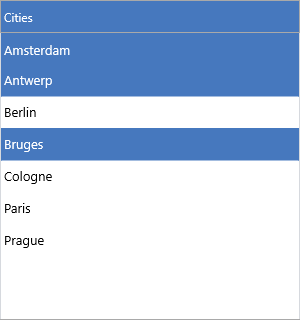
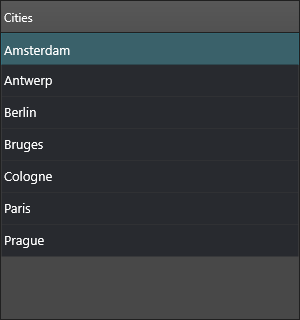
These options compose. The setup below builds a list that sorts on header click, shows the filter drop-down, allows multiple selection, supports type-ahead lookup, and reports the selection count:
procedure TForm1.BuildInteractiveList;
const
  Cities: array[0..6] of string =
    ('Amsterdam', 'Antwerp', 'Berlin', 'Bruges', 'Cologne', 'Paris', 'Prague');
var
  I: Integer;
begin
  ListBox1.BeginUpdate;
  try
    ListBox1.Items.Clear;
    for I := Low(Cities) to High(Cities) do
      ListBox1.Items.Add(Cities[I]);

    ListBox1.Header.Visible := True;
    ListBox1.Header.Text := 'Cities';

    // Sorting + filtering + multi-select + lookup, working together.
    ListBox1.Interaction.Sorting := lcsNormal;
    ListBox1.Interaction.Filtering.Enabled := True;
    ListBox1.Interaction.MultiSelect := True;
    ListBox1.Interaction.Lookup.Enabled := True;
  finally
    ListBox1.EndUpdate;
  end;
end;

procedure TForm1.ListBox1ItemSelected(Sender: TObject;
  AItem: TTMSFNCListBoxItem);
begin
  // SelectedItemCount reflects every selected row when MultiSelect is on.
  Caption := Format('%d selected (last: %s)',
    [ListBox1.SelectedItemCount, AItem.Text]);
end;
void __fastcall TForm1::BuildInteractiveList()
{
  const UnicodeString Cities[7] =
    {"Amsterdam", "Antwerp", "Berlin", "Bruges", "Cologne", "Paris", "Prague"};

  ListBox1->BeginUpdate();
  try
  {
    ListBox1->Items->Clear();
    for (int I = 0; I < 7; I++)
      ListBox1->Items->Add(Cities[I]);

    ListBox1->Header->Visible = true;
    ListBox1->Header->Text = "Cities";

    // Sorting + filtering + multi-select + lookup, working together.
    ListBox1->Interaction->Sorting = lcsNormal;
    ListBox1->Interaction->Filtering->Enabled = true;
    ListBox1->Interaction->MultiSelect = true;
    ListBox1->Interaction->Lookup->Enabled = true;
  }
  __finally
  {
    ListBox1->EndUpdate();
  }
}

void __fastcall TForm1::ListBox1ItemSelected(TObject *Sender,
  TTMSFNCListBoxItem *AItem)
{
  // SelectedItemCount reflects every selected row when MultiSelect is on.
  Caption = Format("%d selected (last: %s)",
    ARRAYOFCONST((ListBox1->SelectedItemCount(), AItem->Text)));
}
Pitfalls
Interaction.Sorting := Truedoes not compile —Sortingis theTTMSFNCListBoxSortingenum; uselcsNormal.- There is no
ldmReordervalue. UseInteraction.Reorder := Truefor in-list reordering andDragDropModeonly for cross-list transfer. ClipboardModevalues arelcmTextOnly/lcmFull(notlcmCopy).
Related API
TTMSFNCListBox—Interaction,Sort,ClearSorting,SelectItem,SelectItems,SelectedItemCount,LookupItemTTMSFNCControlPicker—Control,DropDownWidthMode,DropDownHeightMode,OnItemSelected
See also
- Filtering — the header filter drop-down and programmatic filters
- Events — selection, reorder, drop, and clipboard events
- Appearance — selected-state colors used during selection