Getting Started
TMS FNC Core is the shared infrastructure library for all TMS FNC products. It provides framework-neutral components and helpers for PDF generation, web browsing, printing, data binding, SVG rendering, JSON persistence, styling, and UI infrastructure across VCL, FMX, and WEB Core applications.
Prerequisites
| Requirement | Minimum version |
|---|---|
| Delphi / C++Builder | 10.1 Berlin |
| TMS WEB Core for VS Code | 1.3 |
Install TMS FNC Core through the TMS installer or by compiling and installing the runtime package for your Delphi version, for example FMXTMSFNCCorePkgDXE15.dpk for Delphi 12.
Supported Frameworks and Platforms
| Framework | Platforms |
|---|---|
| VCL | Win32, Win64 |
| FMX | Win32, Win64, macOS, iOS, Android, Linux |
| WEB Core | Chrome, Edge, Firefox |
All FNC units are prefixed to match the framework in use. For FMX use FMX.TMSFNCxxx, for VCL use VCL.TMSFNCxxx, and for WEB Core use WEBLib.TMSFNCxxx.
What's Included
PDF Library
Generate PDF documents with text, drawing primitives, images, and HTML-formatted content.
Key class: TTMSFNCPDFLib
uses
  FMX.TMSFNCPDFLib;

procedure TForm1.CreateHelloPDF;
var
  PDF: TTMSFNCPDFLib;
begin
  PDF := TTMSFNCPDFLib.Create;
  try
    PDF.BeginDocument('output.pdf');
    PDF.NewPage;
    PDF.Graphics.DrawText('Hello, World!', RectF(50, 50, 250, 70));
    PDF.EndDocument;
  finally
    PDF.Free;
  end;
end;
void __fastcall TForm1::CreateHelloPDF()
{
  TTMSFNCPDFLib *PDF = new TTMSFNCPDFLib();
  try
  {
    PDF->BeginDocument("output.pdf");
    PDF->NewPage();
    PDF->Graphics()->DrawText("Hello, World!", RectF(50, 50, 250, 70));
    PDF->EndDocument();
  }
  __finally
  {
    delete PDF;
  }
}
See PDF Library guide for full coverage.
Web Browser
Display web pages, HTML content, and PDF files. Execute scripts and receive results in callbacks.
Key classes: TTMSFNCWebBrowser, TTMSFNCEdgeWebBrowser
See Web Browser guide for setup and usage.
Print Library
Send content to a printer or create print files programmatically.
Key classes: TTMSFNCPrinter, TTMSFNCGraphicsPrintIO
See Printing guide for usage.
Data Binding
Bind multiple UI components to datasets at design time or runtime using TTMSFNCDataBinder.
Key class: TTMSFNCDataBinder
See Data Binding guide for setup.
SVG Rendering
Import and render SVG files in FNC graphics contexts.
Key class: TTMSFNCSVGImageCollection
JSON Persistence
Save and load object state, collections, and custom data to and from JSON.
Key classes: TTMSFNCPersistence, TTMSFNCObjectPersistence
See JSON Persistence guide for full coverage.
Styling
Apply built-in or custom styles to FNC components. Styles are JSON files and can be loaded at design time via TTMSFNCStyleManager or at runtime.
Built-in styles: Dark, Light, Office 2019 Gray, Office 2019 White, Office 2019 Black.
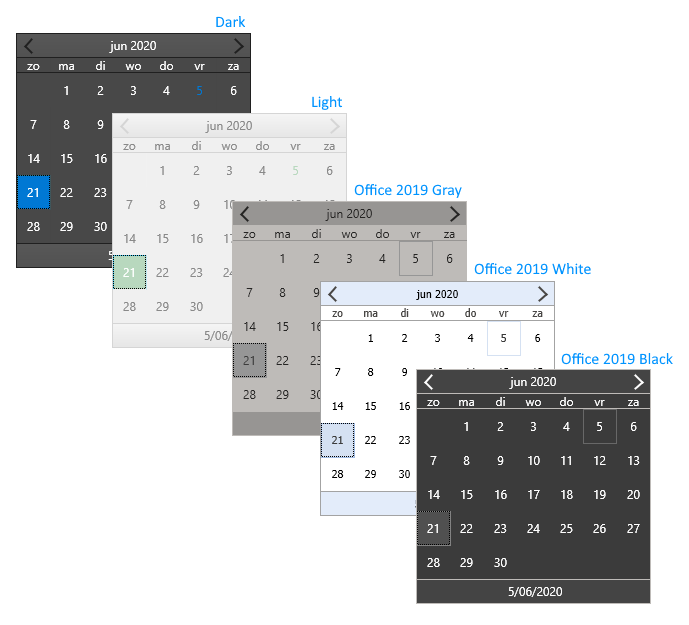
Key class: TTMSFNCStylesManager
See Styling guide for usage.
Responsive Layout
Adapt your UI to different screen sizes and orientations at runtime using TTMSFNCResponsiveManager.
Key class: TTMSFNCResponsiveManager
See Responsive Manager guide for usage.
Filter Builder
Add complex multi-rule filtering to your application with a visual filter editor.
Key class: TTMSFNCFilterBuilder
See Filter Builder guide for usage.
Popup Menu
Use framework-neutral context menus with styling and hierarchical item support.
Key class: TTMSFNCPopupMenu
Next Steps
| Goal | Guide |
|---|---|
| Save and load object state | JSON Persistence |
| Generate PDF documents | PDF Library |
| Print content | Printing |
| Bind components to data | Data Binding |
| Style FNC components | Styling |
| Embed a web browser | Web Browser |
| Adaptive UI layout | Responsive Manager |
| Complex filter UI | Filter Builder |