Getting started
TTMSFNCListBox is a cross-platform list control that displays a scrollable
collection of TTMSFNCListBoxItem rows. Each item carries its own text, icon,
colors, and application data, and the control adds header sorting, a filter
drop-down, keyboard lookup, clipboard support, reordering, and drag-and-drop on
top of the basic list. This page covers the shortest path to a working list:
drop the component, add items, show a header, and respond to selection. The
Items, Appearance,
Interaction, Filtering,
Events, Custom drawing, and
Data & persistence guides go deeper on each
area.
Requirements
- Delphi 10.1 Berlin or later
- TMS FNC Core (required dependency)
- TMS FNC UI Pack
Drop the component
- Drop a
TTMSFNCListBoxonto a form. - Set
Alignto fill the available area, or size it manually. - Add items at design time through the
Itemscollection editor, or programmatically as shown below.
Populate, select, and handle selection
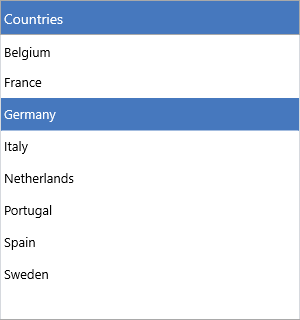
Add items inside a BeginUpdate/EndUpdate pair so the control repaints once
instead of after every item. Items.Add accepts the item text directly and
returns the created TTMSFNCListBoxItem, and OnItemSelected fires with the
selected item:
procedure TForm1.FormCreate(Sender: TObject);
const
  Countries: array[0..4] of string =
    ('Belgium', 'France', 'Germany', 'Netherlands', 'Spain');
var
  I: Integer;
begin
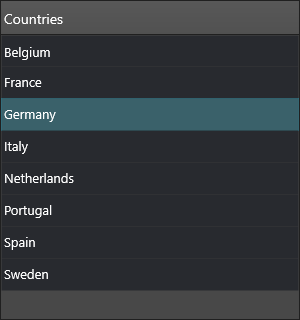
  ListBox1.Header.Text := 'Countries';
  ListBox1.Header.Visible := True;

  ListBox1.BeginUpdate;
  try
    ListBox1.Items.Clear;
    for I := Low(Countries) to High(Countries) do
      ListBox1.Items.Add(Countries[I]);
  finally
    ListBox1.EndUpdate;
  end;

  ListBox1.ItemIndex := 0;
end;

procedure TForm1.ListBox1ItemSelected(Sender: TObject;
  AItem: TTMSFNCListBoxItem);
begin
  Caption := 'Selected: ' + AItem.Text;
end;
void __fastcall TForm1::FormCreate(TObject *Sender)
{
  const UnicodeString Countries[5] =
    {"Belgium", "France", "Germany", "Netherlands", "Spain"};

  ListBox1->Header->Text = "Countries";
  ListBox1->Header->Visible = true;

  ListBox1->BeginUpdate();
  try
  {
    ListBox1->Items->Clear();
    for (int I = 0; I < 5; I++)
      ListBox1->Items->Add(Countries[I]);
  }
  __finally
  {
    ListBox1->EndUpdate();
  }

  ListBox1->ItemIndex = 0;
}

void __fastcall TForm1::ListBox1ItemSelected(TObject *Sender,
  TTMSFNCListBoxItem *AItem)
{
  Caption = "Selected: " + AItem->Text;
}
The selection handler receives the TTMSFNCListBoxItem directly — read
ListBox1.ItemIndex for its position, or ListBox1.SelectedItem for the item
reference. With Interaction.MultiSelect enabled, use SelectedItemCount and
the SelectedItems[] array to read every selected row.
Next steps
- Items — item text, icons, HTML, default item, and per-item data
- Appearance — fills, strokes, fonts, height modes, and the header
- Interaction — multi-select, sorting, reorder, drag-and-drop, clipboard, lookup
- Filtering — the header filter drop-down and programmatic filters
- Events — selection, click, hover, scroll, and clipboard events
- Custom drawing — owner-drawn items, icons, and text
- Data & persistence — strings, files, streams, and the clipboard